MikenJi
New member
- Joined
- Dec 2, 2016
- Messages
- 21
- Reaction score
- 1
- Points
- 3
Hello,
I have this add-on of the Cygnus spacecraft from 2010 to the 2016 version which worked extremely well a couple of months ago. However, it seems that after I've made a couple of mandatory Windows update, its graphics simply does not show up on the high definition D3D9 client anymore!
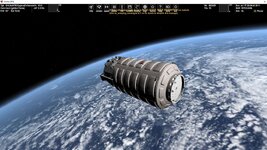
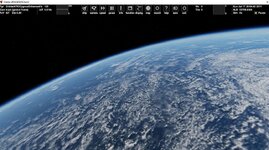
Anyone knows why this is the case? Do I need to reinstall everything or is there a reasonable fix to fix problem? Attached you can see example of the same .scn file, same camera angle taken from SD and HD version (the one that is empty was supposed to have the spacecraft visible)
Thanks,
Dewey
I have this add-on of the Cygnus spacecraft from 2010 to the 2016 version which worked extremely well a couple of months ago. However, it seems that after I've made a couple of mandatory Windows update, its graphics simply does not show up on the high definition D3D9 client anymore!
Anyone knows why this is the case? Do I need to reinstall everything or is there a reasonable fix to fix problem? Attached you can see example of the same .scn file, same camera angle taken from SD and HD version (the one that is empty was supposed to have the spacecraft visible)
Thanks,
Dewey