

-
ORBITER-FORUM will be temporarily closed at 2026-07-23 18:00 UTC while we complete some OF maintenance tasks. The amount of downtime is expected to take up to one hour, but probably less.
You are using an out of date browser. It may not display this or other websites correctly.
You should upgrade or use an alternative browser.
You should upgrade or use an alternative browser.
Discussion Space Shuttle Vessel - Payload Development Thread
- Thread starter GLS
- Start date
Thanks
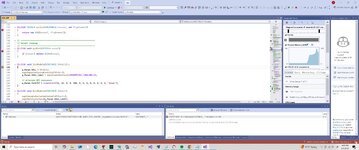
I used the code from the DG and now she works.
DLLCLBK void InitModule(HINSTANCE hModule)
{
g_Param.hDLL = hModule;
oapiRegisterCustomControls(hModule);
//g_Param.hDLL = hModule;
//oapiRegisterCustomControls(hModule);
//g_Param.tkbk_label = oapiCreateSurface(LOADBMP(IDB_TKBKLABEL));
// allocate GDI resources
g_Param.font[0] = CreateFont(36, 16, 0, 0, 400, 0, 0, 0, 0, 0, 0, 0, 0, "Arial");
}
now to get make to payloads
I used the code from the DG and now she works.
DLLCLBK void InitModule(HINSTANCE hModule)
{
g_Param.hDLL = hModule;
oapiRegisterCustomControls(hModule);
//g_Param.hDLL = hModule;
//oapiRegisterCustomControls(hModule);
//g_Param.tkbk_label = oapiCreateSurface(LOADBMP(IDB_TKBKLABEL));
// allocate GDI resources
g_Param.font[0] = CreateFont(36, 16, 0, 0, 400, 0, 0, 0, 0, 0, 0, 0, 0, "Arial");
}
now to get make to payloads
- Joined
- Feb 4, 2008
- Messages
- 9,758
- Reaction score
- 1,028
- Points
- 203
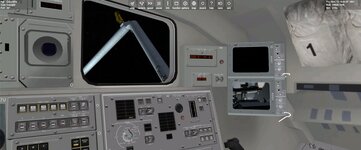
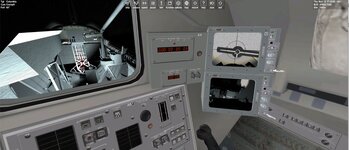
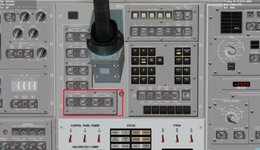
Have you pushed in the circuit breakers for the RMS CCTV on panel R14? There's three of them, row E, RMS CAMR. Then on panel A7U, under CAMERA POWER, RMS to ON. Use the PORT RMS CAMERA switch on the same panel to switch between the elbow camera and the end effector camera.STS2. Trying to attach the ID is GF
For some reason,(operator error) I can get the monitor to display the rms Camera
Thanks. So not sure which view gets you to see the R14 panel. But I got it. Not sure why I am not grabbing it though. I need to see where the attachment in the cfg is?
; === Attachment specs ===
BEGIN_ATTACHMENT
P 0 -1.15 -2 0 0 -1 0 -1 0 XS ;TO PAYLOAD BAY
P -0.62 0.05 -0.03 -0.91 -0.42 0 0 0 1 GF ;RMS/PYLON-RMS GRAPPLE
END_ATTACHMENT
ctrl enter grabs and ctrl backspace release correct?
; === Attachment specs ===
BEGIN_ATTACHMENT
P 0 -1.15 -2 0 0 -1 0 -1 0 XS ;TO PAYLOAD BAY
P -0.62 0.05 -0.03 -0.91 -0.42 0 0 0 1 GF ;RMS/PYLON-RMS GRAPPLE
END_ATTACHMENT
ctrl enter grabs and ctrl backspace release correct?
Attachments

Yes.ctrl enter grabs and ctrl backspace release correct?
Initially I was thinking the alignment might not be good enough, but actually that might not work at all. The IECM vessel is already attached via a "parent" attachment (only one parent is allowed). When the vessel is attached directly to the PLB via the active latches, there is a "handover" between them and the RMS, thus working around this limitation.
I'll have to figure something out for this situation... thanks for catching it! Meanwhile you'll have to release the IECM from the pallet and then grapple it with the RMS.

Thanks. I will try that. But where on the rms is the attachment. and where should the child on the fixture be.
The pallet is a separate vessel that I code with attachment code
The pallet is a separate vessel that I code with attachment code
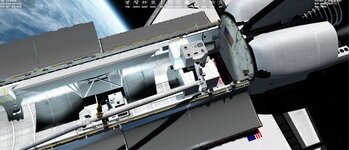
Check the manual: "For the RMS to grapple a payload, it much have an attachment with the ID "GF". The attachment must be placed at the surface of the Grapple Fixture plate, centered in the cam/arm assembly."But where on the rms is the attachment. and where should the child on the fixture be.
Thanks. I adjusted the attachment and add show attachment to the pallet
But I can't attach. When I think I am there I press CTRL and Enter. I see the talkback move,...
I was thinking maybe set up the scn with it attach to see how it would look like attached
But I can't attach. When I think I am there I press CTRL and Enter. I see the talkback move,...
I was thinking maybe set up the scn with it attach to see how it would look like attached
Attachments
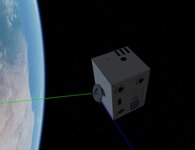
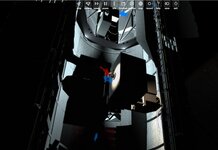
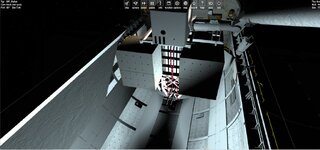
This is from 2016. I wonder if the cross hairs should be in the center of the ball on the grapple target?
I was not able to turn the rms light off. in the scn the light is turned off but you can see the light is on
In the test scenario the IECM is not attached as I get a CTD with the IECM attached at the start
000000.000: (SSV_OV) [INFO] In clbkPreStep
(SSV_OV) [FATAL ERROR] Exception in clbkPreStep: [PORT_RMS] Attached vessel does not match vessel in scenario data
I was not able to turn the rms light off. in the scn the light is turned off but you can see the light is on
In the test scenario the IECM is not attached as I get a CTD with the IECM attached at the start
000000.000: (SSV_OV) [INFO] In clbkPreStep
(SSV_OV) [FATAL ERROR] Exception in clbkPreStep: [PORT_RMS] Attached vessel does not match vessel in scenario data
Attachments
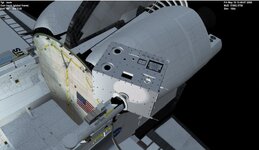
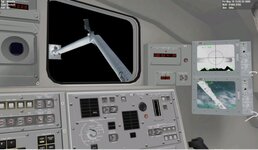
That is the idea.I wonder if the cross hairs should be in the center of the ball on the grapple target?
If you look there are 2 lights: the RMS EE light (on top of the camera, controlled by the switch on panel A7U) and the Wrist Camera LED Illuminator (around the camera lens opening, controlled by a CB on panel R14). Now, STS-2 used the camera type "-506/-508" (actually it would probably be a previous type, but I simplified the options), and that type did not have the LED illuminators.I was not able to turn the rms light off. in the scn the light is turned off but you can see the light is on
As far as the RMS attachment goes, like I said in the previous post, you will not be able to grapple anything that is already attached to another vessel. The workaround for now is to place the EE in the correct place, release the existing attachment, and then grapple with the RMS.In the test scenario the IECM is not attached as I get a CTD with the IECM attached at the start
000000.000: (SSV_OV) [INFO] In clbkPreStep
(SSV_OV) [FATAL ERROR] Exception in clbkPreStep: [PORT_RMS] Attached vessel does not match vessel in scenario data
I hope to have a better solution for the next release.
Thanks. I guess I need to figure out how to get the CB on panel R14. Can you turn them on/off?
In the scenario. The IECM is not attached to anything else. But If I attach to the RMS and restart I get the CTD.
I will see if I can get the attachment to match the crosshairs
In the scenario. The IECM is not attached to anything else. But If I attach to the RMS and restart I get the CTD.
I will see if I can get the attachment to match the crosshairs
So in the scn I have this.
IECM:STS_Payloads\IECM_SSV
STATUS Orbiting Earth
RPOS -6293955.686 997937.955 1313339.937
RVEL 205.7077 6679.8797 -4096.0292
AROT -9.546 -44.562 -81.913
VROT 0.0236 0.1721 0.0035
ATTACHED 0:0,DFI_Pallet
ATTACHED 1:0,Columbia
NAVFREQ 0 0
END
Attached 0:0, Pallet
Attached 1:0 is the IECM is attached to the RMS
I did see where before you move the rms you need to release the IECM.
Still not sure why I got a CTD with the Atlantis testing scenario?
On the Pallet I might make a window so you can control the rms and release/attach the IECM rather than use keyboard and have to switch back and forth
IECM:STS_Payloads\IECM_SSV
STATUS Orbiting Earth
RPOS -6293955.686 997937.955 1313339.937
RVEL 205.7077 6679.8797 -4096.0292
AROT -9.546 -44.562 -81.913
VROT 0.0236 0.1721 0.0035
ATTACHED 0:0,DFI_Pallet
ATTACHED 1:0,Columbia
NAVFREQ 0 0
END
Attached 0:0, Pallet
Attached 1:0 is the IECM is attached to the RMS
I did see where before you move the rms you need to release the IECM.
Still not sure why I got a CTD with the Atlantis testing scenario?
On the Pallet I might make a window so you can control the rms and release/attach the IECM rather than use keyboard and have to switch back and forth
Attachments
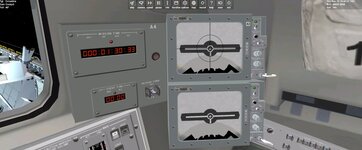
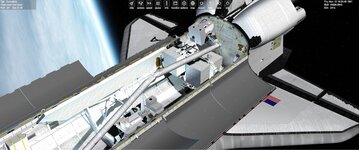
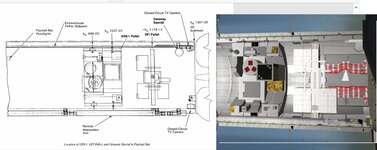
If a diagram like those isn't available, these photos usually help. One just has to count the PRLA slots...
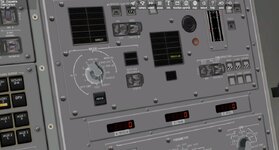
Trying to figure the rms out for STS3. Not sure why the limit reach light is on.
@SUBSYSTEM PORT_RMS
ANGLES -0.000000 0.000000 0.000000 0.000000 0.000000 0.000000
SHOULDER_BRACE 1.0
GRAPPLE 1 1.0000
RIGIDIZE 1 1.0000
EXTEND 1 1.0000
ELBOW_CAM -90.000000 105.000000 40.000000
WRIST_CAM 40.000000
MPM_ROLLOUT 0.0
MPM_LATCHES 0.000000 0.000000 0.000000
@ENDSUBSYSTEM
@SUBSYSTEM PORT_RMS
ANGLES -0.000000 0.000000 0.000000 0.000000 0.000000 0.000000
SHOULDER_BRACE 1.0
GRAPPLE 1 1.0000
RIGIDIZE 1 1.0000
EXTEND 1 1.0000
ELBOW_CAM -90.000000 105.000000 40.000000
WRIST_CAM 40.000000
MPM_ROLLOUT 0.0
MPM_LATCHES 0.000000 0.000000 0.000000
@ENDSUBSYSTEM
Attachments
Trying to figure the rms out for STS3. Not sure why the limit reach light is on.
@SUBSYSTEM PORT_RMS
ANGLES -0.000000 0.000000 0.000000 0.000000 0.000000 0.000000
SHOULDER_BRACE 1.0
GRAPPLE 1 1.0000
RIGIDIZE 1 1.0000
EXTEND 1 1.0000
ELBOW_CAM -90.000000 105.000000 40.000000
WRIST_CAM 40.000000
MPM_ROLLOUT 0.0
MPM_LATCHES 0.000000 0.000000 0.000000
@ENDSUBSYSTEM
You need to read the SCOM: https://web.archive.org/web/2011041...390651main_shuttle_crew_operations_manual.pdf
See section "2.21 PAYLOAD DEPLOYMENT AND RETRIEVAL SYSTEM (PDRS)"
Thanks. Just testing the attachment point and mesh.
The PDP is only attached to the rms. and get this:
000070.476: (SSV_OV) [FATAL ERROR] Exception in clbkPreStep: [PORT_RMS] Attached vessel does not match vessel in scenario data
PDP:STS_Payloads\PDPSSV
STATUS Orbiting Earth
RPOS -5419945.264 -3641626.019 345352.235
RVEL -553.7007 227.4559 -7762.8544
AROT -157.122 56.268 -171.786
VROT -0.0120 0.0090 -0.0144
ATTACHED 1:0,Columbia
NAVFREQ 0 0
END
The PDP is only attached to the rms. and get this:
000070.476: (SSV_OV) [FATAL ERROR] Exception in clbkPreStep: [PORT_RMS] Attached vessel does not match vessel in scenario data
PDP:STS_Payloads\PDPSSV
STATUS Orbiting Earth
RPOS -5419945.264 -3641626.019 345352.235
RVEL -553.7007 227.4559 -7762.8544
AROT -157.122 56.268 -171.786
VROT -0.0120 0.0090 -0.0144
ATTACHED 1:0,Columbia
NAVFREQ 0 0
END
There are parameters in the RMS scenario block that are set when it grapples something, so you cannot just add "ATTACHED".Thanks. Just testing the attachment point and mesh.
The PDP is only attached to the rms. and get this:
000070.476: (SSV_OV) [FATAL ERROR] Exception in clbkPreStep: [PORT_RMS] Attached vessel does not match vessel in scenario data
You can figure out the attachment parameters by putting your payload mesh in blender.
Similar threads

- Replies
- 0
- Views
- 2K

- Replies
- 7
- Views
- 4K

- Replies
- 21
- Views
- 19K

- Replies
- 0
- Views
- 5K

- Replies
- 95
- Views
- 30K
