Shuttle FDO MFD

Can someone write a simple tutorial on how to use this MFD? I'm making no progress at all beyond just adding a maneuver. I guess that comes from being a mostly GSE-guy.

I got to the ISS with 10% of previous knowledge and 90% of indy91's posts in this thread. And not only I got there, I changed the maneuver plan to recover from a mistake I made somewhere.

The basics are:
1) burn the 1º maneuver in the list (duh!)
2) write down the MET of the 2º maneuver
3) delete the 1º maneuver
4) set the threshold of the 1º maneuver (which was previously the 2º) to time and input the MET you previously wrote (if NC-2, change type from EXDV to NC)
5) delete a secondary constraint of one of the following maneuvers... this is where it gets tricky because one has to delete the correct thing, but the info on what to delete after each burn has been posted here.
6) calculate it again
7) go back to 1

It's possible that I'll have the time to run another rendezvous tomorrow, and if so I'll write a more detailed version of the list above.
 
I got to the ISS with 10% of previous knowledge and 90% of indy91's posts in this thread. And not only I got there, I changed the maneuver plan to recover from a mistake I made somewhere.

The basics are:
1) burn the 1º maneuver in the list (duh!)
2) write down the MET of the 2º maneuver
3) delete the 1º maneuver
4) set the threshold of the 1º maneuver (which was previously the 2º) to time and input the MET you previously wrote (if NC-2, change type from EXDV to NC)
5) delete a secondary constraint of one of the following maneuvers... this is where it gets tricky because one has to delete the correct thing, but the info on what to delete after each burn has been posted here.
6) calculate it again
7) go back to 1

It's possible that I'll have the time to run another rendezvous tomorrow, and if so I'll write a more detailed version of the list above.


Thanks for the tips! I've created a PDF with all of the pearls of wisdom from the 10 pages of the two thread regarding this MFD to use as a reference. I wish I was smarter.....LOL

Any chance of broadcasting it on Twitch in real time so that we'll have a video and basic narration? Or record it, and upload it to YouTube?

Tim

---------- Post added at 01:38 PM ---------- Previous post was at 01:27 PM ----------

I'm sorry you guys keep on having problems. My next priority for the MFD is definitely to write a walkthrough of a mission as a tutorial, I hope that will help.

I'm not sure what you mean by hard stop. What happens when you delete a maneuver? The maneuver plan should always become simpler because of that and show better iteration behavior. There are of course some modifications you need to make to a plan after deleting a maneuver, but those are pretty obvious, and if they aren't, I have already mentioned them in this thread.

First off, don't be sorry. You've created a very cool addon here. Like everything related to real world space ops, it's complicated, and that's what makes it fun for us.

What I mean by hard stop is if I change constraints without deleting any previous maneuvers, I don't get errors. In other words, if I'm working on maneuver number three, and don't delete maneuvers one and two, it seems I stand a better chance of not getting an error code that I can't figure out how to clear.

Lastly, it's not always obvious to me what needs to be deleted or added as the plan unfolds. I understand the big picture of what all the burns do, and why they need to be done, but I struggle a bit with the fine details of each burn.

Maybe my problem is I'm saving the FDO MFD and current scenario after each burn? I'm doing that so that if I screw things up, I don't have to re-launch.

Anyhow, I'll await your walk through. Hopefully along with "the how", you'll include a smidge of "the why", as you make your way through the flight plan.

Thanks again for making this MFD!

Tim

 
Last edited:
Thanks for the tips!

Any chance of broadcasting it on Twitch in real time so that we'll have a video and basic narration? Or record it, and upload it to YouTube?

Tim

I don't think my hardware would allow for such things... :facepalm:
 
I don't think my hardware would allow for such things... :facepalm:

No worries, it was just a thought.

Once, or if, I ever get to the point of using it competently, I'll make a video, and upload it for future users. :hello:

Tim
 
What I mean by hard stop is if I change constraints without deleting any previous maneuvers, I don't get errors. In other words, if I'm working on maneuver number three, and don't delete maneuvers one and two, it seems I stand a better chance of not getting an error code that I can't figure out how to clear.

When you press CLC on the maneuver constraints page the MFD will take the current state vectors of chaser and target and do all the trajectory calculations with those. So keeping maneuvers which have already been done in the table will never give any good results.

Lastly, it's not always obvious to me what needs to be deleted or added as the plan unfolds. I understand the big picture of what all the burns do, and why they need to be done, but I struggle a bit with the fine details of each burn.

There are two types of maneuvers basically. Ones associated with some iteration and ones that are not. NC, NH and NPC are really the only ones that do an iteration. For those you place a constraint on some future maneuver, for phasing, height or wedge angle (difference between orbital planes). The other maneuvers have the secondary constraint applied to itself, e.g. a EXDV maneuver needs 3 DVLV secondary constraints on itself.

The basic principle is that for every iteration constraint there needs to be one specific maneuver that tries to achieve it. For every phasing maneuver (NC type) there needs to be a phasing constraint (DR) on some future maneuver. For every height maneuver (NH) there needs to be a delta height constraint (DH). NPC is a bit more tricky, but in general the same rule applies, a WEDG (wedge angle) constraint at some point in the future.

You can always only have one maneuver that targets a specific constraint. So to have multiple phasing maneuvers (e.g. NC-1 to NC-3) you have to make NC-2 and NC-3 placeholder maneuvers of the type EXDV, with a fixed DV of 3 or 8 ft/s second. That's just the numbers that were used on Shuttle missions, they have various reasons. The first placeholder phasing maneuver, NC-2 in this case, will have 8 ft/s, the later one(s) 3 ft/s. So when you have done the NC-1 maneuver you delete it, then you make NC-2 the new phasing maneuver (NC type) and delete the DVLV constraints on it, because they won't be used anymore when the maneuver is a NC type one. You don't need to delete the DR constraint on some future maneuver (usually NC-4 with DR = -40NM), because NC-2 will now try to target that one. But after you have done NC-3 there is no more maneuver that tries to get the phasing right at the NC-4 maneuver, so at that point you should delete the "DR = -40".

Maybe my problem is I'm saving the FDO MFD and current scenario after each burn? I'm doing that so that if I screw things up, I don't have to re-launch.

I do this all the time. After a full rendezvous I have a whole collection of MFD save files, I usually name them e.g. "STS-126A", "STS-126B" etc. They all have small variations of constraints or fewer maneuvers when the mission has progressed.
 
My problem is that I don't know what to enter where. The manual is bad at describing this. If it explained this, I don't think I would have any problems operating this MFD. Right now the manual basically repeats only what the MFD itself is telling you making it redundant. Right now I can't even set up the OMS-2 burn.
 
Last edited:
My problem is that I don't know what to enter where. The manual is bad at describing this. If it explained this, I don't think I would have any problems operating this MFD. Right now the manual basically repeats only what the MFD itself is telling you making it redundant. Right now I can't even set up the OMS-2 burn.

I think the first post in this thread has a good overview of the MFD.
 
I think the first post in this thread has a good overview of the MFD.
Yes, it's a good overview but it still doesn't say exactly what to enter where. I'm not looking for an overview, the current manual is basically that. I'm looking for a proper manual that explains things not just does an overview. For example, what is the proper format to enter for a maneuver threshold? I tried several variations but have gotten nowhere.
 
For example, what is the proper format to enter for a maneuver threshold? I tried several variations but have gotten nowhere.

Quote from page 5 of the manual:

T (Time)
The maneuver’s impulsive ignition time will occur at the specified time. The OMP ex-
pects MET in DDD:HH:MM:SS.SSS format.

And the MFD specific part on page 9:

THR: Add/modify threshold (primary) constraints. Input format: ”Maneuver-ID Threshold-
Type Threshold-Value”.

So to give the MFD a threshold of type T, with a mission elapsed time of 30 minutes, and for maneuver number 1 in the table you input:

Code:
1 T 0:0:30:0
 
So to give the MFD a threshold of type T, with a mission elapsed time of 30 minutes, and for maneuver number 1 in the table you input:
Code:
1 T 0:0:30:0
This was the explanation I was looking for, thank you. Could the DMT be modified to give the burn data in PEG4 targets for OMS-1/2? That's what was used on the real vehicles, PEG7 was only used for the on-orbit burns.
 
Could the DMT be modified to give the burn data in PEG4 targets for OMS-1/2? That's what was used on the real vehicles, PEG7 was only used for the on-orbit burns.

Maybe. Looking through the FDO documents, they seem to have used something called the "Abort Maneuver Evaluator", which calculated PEG-4 targets for nominal OMS-1 and OMS-2, but also ATO and AOA solutions. I might be able to come up with something simple for now, like an additional page that just takes a HT input for PEG-4 and then calculates the optimal OMS-2 (TIG close to apogee, THETAT adjusted to not rotate the line of apsides). And then that would get exported to the DMT with PEG-4 targets.
 
Small update.

Using everything I've gleaned from these two threads, my "Pearls of FDO Wisdom" PDF I created to consolidate posts into one reference, the FDO manual, and GLS's seven step approach to using the FDO MFD, I've been able to make it through all the burns on day one, from launch, to NC-3.

So when I burn at NC-3, I'll only be 54 nm behind the ISS.

I did notice one unusual thing. At least I think it's unusual. There is a NC-4 burn in the MET page of the FDO, but the value of the burn is zero. No deltaV change in any axis. I'm guessing that after the NC-3 burn, if the NC-4 burn still shows zero velocity change needed, I can just delete, and skip the NC-4.

If my wife only knew how much time I've "wasted" on this process....Hahahahaha.

Tim
 
Can you post screenshots of your constraints and evaluation tables for that, Tim?
 
Can you post screenshots of your constraints and evaluation tables for that, Tim?

I should be able to at least post pics of the MET tables.

After all was said and done after the SOR burn, I am 7900k meters behind the ISS, and the ISS is drifting away from me at about 1.5 m/s.


Now I need to figure out SPEC34 to get all the way there.

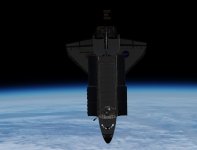
The ISS is so tantalizing close, and I can clearly see it in front of me.

Tim
 
I should be able to at least post pics of the MET tables.

After all was said and done after the SOR burn, I am 7900k meters behind the ISS, and the ISS is drifting away from me at about 1.5 m/s.


Now I need to figure out SPEC34 to get all the way there.

The ISS is so tantalizing close, and I can clearly see it in front of me.

Tim

Ah, I haven't even tried to do the SOI and SOR type burns (so TI and MC4) with the MFD solution because those are usually calculated onboard. Your results are still pretty bad for that, you should be much closer to the target at MC4. Hopefully my upcoming tutorial will help you get that final part right as well. But it will of course not include a SPEC 34 tutorial, haha.
 
Pretty bad? LOL....well, that's sad news.

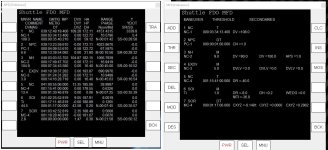
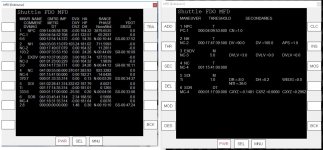
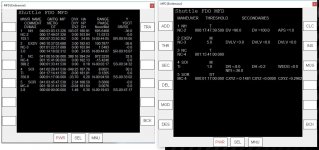
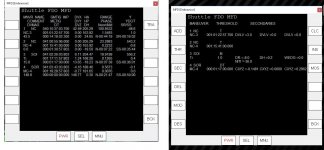
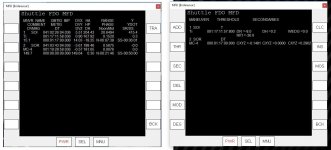
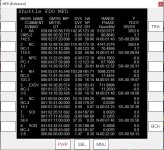
Here is what I have from my flight.

Tim
 

Attachments

  • one.JPG
    one.JPG
    149.1 KB · Views: 146
  • two.JPG
    two.JPG
    149.3 KB · Views: 140
  • three.JPG
    three.JPG
    135.7 KB · Views: 153
  • four.JPG
    four.JPG
    122.3 KB · Views: 133
  • five.JPG
    five.JPG
    101.8 KB · Views: 135
  • STS-130SG PRE OMS2.JPG
    STS-130SG PRE OMS2.JPG
    117.1 KB · Views: 135
Your pre OMS-2 plan looks pretty good. Not very DV optimized, but good enough. I think I already made a post about TI DVZ optimization and it will be large part of the upcoming walkthrough.

Then, one thing you should probably more aware of is secondary constraints that modify the TIG. You keep the APS constraint on the NC-2 maneuver and the NITI constraint on the NC-4 maneuver around in the plan even when you have already given those maneuvers a fixed TIG with sub-second precision. Like in the pre NC-2 plan where you have given it a T primary constraint of 000:17:47:39.5 you still have the APS constraint on the maneuver, so it will be placed on an apsis. And in the evaluation table it then doesn't have the fixed TIG you gave it but was placed on an apsis with the time 000:17:49:07.326. APS and NITI are useful in the initial plan to get the lighting and apsides right, but afterwards they just move the TIGs around when you don't want that anymore.

And I can explain your NC-4 with 0 ft/s DV. You have two NC type maneuvers (NC-3 and NC-4) but only one DR constraint left (DR = -8 on the TI maneuver). So NC-3 will iterate to achieve that constraint and NC-4 has nothing to do anymore, so it just stays at 0 ft/s.

After NC-2 you should have made NC-3 the NC type maneuver and the downrange constraint on NC-4 (the DR =-40) should have still been there until after NC-3 is done. That's where the DVs in the evaluation table start looking a bit wrong.
 
If I recall correctly, I had to remove the DR=-40 because of a "too many iterations" error. Removing it allowed me to clear the error, and continue.

Thanks for all the input!

I think I'm going to take a pause here, and wait for the updated manual with the walk through, to try and take the next step. My brain is hurting....LOL

Tim
 
Last edited:
one last picture....so close, yet so far.


Tim
 

Attachments

  • so close.JPG
    so close.JPG
    82.5 KB · Views: 166
Back
Top