Problem Pursuit MFD

I'm sorry Francisdrake,
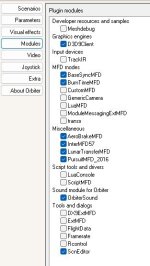
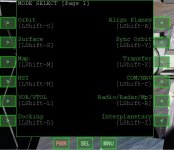
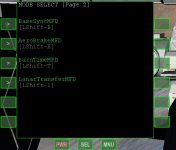
I have reinstalled Orbiter 2016 and PursuitMFD and LagrangeMFD are still not showing up. Other modules install fine.
I think the dll locations are in the right place, but I'm not sure.
I'm not a computer scientist and I don't know what the problem could be?
Thank you.
 
Last edited:
Hello Francisdrake,
I tried Pursuit MFD on another PC and it works normally.
I changed the graphics again and it works correctly.
Thank you.:cheers:
 
Just to say, I had the same error in my new computer. I check the module in modules tab, but it's not showing in orbiter 2016

============================ ERROR: ===========================
Failed loading module Modules\Plugin\PursuitMFD_2016.dll (code 126)
[Orbiter::LoadModule | .\Orbiter.cpp | 600]
===============================================================

  • Intel Core i9-13900K 3 GHz 24-Core Processor
  • Asus TUF GAMING Z790-PRO WIFI ATX LGA1700 Motherboard
  • Corsair Vengeance 64 GB (2 x 32 GB) DDR5-6000 CL30 Memory
  • Zotac GAMING Trinity GeForce RTX 4070 Ti SUPER 16 GB Video Card
  • Corsair RM1000e (2023) 1000 W 80+ Gold Certified Fully Modular ATX Power Supply
  • Western Digital WD_Black SN850X 4 TB M.2-2280 PCIe 4.0 X4 NVME Solid State Drive
  • Windows 11 PRO
pursuit.jpgCapture1.jpgCapture2.jpg
 

Attachments

Failed loading module Modules\Plugin\PursuitMFD_2016.dll (code 126)

This code 126 usual means, that the linker cannot find the dll's required to load the plugin.
I didn't work on a Windows box since about 10+ years, so i am not an Win expert.
However, as far as I remember the (correct) C++ dll's seem to be missing or cannot be found.
Just google for "Microsoft Visual C++ Redistributable".
Not sure if the latest are the greatest, in my case I used the 2015'er edition on my Linux setup.

hth

EDIT: MIght be wort to try out:
 
Last edited:
Back
Top