
Advanced Question Orbiter .tree files

EarthMoon

The Earth and the Moon
Joined
Jul 12, 2022
Messages
54
Reaction score
41
Points
18
Location
Germany
Preferred Pronouns
He, His, Him or You, Your, Yours
How can I generate Orbiter 2016 .tree texture/elevation data?

Generating/editing them with Windows' Notepad doesn't seem to be the best way:

Textures\Deimos\Archive\surf.tree:
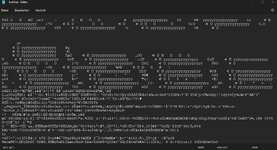
tree-file-in-editor.jpg

Is there a tool to generate the files?
 
I think Utils\texpack.exe is the tool you need (see doc\PlanetTextures.pdf for details on how to use).
Although I don't have any knowledge on how to "create" surface-elevation input data...nevertheless the documentation is always a good source! ;)
 
Last edited:
Hi. It looks like I have more accurate question. And documentation doesn't help me :(

In Docs/PlanetTextures.pdf there is .tree format description. That says
The compressed data size of node i can be inferred from node[i+1].pos − node.pos, where
node[i+1].pos must be replaced with dataLength for the last node.

When I parse Textures\Earth\Archive\Surf.tree TreeNode's pos property I expect they values should not different too much but unfortunately it is :(
May someone say what I do wrong?

I read follow values from the file toc:
0
141910014427136
4
17179869183
-1
25769803775
-4294833034
288540197912576
36159
309877595439104
10
-1
-1
412316860428
55834709110
288540197912576
105274
452711027834880
79
Difference between first two values (0 and 141910014427136) is 132.164 GiB. Obviously, my script works incorrectly. But wait I doing wrong?
So, I do:
  1. Read header (48 bytes);
  2. Read TreeNode:
    1. Read 8 bytes (from 48 to 56) as node's data pos with type of __int64/Int64 (with buf.readBigInt64LE);
    2. Read next 4 bytes (from 56 to 60) as node's uncompressed data size with type of DWORD/Int32 (with buf.readInt32LE);
    3. Read 4 bytes four times as node's child.
  3. Repeat 2. til enough.
I will glad any of your ideas :)
 
You must be off somewhere in your node size, because it works as described for the treeman code. Here are structs I use there:
Code:
typedef struct TREEFILEHEADER    // file header for tree archive data file
{
    char id[4];                    // ID string + version ('T','X',1,0)
    int hdrsize;                // header size (48 expected)
    int flags;                    // flags - currently only bit0 is 1 for compressed tree
    int arvstart;                // archive start address
    long long arvlen;            // archive length
    int nodes;                    // stored nodes incl. valid root nodes
    int root[5];                // root node indices (level 1, 2, 3, 4a, 4b) -1 marks missing nodes
};

typedef struct TREENODEENTRY    // quad-tree entry
{
    long long arvoffset;        // archive start address = header archive start + offset
    int length;                    // uncompressed length, 0 if dummy entry
    int q[4];                    // quad-tree child indices - -1 marks sub-tree end
    int reserved;                // reserved, may contain garbage data
};
 
You must be off somewhere in your node size, because it works as described for the treeman code. Here are structs I use there:
Code:
typedef struct TREEFILEHEADER    // file header for tree archive data file
{
    char id[4];                    // ID string + version ('T','X',1,0)
    int hdrsize;                // header size (48 expected)
    int flags;                    // flags - currently only bit0 is 1 for compressed tree
    int arvstart;                // archive start address
    long long arvlen;            // archive length
    int nodes;                    // stored nodes incl. valid root nodes
    int root[5];                // root node indices (level 1, 2, 3, 4a, 4b) -1 marks missing nodes
};

typedef struct TREENODEENTRY    // quad-tree entry
{
    long long arvoffset;        // archive start address = header archive start + offset
    int length;                    // uncompressed length, 0 if dummy entry
    int q[4];                    // quad-tree child indices - -1 marks sub-tree end
    int reserved;                // reserved, may contain garbage data
};
That works! Thank you 🙏
 
Dear, Face. May you explain me another question? It is about BaseConfig.cfg file.

In OrbiterConfig.pdf describes BEGIN_OBJECTLIST section that contains an objects. Each object has the pos parameter with type of float vector [x, y, z]. So my question is what does mean the pos on surface? How to define base-relative coordinate (lon/lat) for each object from object list section?
 
I hope, that @Face won't mind if I try to answer.

The "POS x y z" input contains coordinates of an object in a local coordinate system related to the base location. The y-coordinate means altitude above surface, the x-axis is directed to the south, the z-axis is directed to the east. All coordinates (x,y,z) are in meters. The base location is set at the beginning of the base configuration file, it looks like: "Location = longitude latitude".

You could take a look at configuration files for the default bases. For example, /Config/Earth/Base/Canaveral.cfg.
 
In OrbiterConfig.pdf describes BEGIN_OBJECTLIST section that contains an objects. Each object has the pos parameter with type of float vector [x, y, z]. So my question is what does mean the pos on surface? How to define base-relative coordinate (lon/lat) for each object from object list section?
The base center point is defined as touching the Gbody sphere on the specified lon/lat coordinates. From there you basically have a tangential plane where the elements are place. AFAIK Orbiter has a left-handed coordinate system, so you take your left hand, assign x to thumb, y to index and z to middle and put them into orthogonal directions (thumb and index shaping an "L" while middle points away). Now imagine that hand placed on the center point of the base, the thumb pointing to the bottom of the plane (south), the index away from the sphere (altitude), and the middle to the right of the plane (east). Right means in parallel to the equator line, bottom means to the pole. Might get wonky at the poles, though.

Now it gets interesting if you have objects very far away from the center point, because the Gbody's curvature comes into play. This means that far-away objects are floating in the sky, even if their y-value is zero. There are two possibilities for that: you compensate manually by means of applying a negative y-value to them, or you use the built-in "MAPOBJECTSTOSPHERE" flag to do that automatically.
 
Thanks for your lightning fast answers 🙏

So, if I draw the surface (.tree) on 2d plane, how I can connect the "local coordinate system" with surface's tile pixels? What is the "local coordinat system"?

Or another words: how many pixels in meter for specified resolution level to define xy-pixel in the tile?
 
Thanks for your lightning fast answers 🙏

So, if I draw the surface (.tree) on 2d plane, how I can connect the "local coordinate system" with surface's tile pixels? What is the "local coordinat system"?

Or another words: how many pixels in meter for specified resolution level to define xy-pixel in the tile?
I think I posted an Excel sheet for that somewhere already. I'll check.
 
This here I meant: TileAddress .
It is an Excel sheet taking lon/lat as input and showing you the tile address in the tree for each level, as well as the exact pixel containing that point.
It is kind of the reverse answer to your question, but maybe you can reverse-engineer it to get the meter per pixel. I'm not 100% sure, but I think I've also posted the pixel-per-meter calculation in the flattening experiment thread. Please also take a look there, it is so long ago that I don't remember every detail anymore.
 
Yes. Thank you again! This is what I meant! :hailprobe:

I've been trying to find it. I should have asked first.
 
Back
Top