
Project Orbiter Master/Slave renderer

kamaz

Unicorn hunter
Addon Developer
Joined
Mar 31, 2012
Messages
2,298
Reaction score
4
Points
0
There's a new game
We like to play you see
A game with added reality

We call it -- master and servant


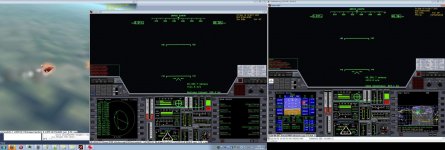
XR-1 Master/Slave, ready for takeoff. Right Orbiter instance is master, left and center are slaves.


Florida below.


Master and slave MFDs are independent.


Flying over the East Coast. Virtual cockpit on slave, glass cockpit on master.

Edit 2014-01-08. New version (rev28) is available, announcement and list of changes here
Edit 2013-12-29. New version (rev25) is available, announcement and list of changes here
Edit 2012-09-26. The XR2 bug is now fixed.
Edit 2012-09-13. README and release below.

Orbiter Master - Slave
======================

This add-on copies the simulation state real-time from a single master instance to multiple
slave instances. Communication is performed using UDP protocol.

Slave instances run independetly of the master instance, except that the simulation state
(that is, MJD, vessel state and location) is copied from master to slave(s) every frame.

Limitations:

Generally speaking, only the data exposed through VESSEL, VESSEL2 and XRVesselCtrl interfaces
are shared between instances. In particular, it means that:

- (un)docking is not supported (okay, I plan to fix *that* one)
- UMMUs are not supported (will appear differently on master and slave)
- UCGOs are not supported (will appear differently on master and slave)
- some DG-IV-specific features are not supported

This add-on is released under the GPL-2.0 license.

Orbiter Master - Slave launch chekclist
---------------------------------------

0. If you want to run multiple Orbiter instances on the same computer, install and enable
this add-on: http://orbiter-forum.com/showthread.php?p=241888&postcount=13

1. Unpack the add-on, and edit Config\OrbMaster.cfg and Config\OrbSlave.cfg to suit your needs.

2. Start master instance: start Orbiter, enable OrbMaster.dll module, launch the simulation.
The master will periodically (every 10s) save current simulation state to the scenario named
000MasterSlave. The slave needs this file at startup. If you want to put master and slave(s)
on different computers, put your Orbiter install on a network share or use some other means
to transfer the scenario file to the slave (HTTP, FTP, ...).

NOTE: if waitForClients=1 in OrbMaster.cfg, the master will hang during startup until the
first client connects.

3. Launch orbiter, disable OrbMaster.dll, enable OrbSlave.dll. Load scenario 000MasterSlave
and launch the simulation.

NOTE: NEVER have both OrbMaster.dll and OrbSlave.dll enabled in one instance at the same time!

4. If you notice that the simulation state on the slave diverges from that on master, kill
the slave and restart it as per step 3. This causes a full scenario reload.
 

Attachments
Last edited:
Master/slave? Isn't this illegal? :P

This is probably good for those people who have multiple screens.
 
Cool. How much latency do you see with the slave? Can the slave instance be run on a different machine?
 
I can see uses for this. Are you intending to release it?
 
Last edited:
Well, due to an unexpected change of plans for tonight... See the top post for release & description. :) (And please thank my girlfriend. The idea was hers.)

If you have any more questions about the add-on, feel free to ask.
 
Well, due to an unexpected change of plans for tonight... See the top post for release & description. :) (And please thank my girlfriend. The idea was hers.)

If you have any more questions about the add-on, feel free to ask.

Kamaz, thanks for releasing this. However, if your girlfriend gives you the time, could you recompile it in Release mode? At the moment it is trying to load a debug dll...

Thanks!
 
Done, new version (rev 13) attached to the top post.
 
Can this be used as windows on different front, sides and rear of an interior virtual VC.
 
Can this be used with Orbiter NG and external graphics clients?
 
Can this be used as windows on different front, sides and rear of an interior virtual VC.

Yes, as seen in the screenshots. The only problem is that you cannot use VC on slave instance to control the spacecraft. Spacecraft must be controlled from master.

Can this be used with Orbiter NG and external graphics clients?

Yes. You can even mix different clients.

Here's how it works. Each Orbiter instance does the rendering independently. I simply copy position, orientation and status of all vessels from master to slaves. So at a given moment, all instances have the same simulation state. What and how each instance renders, is its own business.

You can even have different ships in focus on different instances and watch your docking approach simultanously from both spacecrafts.
 
Last edited:
Hy kamaz,

Very cool project! It is a nice alternative to OMP for those who want to have multiple views and/or "streaming" of Orbiter sessions.

Your decision to put it under GPL is also much appreciated. Your code is nicely structured and well thought out. :thumbup:

If you allow, I'd like to suggest small enhancements:

  1. Make your network operations asynchronous to Orbiter's main loop. As it is now, it seems you are sending the UDPs via sendto in a blocking manner. While this won't be an issue with small and few packets, it could lead to indeterministic timing if many clients and/or vessels are present, so low frame rates may be the result.
  2. Use a controller mechanism to bring slave MJD in sync with master MJD instead of just setting the acceleration/discrete time. If you like, you can take a look at how I do it in OMP.
  3. Instead of using an open frame design with start and end messages (using the first as time frame and the last as buffer synchronization), you could embed the time info in every packet. It won't increase your packet size too much and makes the frame consistency code more simple. As it is now, you could encounter situations where a client may always find an end message with following vessel messages in the buffer (due to e.g. buffering on the route), leading to strange artifacts. It would mean that you'll always have some packets missing (most prominently the start frame), with update packages still updating SOME vessels, but without any time synchronization whatsoever.
regards,
Face
 
Last edited:
This seems to be very interesting. Could this be used/expanded to be a new virtual mission control application for Orbiter (the last vMission Control I used was from 2003 or 2004 and there was a similar application in 2008/2009/2010).
 
A new release (rev14) is attached to the top post.

This release is the same as rev13, except that it fixes the CTD with XR vehicles. XR2 and XR5 now work even when MJD synchronization is enabled. Many thanks to dbeachy1 for helping to debug the issue.

Remaining known issue with XR2: on the slave renderer, you will see the XR2 payload module flying alongside your spacecraft instead of sitting in the payload bay. This will cease once you climb above 10km altitude, and the add-on switches from synchronizing MJD every frame to synchronizing MJD every 10 seconds. Aside from looking strange, that problem does not seem to disrupt anything.

Thanks for all feedback. New features will be implemented in the next release.

---------- Post added at 08:43 PM ---------- Previous post was at 08:36 PM ----------

This seems to be very interesting. Could this be used/expanded to be a new virtual mission control application for Orbiter (the last vMission Control I used was from 2003 or 2004 and there was a similar application in 2008/2009/2010).

If you combine this add-on with my other add-ons from this thread: http://orbiter-forum.com/showthread.php?t=28474 you will probably get closer to this goal...
 
This is a very exciting add-on for simpit design. Thank you, immensely.
 
Can you be in two seperate spacecraft, with this addon ? Such as a split screen for docking
?
 
The slave is too jumpy to be usable, any suggestions ?
 
Back
Top