Problem Orbiter Fonts

almerwibowo

New member
Joined
May 12, 2026
Messages
4
Reaction score
3
Points
3
Location
indonesia west java
Hello, why is it like this? I just installed SSV_Font from the space shuttle vessel, but after I installed it, it became like this? Please help.Screenshot 2026-05-16 010307.png
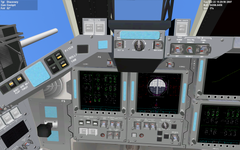
 
Hello, why is it like this? I just installed SSV_Font from the space shuttle vessel, but after I installed it, it became like this? Please help.View attachment 48804
Hi there!
Wow, I've never seen that before... but it doesn't seem to be just the font, because the rectangles in the display have no fill.
If you launch a Delta Glider scenario, do the MFDs there also look like that, or do they look fine?
 
Hi there!
Wow, I've never seen that before... but it doesn't seem to be just the font, because the rectangles in the display have no fill.
If you launch a Delta Glider scenario, do the MFDs there also look like that, or do they look fine?
in delta glider looks the same,but when I try not using D3D9 client the font is normal
 
Last edited:
in delta glider loo.ks the same,but when I try not using D3D9 client the font is normal
OK, so this is a more generic graphics problem.
Which Windows version and graphics card are you using, and in which folder do you have Orbiter?
Try opening the D3D9.cfg file, and change the "EnableDX12Wrapper" parameter to 1, and try again. If things don't improve, change it back to 0.
 
OK, so this is a more generic graphics problem.
Which Windows version and graphics card are you using, and in which folder do you have Orbiter?
Try opening the D3D9.cfg file, and change the "EnableDX12Wrapper" parameter to 1, and try again. If things don't improve, change it back to 0.
OK, but I've changed the version to 2024 so everything is normal, thank you.
 
Back
Top
