Orbiter 2024 Release

Status
Not open for further replies.
Confused...is the base client using D3D7 still, or D3D9? I didn't see an option in the modules tab to enable D3D9 client out of the box, and the default installation is CTD when the 3D window tries to render, with zero errors in Orbiter.log.

Also, I have an ASUS ROG M16 (2023) with both intel graphics and nVidia RTX 4070, and only the intel Hardware T&L HAL is being enumerated.

Thanks,
VU
I have vague memories of frustrating moments trying to get my laptop, which then had an Intel Core i5 650 (with integrated graphics) and an Nvidia GT320, to run orbiter on the discrete Nvidia GPU. If using Orbiter_NG and it persists in not detecting the second GPU, it may be necessary to manually add Orbiter_NG to the applications to use the discrete GPU.
 
Thanks to both of you. I knew Orbiter_NG was the way to go, but my mind was stuck in older releases apparently, looking for the module to enable. After enabling the wrapper in D3D9.cfg I am up and running.

No joy yet after adding it manually in nVidia Control Panel. I'll keep fiddling.

Thanks again!

VU
 
Thanks to both of you. I knew Orbiter_NG was the way to go, but my mind was stuck in older releases apparently, looking for the module to enable. After enabling the wrapper in D3D9.cfg I am up and running.

No joy yet after adding it manually in nVidia Control Panel. I'll keep fiddling.

Thanks again!

VU
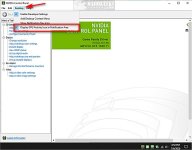
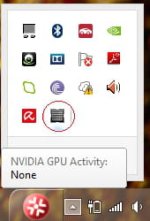
Concerning the nvidia control panel: one very useful thing to do is to activate the tray icon that always lists whether the discrete GPU is active and, if yes, what is running on it:
show or hide nvidia display gpu activity icon in system tray 1(1).jpg

1736271994398.jpeg
 
No joy yet after adding it manually in nVidia Control Panel. I'll keep fiddling.
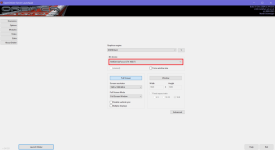
I'm not sure I understand your problem, but try to add the following file in NVIDIA Control Panel:

/Modules/Server/Orbiter.exe

And try to choose your discrete card like:

Без імені.png
I have vague memories of frustrating moments...
Me too. It was quite a long time ago, but it caused me to leave Orbiter for many years. Also, for many years I only had Linux, since Orbiter was the only thing I needed Windows for.
 
I'm not sure I understand your problem, but try to add the following file in NVIDIA Control Panel:

/Modules/Server/Orbiter.exe

And try to choose your discrete card like:

View attachment 41660

Me too. It was quite a long time ago, but it caused me to leave Orbiter for many years. Also, for many years I only had Linux, since Orbiter was the only thing I needed Windows for.
That was the issue. I had added orbiter_ng but not the orbiter.exe in modules/server. All good now. Getting the message during load about the symlinks, which I can sort easily. Am I imagining things, or wasn't there an option at one time for the launcher to try and create those? Neither here nor there, just thought I remembered seeing that years ago.
 
This might be a dumb question, I should know, but I have not touched Orbiter in literally ten years. I still have the high resolution planetary textures from Orbiter16 (I don't have to re-download them). Where do I put them? The manual mentions them and where to get them, but doesn't really say what to do with them.
 
The first message on the previous page of this thread could help you with this.
 
@Zatnikitelman, or you can just move your high resolution textures from the Orbiter 2016 directory into Orbiter 2024. Note, that Mars requires some edits in its configuration file.
 
Amazing! Is there homepage for Orbiter that is updated or is this forum the only active avenue for updates?
 
@Zatnikitelman, or you can just move your high resolution textures from the Orbiter 2016 directory into Orbiter 2024. Note, that Mars requires some edits in its configuration file.
Since Orbiter 2024 is a new release, instead of just mentioning the requirement for edits, how about posting what they are for new members of the forum?
 
Here are instructions for Orbiter 2016. I supposed they are right for Orbiter 2024 as well.
I found that my Mars.cfg file in Orbiter 24 already contained the edits you pointed out, with one exception. The MaxPatchResolution in Orbiter 24 was 20, not 16. Will this make a significant difference?
 
I cannot get Orbiter 2024 to work at all - despite successfully running Orbiter 2016, Orbiter 2010, and Orbiter 2006. Several days ago I described my experience and and posted a plea for help over in the General Questions & Help forum:


I have not made any progress trying to figure out what is (or is not) going on. Figured I would post this here and see if anyone might be able to help. Unsure there is a forum sub-section dedicated to troubleshooting the new Orbiter.

Peace,

cs
 
I cannot get Orbiter 2024 to work at all - despite successfully running Orbiter 2016, Orbiter 2010, and Orbiter 2006. Several days ago I described my experience and and posted a plea for help over in the General Questions & Help forum:


I have not made any progress trying to figure out what is (or is not) going on. Figured I would post this here and see if anyone might be able to help. Unsure there is a forum sub-section dedicated to troubleshooting the new Orbiter.

Peace,

cs
I can't think of anything else without knowing more about what's going on "under the hood".

If you disable the graphics client and load in console-mode only, does it crash?

What we might need to do, is have you build the debug version, attach the debugger and see where exactly it crashes in the code.
 
Status
Not open for further replies.
Back
Top