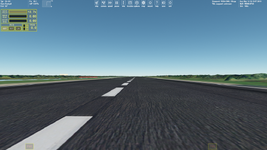
Object textures making

I've been looking through my tex. folder and noticed the wall tex from the wideawake base (good example of tex use) has *_n.dds files for custom meshes?
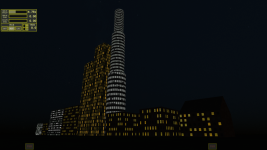
You could check if that nighf texture is displayed (work correctly) if you have this add-on installed.
The manual does say that Hangar3 doesn't support textures, but maybe a good time to note that for OO development.
Yes, the only roof texture work correctly. It looks like two other textures have problems with UV maps, since you can use monochrome textures for them and they "work". It would be right to repair that in OpenOrbiter to get that default hangar type. I'll create an issue on GitHub later.
 
You could check if that nighf texture is displayed (work correctly) if you have this add-on installed.
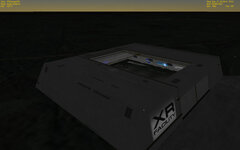
It's Orbiter2010, upon closer inspection I think Wideawake only uses Blocks. But the XR Facility does and it seems to work, should also work in O2016? If I have time I'll install and check.
XRf.jpg
 
Well, now I understand that we can use the "_emis" texture map for this purpose.
But it shines even during the day unlike the "_n" texture which only "turns on" at night. That's not good, since the "_emis" texture overrides the main (color) texture. So, it would be better to add the "_n" texture for custom meshes to switch between day and night textures. I'm going to create the corresponding request on GitHub.
 
Yes, emissive materials should really be kept for things that are supposed to be 'lit' all the time.
 
Thank you.

Yes, of course, the texture is upside down, although I oriented it correctrly in Anim8or, so I should rotate it 180 degrees in Anim8or.

It seems like we should use the DirectX normal maps for Orbiter, not OpenGL.

Also, I should use a lower resolution texture, since it flicker (with a normal map).

By the way, I took this texture from texturecan.com. It says that all the textures provided on this site are free and can be used for any purposes.

And I have a question regarding normal maps. I have the texture and its normal map in the same resolution:

View attachment 38930View attachment 38931

What is the point of using the normal map with the color texture if they have the same resolution? Can't we make a color texture with details presented on its normal map and get the same result as with the normal map?

I vote for OpenGL given it is cross platform and could run on anything.
 
It looks like we can't use textures for default objects (BLOCK, TANK, HANGAR) that aren't located in the main Texture directory. The "Config/Base.cfg" file doesn't read the texture path. Could someone confirm this, please?
 
Anyone able to share a high-level guide to retexturing existing vanilla objects in Orbiter 2024? I would love to rework OM-1, maybe even replace the mesh with something a little more inspiring than the default. What are the texture types and how do we name them, what sizes are supported etc?
 
I encountered an unusual feature. There's the DG texture \Textures\DG\idpanel1.dds. Its original resolution is 256x256:

idpanel1.jpg

I try scaling the texture (increase/decrease resolution). But in game it doens't display correctly:

Без імені.png

I tried 512x512, 128x128 and other resolutions. It looks this texture displays correctly only with its original resoltuon 256x256. That's strange since I didn't saw such the bahavior of the scaled textures before.
 
I tried 512x512, 128x128 and other resolutions. It looks this texture displays correctly only with its original resoltuon 256x256. That's strange since I didn't saw such the bahavior of the scaled textures before.
yeah that's unfortunately a thing with this specific texture. I had to take this into account for the skins I made for the DG (which was annoying). I think it's due to the fact text is written on the texture directly (the name of the vessel you know) so increasing the resolution screws with this.
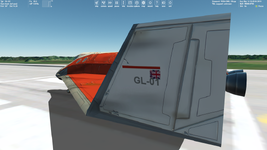
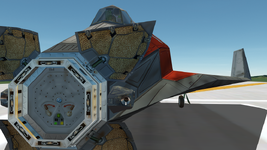
Some DG textures upscaled:
Wow the inside looks very crisp! Not sure about the outside though. I think for this one I'd rather stay with the original lol
 
I encountered an unusual feature. There's the DG texture \Textures\DG\idpanel1.dds. Its original resolution is 256x256:

View attachment 43736

I try scaling the texture (increase/decrease resolution). But in game it doens't display correctly:

View attachment 43737

I tried 512x512, 128x128 and other resolutions. It looks this texture displays correctly only with its original resoltuon 256x256. That's strange since I didn't saw such the bahavior of the scaled textures before.

Found it, line 1100 in DeltaGlider.cpp (in the OrbiterSDK folder) :

// **************** vessel-specific insignia ****************

insignia_tex = oapiCreateSurfaceEx (256, 256, OAPISURFACE_RENDERTARGET | OAPISURFACE_TEXTURE | OAPISURFACE_MIPMAPS);
SURFHANDLE hTex = oapiGetTextureHandle (exmesh_tpl, 5);
if (hTex) oapiBlt (insignia_tex, hTex, 0, 0, 0, 0, 256, 256);

It expects a texture of 256x256 pixels, and only that. I guess someone could try to change that 256 to 512 or 1024, not sure what the consequences would be.
 
Has anyone known/tried to use any AI services for creating textures for objects with existed and provided UV maps? It seems promising.
 
Has anyone known/tried to use any AI services for creating textures for objects with existed and provided UV maps? It seems promising.
that's a good way to get something that didn't look at all like you wanted. And no, I wouldn't recommend it. It sounds like a terrible idea. Just do your textures yourself. Even terrible hand-made textures will look better than AI generated crap.
 
Back
Top