My first simpit!

guitarist473

The UMMU that can play guitar
Joined
Feb 1, 2009
Messages
196
Reaction score
0
Points
0
Location
Long Eaton, Nottinghamshire England
Hello,

After 4 years of failed planning (running out of money basicly) i am finally bringing my simpit together, my parents say theyl get me all the construction materials and hardware, but i think i might have to put it together, not that im complaining :) i like building stuff!

Anyways this is my xmas pressie this year from them and im very grateful!

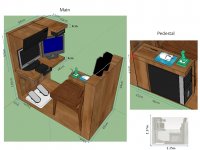
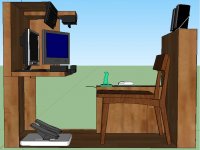
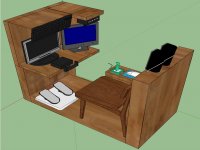
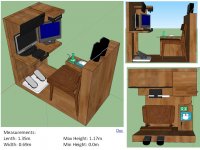
But back to the point i have got a list of hardware and construction materials needed and ive drawn up a model on sketchup.

I hope to start construction this weekend, hopefully itl be finished by the deadline of 25/12/2010.

I have put this powerpoint together too incase any of you want to look at what im going for with this.

Il post updates as soon as they come!

Well, thank you for your interest thats it for now!

Check out the pictures of the sketch up model in the attatchments [Below]

Thanks,

Guitarist473
 

Attachments
  • SIMPIT01.jpg
    SIMPIT01.jpg
    200.1 KB · Views: 173
  • SIMPIT02.jpg
    SIMPIT02.jpg
    184.3 KB · Views: 100
  • SIMPIT03.jpg
    SIMPIT03.jpg
    146.5 KB · Views: 81
  • SIMPIT04.jpg
    SIMPIT04.jpg
    162.6 KB · Views: 130
Last edited:
Looks very well planned. Im assuming this computer will be dedicated to Orbiter? Also what are the specs on the machine you'll be using?
 
The computer will be dedicated to:
Orbiter
MSFS2004/FSX
Lock on: modern air combat

But yeah mainly orbiter :)

And im not sure on the specs, im getting the new computer off my brother for xmas.
And its new, he only brought it earlier this year.
Im pretty sure its alot better than my current 10 year old brick factory of a computer.


I wont be using this straight away though because i must transfer all the data off my current pc to the new one.

My current pc AFAIK has a Pentium 4 1.79Ghz processor, 1Gb of Ram, a nvidia 400mx and about 40GB of internal memory.

EDIT:

With this setup how do i have multiple monitors and how do i switch control to either monitor for the keyboard and mouse, i want the main flight window (HUD and visual) on the monitor directly infront, then two MFDs displayed on the monitor slightly to the right of the pilot seat.
How would i do this?

Ive never built or used anything like this before so i have no idea.
 
Last edited:
With this setup how do i have multiple monitors and how do i switch control to either monitor for the keyboard and mouse, i want the main flight window (HUD and visual) on the monitor directly infront, then two MFDs displayed on the monitor slightly to the right of the pilot seat.
How would i do this?

The new computer will most certainly come with a graphics card that has two monitor outs, which makes it a breeze. I have no Idea how you would do the setup with the stone age card in your current computer, probably best just to wait for the new one before attaching the second monitor.

How are you going to attach that keyboard up there? It's kind of a nice Idea...
 
probably best just to wait for the new one before attaching the second monitor.

ok seems like the best idea.

How are you going to attach that keyboard up there? It's kind of a nice Idea...

Im not going to take credit for an idea i didnt come up with, i saw this keyboard layout on someone else's simpit and i thought it'd make a nice addition but thanks anyways! :)

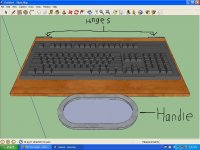
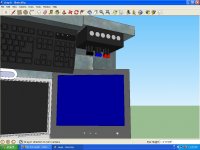
The keyboard will be on a wooden panel i think, which will be hinged to the top part parallel to the throttle quadrent. this panel with the keyboard will then be able to swing down when needed for use, or stowed up when a clear view of the monitor is needed or when its just not in use.

Does that sound ok? or non-understandable? im not good at explaining my idea's, i just draw, model or animate them.

think il draw up an animation to explain it better, hold on a sec...
 

Attachments

  • keyboard.jpg
    keyboard.jpg
    182.3 KB · Views: 78
  • keyboard2.jpg
    keyboard2.jpg
    55 KB · Views: 49
Last edited:
Looks great! Please keep us posted.
:salute: will do!

I was thinking instead of leaving it a generic wood colour i would paint it metallic gray, add some picture panels and black and white warning tape for spaceship-y effect?

a good idea?

Also, someone helped me with a solution to my multiple control inputs through the use of
flybywire V0.9 thank you n122vu, that thread can be found:

http://www.orbiter-forum.com/showthread.php?t=19461

So now i have the yoke working the Linear movement of the RCS and the right-hand joystick working the rotation... Or would it be better the other way round?

...and the Throttle quadrent with its multiple configurable input axis will work the thrusters like this...

Black handle=Main engines
Red handle=Hover engines
Blue handle=Retro engines

Throttle.jpg

Oh btw: i wanted to fit a Master warning alarm light to this simpit on the dashboard, just right to the yoke, how would i go about doing this? what programming would it need and what kind of hardware? has anyone done this in their simpit? i want it to flash and sound a audible warning when the master alarm of, say... the DGIV or XR2 goes off in the simulation to indicate low fuel or catastrophic failure, something like that?

Thanks for your interest :)

Guitarist473
 
Last edited:
Wow, looks really cool. But isn't the throttle up there a bit displaced? Say if you try to do a manual landing approach and have to control de hovers and the orientation of the ship with the joystick, could be a bit unconfortable.
 
Oh btw: i wanted to fit a Master warning alarm light to this simpit on the dashboard, just right to the yoke, how would i go about doing this? what programming would it need and what kind of hardware? has anyone done this in their simpit? i want it to flash and sound a audible warning when the master alarm of, say... the DGIV or XR2 goes off in the simulation to indicate low fuel or catastrophic failure, something like that?
The XR vessel series has an API you can use to determine if the master warning light is activated (search for XRVesselCtrl). The DGIV doesn't have that option.

Wow, looks really cool. But isn't the throttle up there a bit displaced? Say if you try to do a manual landing approach and have to control de hovers and the orientation of the ship with the joystick, could be a bit unconfortable.
I'll agree with this, I see two problems with the throttle location:
- Why up above? While some older seaplanes used throttle controls above the pilot, this isn't very common anymore.
- If the stick is going to be the primary control in the atmosphere, controlling the throttle while flying will be very difficult, since you'll be flying with your right hand and will need to cross your left hand across your body to use the throttle.
 
There is a yoke for atmospheric flight and rotation movements with the RCS in space.
The joystick will be used in space for linear RCS movements
So the left hand will be on the yoke (like a steering wheel) and the right hand on the throttle.

The yoke isnt very big or visible on the pictures though so i get where your coming from with that.

The throttles are above because it looks cool and is in a un-ergonomic place and makes it very manual. I like to be very hands on with my simulations, i dont like it to be easy. (Yeah, im weird!)

Should i leave the master alarm out then if its not going to be possible to function automaticly with every vessel without editing or reconfiguring?
 
Last edited:
There is a yoke for atmospheric flight and rotation movements with the RCS in space.
The joystick will be used in space for linear RCS movements
So the left hand will be on the yoke (like a steering wheel) and the right hand on the throttle.

The yoke isnt very big or visible on the pictures though so i get where your coming from with that.
Ah, you had previously said that the yoke would be for linear and the stick for rotation.

The throttles are above because it looks cool and is in a un-ergonomic place and makes it very manual. I like to be very hands on with my simulations, i dont like it to be easy. (Yeah, im weird!)
This isn't really the best cockpit design--the primary controls need to be rapidly accessible to the pilot, and that includes the throttles. I think you'll get enough "big cockpit" feel if you have several controls on the keyboard above your head, there's no reason to sacrifice realism and put the throttles there too.

Should i leave the master alarm out then if its not going to be possible to function automaticly with every vessel without editing or reconfiguring?
That's up to you, but it's definitely not going to work automatically.
 
Last edited:
Ah, you had previously said that the yoke would be for linear and the throttle for rotation.

I wasnt sure if it would be in that setup or not, i was posting a question what layout would be better but yeah i have changed my mind and decieded the yoke will be used for RCS rotation + atmospheric flight and the joystick for RCS latitude adjustments.

There is another reason the throttles are there aswell... space.
My space is very limited for this pit as it is in my bedroom, and my bedrooms small to begin with.

And i think il leave the working Master alarm out and just put a static Picture panel of one or something.

Thanks for your comments!

P.S...
and the throttle for rotation
Throttle for rotation!? :uhh:

Im pretty sure i didnt say throttles...

The joystick will be used in space for linear RCS movements
Is what i said :)

Guitarist473
 
Last edited:
Yeah, that's what I get for not fully paying attention when I post.

heheheh, iv done it alot on this forum. :)

I was wondering... how could i rig this pit to have Light effects such as just-for-show flashing fairy lights or something?

Also... how would i go around designing the outer panels of the pit? paint? print and stick? something else that im missing because of almost 35 hours of sleep depriveation?
 
Last edited:
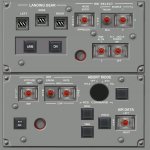
There are panels you could use from the SSU textures.

example:
 

Attachments

  • panelF6.jpg
    panelF6.jpg
    119.4 KB · Views: 94
Thats a good idea for the dashboard/interior panels but what should i do about the actual outside parts of the simpit, i dont just want them a wood colour, i want them looking sci-fi and metallic...

Thank you for your comments!

Guitarist473
 
They have silver tarps (pretty cheap) that could look like mylar, or canvas that could pass as thermal blanket.
 
silver tarps
it would make it look rather sci-fi metal and realistic, but can the same be done with paint? i dont think tarps would look good hanging around in my bedroom... :( ...otherwise a nice idea!

Maybe i could add an airlock panel to the outer side just for visual effect...?
Something that looks like a big metal door with Airlock 01 written on the side?
 
Thanks for the link that website should come in very handy once i start getting everything going.

For the moment im not going to worry about paint and stuff, i just remembered i havent even started building it yet so i dont no why i was asking about this so early in the project.
But i will remember all of this for when the time comes to finish the pit off with abit of colour and design.

Thank you for your posts!

I dont think there will be any updates untill construction starts which will probably be around saturday-ish?

Guitarist473
 
Back
Top