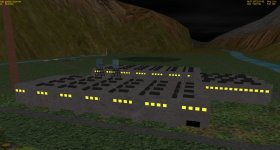
Project Lunar SpacePort Base

I'd suggest a giant landing pad over a regolith runway, a pad big enough for a craft like the XR-5 to "roll out" a bit if the pilot doesn't do a precise hover landing.
The Heinlein Base has such an example of a large landing area.
Could you show a photo? I do now realize that aircraft land on runways, not directly at the gate, and it is kinda unsafe to land directly.
 
I'd suggest a giant landing pad over a regolith runway, a pad big enough for a craft like the XR-5 to "roll out" a bit if the pilot doesn't do a precise hover landing.
The Heinlein Base has such an example of a large landing area.
You just reminded me of the fabled Moon Airbace; it's been more than ten years I think but for some reason it still popped in my mind along with those golden comments on its OH page
 
I don't have a picture on hand, but the base Heinlein Base is easy enough to find at the 'hangar.

My take on landing at any base with no atmosphere... The pad has a bunker nearby where the craft can be towed for storage/unloading. Or, the pax transfers (pax=people) can EVA the craft and walk to a nearby airlock that leads underground. Another option is a movable fixture that softdocks with the craft for entry and exit.
For inspiration see Lunar Base Niven, or Moonbase Alpha, there are a few other good examples but I think those are the most representative of what I have in my mind.
 
Yes! but with the block object in Orbiter and with custom textures. Also, maybe signs for different hangars, gates, fuel towers, lat/long, and a sign that shows the name of the spaceport.

Mmhh ... :unsure: Not easy to modify the textures of the orbiter's default objects (Block, Hangar, hangar2, Tank etc).

Look: the textures are very small : 32x32 pixels. :confused:

ex1.jpg

To be compared with my textures (1024x1024 pixels) ?

ex2.jpg

The best, if you want a good result and personalized effects and signs, is to make the objects yourself ... ;)
 
I don't have a picture on hand, but the base Heinlein Base is easy enough to find at the 'hangar.

My take on landing at any base with no atmosphere... The pad has a bunker nearby where the craft can be towed for storage/unloading. Or, the pax transfers (pax=people) can EVA the craft and walk to a nearby airlock that leads underground. Another option is a movable fixture that softdocks with the craft for entry and exit.
For inspiration see Lunar Base Niven, or Moonbase Alpha, there are a few other good examples but I think those are the most representative of what I have in my mind.
Yes, that is what the hangars are for next to the pad, and the little extension from the circular building is supposed to be the soft-docking jetway bridge.
 
Mmhh ... :unsure: Not easy to modify the textures of the orbiter's default objects (Block, Hangar, hangar2, Tank etc).

Look: the textures are very small : 32x32 pixels. :confused:

View attachment 27125

To be compared with my textures (1024x1024 pixels) ?

View attachment 27126

The best, if you want a good result and personalized effects and signs, is to make the objects yourself ... ;)
Sorry for the late reply, I have been loaded with tests and work at school.
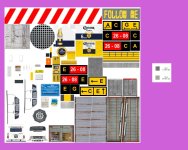
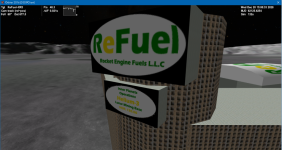
I see, maybe I can resize my image to a lower size? Because I recall that one of the old 2006 ReFuel lunar base used a block structure with custom textures for a nice billboard thing.

1638395235258.png

Here is the base file, I am curious to see if it's a custom mesh or a block.
 

Attachments

Last edited:
I see, maybe I can resize my image to a lower size? Because I recall that one of the old 2006 ReFuel lunar base used a block structure with custom textures for a nice billboard thing.
Here is the base file, I am curious to see if it's a custom mesh or a block.
So yes, it is easy. ;)

Here in the refuel.cfg file the 2 sections defining these 2 signs:

1) the top one

; Actual Sign for ReFuel
BLOCK
POS 423 134.9 -33
ROT 126
SCALE 28 40 80
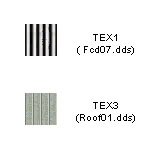
TEX1 Roof01 8 1
TEX2
ReFuel_sign 1 1
TEX3 Roof01 8 1
END


2) and the lower one :

; Moon base Sign for ReFuel
BLOCK
POS 423 104.9 -33
ROT 126
SCALE 28 25 50
TEX1 Roof01 8 1
TEX2
ReFuel_Moon 1 1
TEX3 Roof01 8 1
END


As you can see, it's not a mesh, but a block

To change the size, just change the values of "SCALE x y z"
(try for example "SCALE 10 10 80" instead of SCALE 28 40 80)

you may also need to change the values of POS x y z :unsure:
 
So yes, it is easy. ;)

Here in the refuel.cfg file the 2 sections defining these 2 signs:

1) the top one

; Actual Sign for ReFuel
BLOCK
POS 423 134.9 -33
ROT 126
SCALE 28 40 80
TEX1 Roof01 8 1
TEX2
ReFuel_sign 1 1
TEX3 Roof01 8 1
END


2) and the lower one :

; Moon base Sign for ReFuel
BLOCK
POS 423 104.9 -33
ROT 126
SCALE 28 25 50
TEX1 Roof01 8 1
TEX2
ReFuel_Moon 1 1
TEX3 Roof01 8 1
END


As you can see, it's not a mesh, but a block

To change the size, just change the values of "SCALE x y z"
(try for example "SCALE 10 10 80" instead of SCALE 28 40 80)

you may also need to change the values of POS x y z :unsure:
Wait you can move blocks up and down! That's very very helpful! I never knew that, and it severely hindered my creativity. I'll see what I can come up with. Thanks!
 
You can stack blocks and tanks upon one another for all sorts of shapes. Wedding cake, Seattle Space Needle (ish), Cool looking office buildings, etc.

I once took very short blocks (10 meters x 10 meters, .5 meter high) and stacked them, rotating incrementally and (sort of) made the "Turning Torso" building. Looked cool during the base approach, not so good wandering around UMMU
 
You can stack blocks and tanks upon one another for all sorts of shapes. Wedding cake, Seattle Space Needle (ish), Cool looking office buildings, etc.

I once took very short blocks (10 meters x 10 meters, .5 meter high) and stacked them, rotating incrementally and (sort of) made the "Turning Torso" building. Looked cool during the base approach, not so good wandering around UMMU
I do plan on making cool looking towers, so thanks for the idea! I didn't know you can make blocks hover!
 
Last edited:
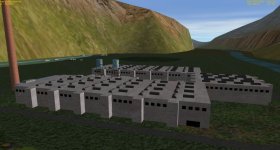
I am planning on putting the finishing touches on the Arrivals/Departure Terminal and Will start working on the rest of the spaceport, the space hotel, and the train system. Also, if I recall, the base is somewhat close to Pappy's HoneyMoon Base, so that is a great destination! I am taking inspiration from the ReFuel Lunar base and am trying to keep the base as "stock" as possible to keep that look of Brighton Beach.
 
And we can have fun with the "blocks":

for example, with this building (in my add-on "Tintin on the moon") :
The builiding is a "mesh" but its windows are "blocks".

Day :

tt1.jpg

Night :

tt2.jpg

And as the blocks can change texture at night (day and night have different textures)
This makes it possible to have these effects with the windows .....:LOL:
 
And we can have fun with the "blocks":

for example, with this building (in my add-on "Tintin on the moon") :
The builiding is a "mesh" but its windows are "blocks".

Day :

View attachment 27155

Night :

View attachment 27156

And as the blocks can change texture at night (day and night have different textures)
This makes it possible to have these effects with the windows .....
Wow! That put's my Lunar Base to Shame :LOL: I like it very much.
Do you know what size I should make the logo and custom textures? Also, how do you think I should make night-time textures? Increase the colour brightness?
 
Wow! That put's my Lunar Base to Shame :LOL: I like it very much.
Thank you ! :salute:

Do you know what size I should make the logo and custom textures? Also, how do you think I should make night-time textures? Increase the colour brightness?

Just a little reminder of the variables for "Blocks" (in Orbiter's doc)

POS Centre of the block’s base rectangle (in local coordinates of the surface base). Note that the y-coordinate is the elevation above ground. Default: 0 0 0
SCALE Object size in the three coordinate axes. Default: 1 1 1
ROT Rotation around vertical axis (degrees). Default: 0
TEX1 Texture name and u,v scaling factors for walls along the x-axis. Default: none
TEX2 Texture name and u,v scaling factors for walls along the z-axis. Default: none
TEX3 Texture name and u,v scaling factors for roof. Default: none


For day and night textures, it works like this :
  • for example your texture is called popo.dds (day texture)
  • the night texture will be named popo_n.dds

Night textures are already "luminous". So you can change the colors, or use the same one : just rename to <name>_n.dds

And for texture size, depending on the visual result obtained in Orbiter.
Just try and see... ;)

You can start with a 128x128 pixels texture.
if that's not enough, you try 256x256, then 512x512 and finally 1024x1024.
(Do not to exceed 1024x1024 because it will take a lot of resources system).
We will say that 2048x2048 is a maximum, often useless .....

 
Thank you ! :salute:


Just a little reminder of the variables for "Blocks" (in Orbiter's doc)

POS Centre of the block’s base rectangle (in local coordinates of the surface base). Note that the y-coordinate is the elevation above ground. Default: 0 0 0
SCALE Object size in the three coordinate axes. Default: 1 1 1
ROT Rotation around vertical axis (degrees). Default: 0
TEX1 Texture name and u,v scaling factors for walls along the x-axis. Default: none
TEX2 Texture name and u,v scaling factors for walls along the z-axis. Default: none
TEX3 Texture name and u,v scaling factors for roof. Default: none


For day and night textures, it works like this :
  • for example your texture is called popo.dds (day texture)
  • the night texture will be named popo_n.dds

Night textures are already "luminous". So you can change the colors, or use the same one : just rename to <name>_n.dds

And for texture size, depending on the visual result obtained in Orbiter.
Just try and see... ;)

You can start with a 128x128 pixels texture.
if that's not enough, you try 256x256, then 512x512 and finally 1024x1024.
(Do not to exceed 1024x1024 because it will take a lot of resources system).
We will say that 2048x2048 is a maximum, often useless .....
Few more questions. I plan on making a rectangular sign, what size should the texture be? Is the square texture enough?
Also, since I have more than 9 pads, the pad numbers on the pad aren't showing properly. Is there a way to make new pad textures or possibly hide the pad number?
This seems like a great Orbiter Base building thread, hopefully people with same questions can find answers too.
 
I plan on making a rectangular sign, what size should the texture be? Is the square texture enough?
For the size, try 128x128. If not good enaugh, try 256x256.... (or 64x64 or 512x512) .
The texture is better if it is a square.
Also, since I have more than 9 pads, the pad numbers on the pad aren't showing properly. Is there a way to make new pad textures or possibly hide the pad number?
I'dont know yet... (or I don't remember :ROFLMAO: ) I"'ll try to see that....
This seems like a great Orbiter Base building thread, hopefully people with same questions can find answers too.
your welcome... (and it is good for me to learn english..... ) ?? ;)
 
Back
Top