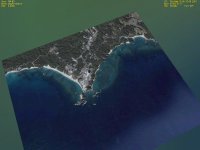
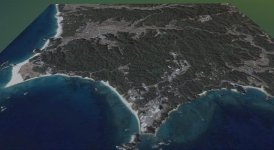
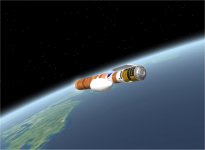
Project H-2B HTV update

I've made the textures for the Yoshinobu Space Center and put them in the textures folder and added this to the Tanegashima.cfg

Code:
9 0030 0127 1
9 0030 0128 1
9 0030 0129 1
9 0030 0130 1
9 0031 0127 1
9 0031 0128 1
9 0031 0129 1
9 0031 0130 1
9 0032 0127 1
9 0032 0128 1
9 0032 0129 1
9 0032 0130 1
9 0033 0127 1
9 0033 0128 1
9 0033 0129 1
9 0033 0130 1

but they don't show in Orbiter, am I naming them properly ?

Those numbers don't agree with what comes out of Ar81's Surface Tiles Wizard.
http://i89.photobucket.com/albums/k207/Notebook_04/H2B.jpg

As Starshipexplorer says above you need the BEGIN/END SURFTILES lines in your config file.

Try copying this into your config file, after backing up and removing the lines between [code/code] you posted.

BEGIN_SURFTILELIST
9 22137 95373 1
END_SURFTILELIST

!!!!Edit: got the lat/long crossed in the Surface Tiles Wizard BaseLacations.txt entry. Should be :

Yoshinobu: +130.9754473 +30.4009972

(thats my estimate from Google Earth.

This gives:

BEGIN_SURFTILELIST
9 95373 22137 1
END_SURFTILELIST

the Surface Tile file name in Textures directory would then be

Earth_9_e95373_n22137.dds

Should have spotted that when the lattitude was 130 degrees....

N.
 
Last edited:
Thanks, but I do have those, I only showed what I entered to the .cfg file. Here is the whole file. The level 4 tiles show up, but the numbers are'nt close to the level 9 ones.
Code:
BASE-V2.0
Name = Tanegashima
Location = 130.991229 30.605067
Size = 200
BEGIN_OBJECTLIST
LPAD2
 POS 0 0 0
 SCALE 0 0 0
 TEX Lpad02
      NAV 131.15
END
RUNWAY
 END1 -546.925835117041 0 -855.204093469207
 END2 546.925835117041 0 855.204093469207
 WIDTH 44.8056
 ILS1 110.10
 ILS2 110.20
 RWTEX Runway2
 NRWSEG 15
 RWSEG1 1 0.025 0.5 0.75 1 0.852
 RWSEG2 1 0.025 0.5 0.75 1 0.852
 RWSEG3 1 0.007 0.5 0.75 0.852 0.7305
 RWSEG4 1 0.06 0.5 0.75 0.5 0.03125
 RWSEG5 1 0.007 0.5 0.75 0.7305 0.6133
 RWSEG6 1 0.1 0.5 0.75 0.5 0.03125
 RWSEG7 1 0.007 0.5 0.75 0.6133 0.5
 RWSEG8 6 0.538 0.5 0.75 0.5 0.03125
 RWSEG9 1 0.007 0.5 0.75 0.5 0.6133
 RWSEG10 1 0.1 0.5 0.75 0.03125 0.5
 RWSEG11 1 0.007 0.5 0.75 0.6133 0.7305
 RWSEG12 1 0.06 0.5 0.75 0.03125 0.5
 RWSEG13 1 0.007 0.5 0.75 0.7305 0.852
 RWSEG14 1 0.025 0.5 0.75 0.852 1
 RWSEG15 1 0.025 0.5 0.75 0.852 1
END
RUNWAYLIGHTS
 END1 -546.925835117041 0 -855.204093469207
 END2 546.925835117041 0 855.204093469207
 WIDTH 44.8056
 PAPI  3 3.0 300
 VASI  3 250 300
END
END_OBJECTLIST
BEGIN_SURFTILELIST
4 2979 697 1
4 2980 697 1
4 2981 697 1
4 2982 697 1
4 2979 696 1
4 2980 696 1
4 2981 696 1
4 2982 696 1
4 2979 695 1
4 2980 695 1
4 2981 695 1
4 2982 695 1
9 0030 0127 1
9 0030 0128 1
9 0030 0129 1
9 0030 0130 1
9 0031 0127 1
9 0031 0128 1
9 0031 0129 1
9 0031 0130 1
9 0032 0127 1
9 0032 0128 1
9 0032 0129 1
9 0032 0130 1
9 0033 0127 1
9 0033 0128 1
9 0033 0129 1
9 0033 0130 1
END_SURFTILELIST
 
Understood. I'll look at that ...Looks good

N.
 
Thanks for the effort ! I can finish the addon pretty quickly if I get this solved.
 
Project suspended !!

I can't figure out the problem with the surface tiles. I've looked at the suface tile wizard tutorial, but I can't understand why it won't work. Sorry to those who were expecting this addon.
 
Project suspended !!

I can't figure out the problem with the surface tiles. I've looked at the suface tile wizard tutorial, but I can't understand why it won't work. Sorry to those who were expecting this addon.

Can't you just release it without the surface tiles? Just the launchpad would be fine. ;)

Seems a shame to waste all the effort you have put into it so far...
 
Project suspended !!

I can't figure out the problem with the surface tiles. I've looked at the suface tile wizard tutorial, but I can't understand why it won't work. Sorry to those who were expecting this addon.

Don't know,but check if there already exist base on same cordinate and fighting with your base,just a thought.
 
Hi Donamy. I made some Level 6 tiles from Notebook's coordinates using EasyTiler. Does this look correct?
 

Attachments

  • Tanegashima.jpg
    Tanegashima.jpg
    72.9 KB · Views: 38
Last edited:
To Donamy and all above:

I don't know how you have given the names of the the .dds surface tile file names, but I have always used this format:

Earth_9_e95373_n22137.dds

You have to give that "Planet_level_Longtitude_Latitude.dds"
structure, or it dosen't show.

Look in the textures directory of a basic Orbiter installation, and I think you will see waht I mean.

N.
 
Why not simply create a horizontal plane mesh with the right dimensions and texture it ?

I wanted to be able to have some shadows from the lightning stansions and pad.

Don't know,but check if there already exist base on same cordinate and fighting with your base,just a thought.

I don't have any other textures with those coordinates

Hi Donamy. I made some Level 6 tiles from Notebook's coordinates using EasyTiler. Does this look correct?

Yes, That looks great ! Mine are level 9 and alittle bigger, but that would be fine. I couldn't figure EasyTiler out.

To Donamy and all above:

I don't know how you have given the names of the the .dds surface tile file names, but I have always used this format:

Earth_9_e95373_n22137.dds

You have to give that "Planet_level_Longtitude_Latitude.dds"
structure, or it dosen't show.

Look in the textures directory of a basic Orbiter installation, and I think you will see waht I mean.

N.

That is the format I used.

Earth_9_e0127_n0030.dds
 
Don,

Here is a level 7 set of tiles I whipped up, if you want them...

Dave
 

Attachments

  • Tanegashima.JPG
    Tanegashima.JPG
    68.9 KB · Views: 29
That would be great, Could I get a config file to go with it. LOL
 
You have mail...
 
I
That is the format I used.

Earth_9_e0127_n0030.dds

Donamy, just to make sure I'm miss-understanding you correctly,;)
I played around with Surface Tile Calculator, and got this:

http://i89.photobucket.com/albums/k207/Notebook_04/DonamyBase.jpg

Looks like your tiles are around 0.175 North, 0.042East, to give you a .dds file called "Earth_9_e0127_n0030.dds".

Here's a short base config to get there.
BASE-V2.0
Name = Donamy
Location = +0.175 +0.042
Size = 2000
BEGIN_OBJECTLIST
LPAD2
POS 0 0 0
SCALE 0 0 0
TEX Lpad02
NAV 130.20
END
END_OBJECTLIST
BEGIN_SURFTILELIST
9 127 30 1
END_SURFTILELIST

You could copy and paste those lines into a .txt file using a new Notepad document, rename it to a .cfg type. That will give you a base near those lat/long co-ordinates. Another method would be to use an existing .cfg, and delete all, then paste those lines in, and save as "Donamy".

You could make a scenario for that, or just fly there using the "Donamy" base selected in MAP MFD.

You seem to have a few offers of surface tiles!, so this is probably not relevant, just wanted to understand those numbers.

N.
 
Adding some alpha transparency to the surface tiles limits would be nice, so that they blend into the default planet textures.
I can do it, I only need to have access to the dds files.
 
Having another bugger of a time with multistage. I have the four booster meshes in the meshes/multistage folder, but the guidance.txt won't work. If I eliminate boosters 3 and 4 from the .ini, it launches. I'm stumped, any suggestions ?

Here's the .ini if someone would like to take alook.
Code:
[MISC]
cog=49.0
[TEXTURE_LIST]
TEX_1=Contrail1
TEX_2=Contrail2
TEX_3=WEx
TEX_4=WEx2
[PARTICLESTREAM_1]
NAME=SRBsm
TEX=Contrail1
SRCSIZE=3
SRCRATE=150
V0=140.0
SRCSPREAD=0.3
LIFETIME=15
GROWTHRATE=5
ATMSLOWDOWN=1.0
LTYPE=DIFFUSE
LEVELMAP=LVL_PSQRT
LMIN=0
LMAX=1
ATMSMAP=ATM_PLOG
AMIN=1e-4
AMAX=2
[PARTICLESTREAM_2]
NAME=SRBex
TEX=Contrail2
SRCSIZE=1.8
SRCRATE=2000.0
V0=100.0
SRCSPREAD=0.0
LIFETIME=1
GROWTHRATE=18
ATMSLOWDOWN=0.0
LTYPE=EMISSIVE
LEVELMAP=LVL_PSQRT
LMIN=0
LMAX=0
ATMSMAP=ATM_PLOG
AMIN=1e-4
AMAX=1

[BOOSTER_1]
N=1
MeshName="multistage\H-2BSRB_A"
Height=15.2
Diameter=3.5 
EmptyMass=20000.0
FuelMass=100000.0
Thrust=3309000.0
angle=0
off=(0,3.9,0)
BurnTime=130
ENG_1=(0,0,0)
ENG_PSTREAM2=SRBex
ENG_TEX=WEx2
[BOOSTER_2]
N=1
MeshName="multistage\H-2BSRB_B"
Height=15.2
Diameter=3.5 
EmptyMass=20000.0
FuelMass=100000.0
Thrust=3309000.0
angle=0
off=(3.9,0,0)
BurnTime=130
ENG_1=(0,0,0)
ENG_PSTREAM2=SRBex
ENG_TEX=WEx2
[BOOSTER_3]
N=1
MeshName="multistage\H-2BSRB_C"
Height=15.2
Diameter=3.5 
EmptyMass=20000.0
FuelMass=100000.0
Thrust=3309000.0
angle=0
off=(0,-3.9,0)
BurnTime=130
ENG_1=(0,0,0)
ENG_PSTREAM2=SRBex
ENG_TEX=WEx2
[BOOSTER_4]
N=1
MeshName="multistage\H-2BSRB_D"
Height=15.2
Diameter=3.5 
EmptyMass=20000.0
FuelMass=100000.0
Thrust=3309000.0
angle=0
off=(-3.9,0,0)
BurnTime=130
ENG_1=(0,0,0)
ENG_PSTREAM2=SRBex
ENG_TEX=WEx2
[STAGE_1]
MeshName="JAXA\H-2Bcore"
off=(0,0,0)
Height=38.76
Diameter=5.1
EmptyMass=300000.0 
FuelMass=1400000.0 
Thrust=26000000.0
BurnTime=295
ENG_1=(0,0,-24.5)
ENG_2=(3.5,0,-24.5)
ENG_TEX=WEx
ROT_SPEED=0

[STAGE_2]
MeshName="JAXA\H-2Bstage2"
IGNITE_DELAY=5
off=(0,0,0)
Height=16.75 
Diameter=4.5
EmptyMass=98000.0 
FuelMass=1000000.0 
Thrust=9000000.0
BurnTime=1000
ENG_1=(-2,0,-12.5)
ROT_SPEED=0
SPEED=2.5
 
Don't know why you have problem,my X-71 have 4 booster and all work fine compare with your config file,maybe you figure out what's wrong,astrosommy make a guidance for it maybe he know what's wrong.
 
Don, check your Email...
 
Fianally got the multistage problems worked out, moving along nicely now.
 

Attachments

  • FairingSep.jpg
    FairingSep.jpg
    35.2 KB · Views: 33
Back
Top