Problem General orbiter problem

stafpaper

New member
Joined
Jan 9, 2012
Messages
1
Reaction score
0
Points
0
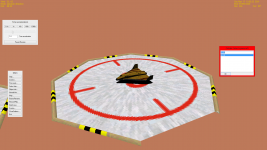
Well since stopping orbiter for a while i came back a year later with my OS updated to windows 8. I started playing and mid way through i opened time accel and accelerated time when i was done i tried closing time accel using CTRL F2 (there are no X's on the UI) and it would not close thus having my screen cluttered with UI's I don't need while playing annoying me to a huge extent.


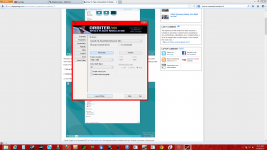
i have thrown in a couple screenshots of my video settings and of the game
 

Attachments
  • Screenshot (2).png
    Screenshot (2).png
    286.1 KB · Views: 14
  • Screenshot (1).png
    Screenshot (1).png
    299.4 KB · Views: 14
Last edited:
... when i was done i tried closing it using CTRL F2 (there are no X's on the boxes) and it would not close thus having my screen cluttered with UI's I don't need while playing annoying me to a huge extent.

Closing what? Orbiter, time accel, lauchpad?

I don't have Windows 8, so I can't begine to replicate your problem until I know what it is you are asking.
 
Well since stopping orbiter for a while i came back a year later with my OS updated to windows 8. I started playing and mid way through i opened time accel and accelerated time when i was done i tried closing it using CTRL F2 (there are no X's on the boxes) and it would not close thus having my screen cluttered with UI's I don't need while playing annoying me to a huge extent.

That sounds as if the chrome that windows get through Win32-API calls has changed for Win8. At least it would explain why there is no X. Do you see other buttons, like the question mark (help)? Or better yet... could you please make a screen-shot of the problem?
 
I also had the same problem (but for some reason not anymore), try clicking on the place where X's are supposed to be. That closed the box for me.
 
I also had the same problem (but for some reason not anymore), try clicking on the place where X's are supposed to be. That closed the box for me.

Same here; using D3D9 in Win7 with Aero omits the buttons from windows, but clicking in their location still works. The X is still present, though, only none of the other buttons (pause in scenario editor, pin in extmfd, etc.)
 
Back
Top