Fairing Progress

n122vu

Addon Developer
Addon Developer
Donator
Joined
Nov 1, 2007
Messages
3,204
Reaction score
60
Points
88
Location
KDCY
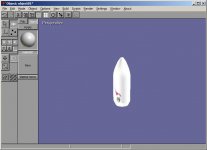
Per some good advice from DaveS, I made some changes to the fairing I was working on which really improved the overall look (attached).

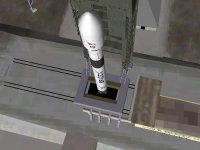
I placed it in Orbiter atop glider's Falcon 9 rocket and it looks ok. I have some cleanup work to do on the inner edges but otherwise it doesn't look half bad to me. One thing I did notice though, when launching the rocket, the minute I jettison the fairing I get a CTD. Not sure what is causing that but I'm going to keep digging.

*Update 6/12/10* - CTD doesn't seem to happen when waiting until stage separation to do so. Does not occur when using a guidance file. Leaving this one alone to return focus to the mesh itself and texturing, which is going well, but have hit another bump in the road (comment below)

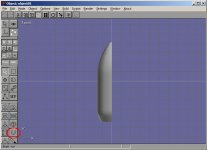
**EDIT** Attached image showing location of the Shell tool in Anim8or
 

Attachments

  • Falcon 9 Fairing 3.JPG
    Falcon 9 Fairing 3.JPG
    35.1 KB · Views: 27
  • ShellTool.JPG
    ShellTool.JPG
    45.2 KB · Views: 11
  • Fairing1Texture.JPG
    Fairing1Texture.JPG
    35.7 KB · Views: 13
  • MyFalcon9Fairing.JPG
    MyFalcon9Fairing.JPG
    65.9 KB · Views: 12
What 'tool' did you use to beef up the fairing. I'm still an anim8tor noob, and have resigned myself to just drawing a "double-hull" with the line too and using the lathe. Is there an easier way?
 
It's called the Shell tool. Select the mesh, then select Object/Point Edit mode. It's located in the lower part of the toolbar in the right column (button has a "U" symbol on it). Select it then click and drag the mouse and the shell will appear.

Thanks to DaveS for pointing me to that tool btw.

I've discovered the fairing-related CTD only happens if I jettison the fairing before glider's Falcon 9 jettisons the "pseudo-booster" and/or the 1st stage. Haven't had time to completely test which I must wait for before jettisoning the fairing.

Also, in Spacecraft/Multistage-based craft, I'm trying to determine if there is a variable in the ini file that determines when the fairing jettisons automatically, as mine doesn't, and which direction it falls when it jettisons.
 
Last edited:
Sweet deal, I'm off to re-do my Athena fairings!
Meh, I'm pretty sure you've got to command the fairing to separate by the fairing() command. I've tried to time index mine to jettison just as the music starts to play. For me and my Athena II I've got it at 135=fairing()
Multistage is also smart enough to understand that the weight changes then as well, so dumping the fairing can cause a slight increase in performance... Just so long as your up in the (very) thin air anyways.
 
Ah, see there's where I'm going wrong. I knew that could be controlled by the guidance file, but I was wondering if there was also an atmospheric pressure setting in stage/multistage also that would control it. I just happened to pick a scenario from glider's pack that happens to NOT be using a guidance file. I'll change it tonight to point to a guidance file that will jettison it automatically and see how it goes.

Been a good learning experience, if nothing else.
 
I'm fairly happy with the basic shape of the fairing for my purposes. It looks too polygonal from the front-on position, but I can live with that for now. I'll make a better one once I have the entire vessel completed.

My next step will be learning to add a texture to the fairing, which I plan to work on over the weekend. Once I get that down, I'll move on to making a main rocket body.
 
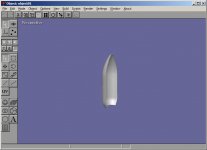
I have one side of the fairing textured in Anim8or (attached to blog post). I re-exported the mesh. I have the texture saved as .dds with the same name, but I can't seem to get it to load in Orbiter.

One thing to note, I made the mesh too large in Anim8or, so I'm using MeshWizard to resize it properly for Orbiter, which is working as it should. Could this resizing be what is causing the texture not to load, or would the UV map translate properly into the smaller size and apply the texture properly? Still digging into this problem. Once the texture is loaded in Orbiter I'll post more pics.
 
Try to open your .msh file in notepad and look at bottom of it.There will be lines like this:

TEXTURES 6
SpaceX\f9_2nd_stg_hull.dds

You must write this:

TEXTURES 1
Name of directory in "Textures" folder where your texture is\File name.dds

I don't know how it is in Anim8or, but some converters write this lines incorrectly and therefore textures are not working in orbiter without correcting.
 
Last edited:
Glider - that did it. Thank you for the tip! Although, I have to ask, is it normal to have to rotate the texture 180 degrees so that it is upside down in the image editor in order for it to be right-side-up in Orbiter?
 
The mesh still needs a little work around the top, but otherwise I'm satisfied with it. Going to clean it up a bit then move on to the rocket body.
 
In most cases a texture in orbiter is in the same position as it is in 3D modeling program. But my converter sometimes mirorr it. may be your converter did the same thing.

About new screenshot: it seems that normals at the edge of your fairing is in unrealistic direction ( edge looks roundish ). it would be better to detach inner and outside parts of fairing and then attach them again before converting into .msh . if you do that, normals at the edge of the fairing will be directed 90* to the tangent and the edge will look sharp.
 
Opening the mesh in MeshWizard shows the UV map inverted, so that must be what is happening.

Not sure which would be the best way to detach and re-attach the inner and outer parts in anim8or. I'll see if I can get that to work though. Thanks for that tip also.
 
Back
Top