OHM Enhanced Base Textures

OrbitHangar

Addon Comments
Joined
Apr 9, 2008
Messages
3,832
Reaction score
18
Points
0
Legacy Reviews

Legacy Add-on Reviews from Orbit Hangar Mods


Review by algol
Pros: Worth it for the Door01 and Monorail textures alone
Cons: Did have to re-name some of my old favorates to keep them
Review:
Wow , put a bit of extra polish on all my bases, a great improvement on the stock and earlier improved textures, too. Not much of a frame rate hit either, (Didn't notice at all.) Did have to re-name some of my old favorates to keep them, but only five minutes work, including editing base.cfg too. Orbiter needs some dedicated tank textures too and you seem the guy to do it. Great work!
 
Spike Spiegel's Enhanced Base Textures ------------------------- A set of higher-resolution textures (256x256 and 512x512) to replace the default base textures. All standard Orbiter base textures have been recreated from scratch except for the "ball" textures. Installation --------------- Unzip to your Orbiter folder, preserving the paths set in the .zip file. This will REPLACE your original textures, so save a backup copy of them in case you want to restore the originals.

[ame=http://www.orbithangar.com/searchid.php?ID=4032]More...[/ame]
 
Reminds me of a similar mod I made long ago...
[ame="http://www.orbithangar.com/searchid.php?ID=801"]Enhanced Runway Textures[/ame]

Yours is better though. Nice Job!
 
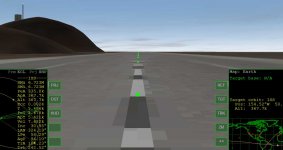
Hey Spike, I like the texture pack. There is one issue with it that I've noticed though... The MIP maps of the runway texture seem to have some problems or something. The texture filtering is causing very low LOD textures to show up too close, so the runway appears to blur out when looking down it from the ground. Makes me wish Orbiter had anisotropic filtering... I've attached a screenshot of what I'm talking about.
 

Attachments

  • badfiltering.jpg
    badfiltering.jpg
    52.8 KB · Views: 55
I also had made a kit with [ame="http://www.orbithangar.com/searchid.php?ID=2753"]building textures[/ame] (by the time I made it, I felt that I needed to see more detailed windows) but I did not remake the train textures. Nice work, it was about time. I think I will use yours.
 
Last edited:
Just installed it, very smooth.

N.
 
Thanks guys. Arkalius, I noticed the same thing, but I thought it was just due to the rendering engine. While I may not be new to digital art, I am fairly new to applying textures in a game engine. Does someone know if there's a way I can improve this or counteract this effect, or is it something that's just inherent in Orbiter's rendering engine?

Thanks for all your help.
 
Well it's bilinear texture filtering. I assume your texture is MIP mapped? It seems orbiter is a pretty nasty LOD bias at low angles of viewing or something because it filters that way too much at close range there. I think the only way you can fix it is by getting rid of the mip maps and just have a single texture. I think that's how the default runway texture is anyway.
 
I looked into it and noticed that you are correct about the original runway not having mip maps. I'm going to get back to this shortly, correct the issue, then release the update.

---------- Post added at 09:10 PM ---------- Previous post was at 06:44 PM ----------

I have updated the file on Orbit Hangar. The runway should look nicer now. Thanks Arkalius for bringing this to my attention.
 
Yeah looks better now... though now it has the typical aliasing artifcats of a non mipmapped texture, but I think it looks better than that annoying blur out. I wonder if there's something that can be done to make the filtering be so ugly at shallow angles?
 
Back
Top