Problem disappear texture on MoonBaseAlpha

shared

New member
Joined
Jul 26, 2011
Messages
6
Reaction score
0
Points
0
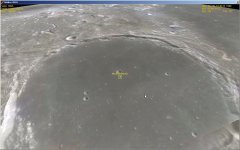
just installed MoonBaseAlpha add-on.
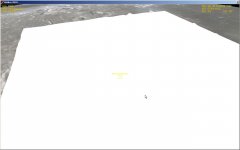
disappear when zoom in.
how to fix that?
 

Attachments

  • capture_07292011_213352.jpg
    capture_07292011_213352.jpg
    114 KB · Views: 17
  • capture_07292011_213356.jpg
    capture_07292011_213356.jpg
    54 KB · Views: 15
Last edited:
[just-a-guess]
Did you by chance manually add the texture 'call-out' to your base.cfg file?
By the look of the second picture, Plato crater is being rendered, but is the no-texture ice-cube white that gets assigned if there is no texture applied to it.
[just-a-guess]
I had that happen to me when I first added Moonbase Alpha, then again with Niven. Well with Niven, the base was there, but again, glossy white... There is a list in the readme that shows what needs to be added.
Side note -> Have you also added Kev 33's Shado Base? It's a pretty good looking looking base also. [ame="http://www.orbithangar.com/searchid.php?ID=336"]Shado-Base1[/ame]
 
Last edited:
the base was there, but again, glossy white...
my base also there, only texture of the moon surface gets white
Did you by chance manually add the texture 'call-out' to your base.cfg file?
no, I did nothing with base.cfg
 
Which Moonbase Alpha are you using? I started with Christiano's, there should be a readme.txt that will tell you what to add to your base.cfg file that will allow Orbiter to implement the textures to the mesh.
 
Which Moonbase Alpha add-on are you using?
 
Moonbase Alpha 101027v1.1
By Gattispilot & Ben Sisko
there should be a readme.txt that will tell you what to add to your base.cfg
I found a Moonbase Alpha Operations Manual.pdf
and added to base.cfg some lines, as said there.
Now all works. Thanks all
 
Last edited:
Check the manual (page 3). You have to edit the Base.cfg:

Code:
                             Installation
To install Moonbase Alpha, create a clean Orbiter 2010 P1 (100830). Add:
Displacement booths ([url]http://www.orbithangar.com/searchid.php?ID=4386[/url])
Discard the scenarios folder.
Orbiter Sound 3.5
UCGO 2.0
UMmu 2.0
(All available at [url]http://orbiter.dansteph.com/index.php?disp=d[/url]).
Unzip Moonbase Alpha to the location of your Orbiter 2010 P1 folder. Be sure to
preserve the directory structure of the package (for example, in WinZip this re-quires
activating the “Use Folder Names” option).
The following programs are optional, but enhance the functionality and visual
presentation of the simulation:
CameraMFD v0.12 ([url]http://www.orbithangar.com/searchid.php?ID=2645[/url])
Realistic Background ([url]http://www.orbithangar.com/searchid.php?ID=4799[/url])
Moonbase Alpha is placed in the same location used in earlier iterations. Crater
meshes and textures have been included from Moonbase Alpha beta 5a (by Santanas).
[COLOR="Red"]Edit the Base.cfg by adding the following lines:
plato1
plato
plato_lres[/COLOR]
From the Orbiter Launchpad, open Modules and select displacement to activate the
Moonbase Alpha T Car system.
Orbiter does not modify the Windows registry or any system resources, so no
complicated de-installation process is required. Simply delete the Orbiter folder
with all contents and subdirectories. This will uninstall Orbiter completely.

 
Back
Top