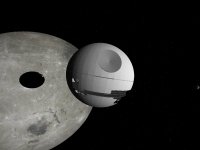
I can confirm the Max Pain's Patch worked on my machine. I already had the shuttle and tie fighter installed before I installed the death star. I got crashing until I used Max's files. So cheers Max.
It's mesh is appearing as it should,but its all white.
if its the name of the deathstar's texture folder thats wrong then i would like to know the correct name for the folder. if its not that then i would like to know exactly what i should do to fix it
Hello all, alright. It does work. idk if I did something different but here is what I did exactly.
1. downloaded deathstar and extracted into orbiter directory using winzip with use folder names checked etc. Just like any other addon.
2. Downloaded Shuttle TD by the same author and extracted it but replacing the shuttle TD.ini file in the process.
3. Downloaded the patch that Max Pain provided. I then extracted the patch into a seperate folder and moved the files in the spacecraft folder into the configuration folder and overwriting them. Then I just loaded up one of the scenarios and it worked. I do not know if you have to have the shuttle TD addon but I would recomend it just incase. If your getting that problem with it not displaying the body then it's probably a graphics card error or your missing one of the files. IT DOES WORK THOUGH!
Geez! This thing is a frame rate killer! It drop mine down to 4 and 3 FPS! (I can't even tell if the shuttle is working...) But is it worth it? Yes! Well, still have to check the exterior, but I think it is a good "little" add on!
Geez! This thing is a frame rate killer! It drop mine down to 4 and 3 FPS! (I can't even tell if the shuttle is working...) But is it worth it? Yes! Well, still have to check the exterior, but I think it is a good "little" add on!
This site uses cookies to help personalise content, tailor your experience and to keep you logged in if you register.
By continuing to use this site, you are consenting to our use of cookies.