Question Custom Planet Elevation Maps for Orbiter 2016?

I did just that, and yet I still keep getting that error. What exactly am I doing wrong?
I only got that error when I tried using an 8bit map. Are you sure both greyscale and 16 bit are selected under Image/Mode? If the pixel values are wrong you should get a different error message. Could also check under image size that the resolution is 72 pixel?
 
In CS5 they're both in the same panel, bit selection is further down, 8, 16, and 32 bit.
 
Thanks, got it figured out. I set the maxpatch to 9 which made no difference, but when I set it to 19 it works! Also added ElevationResolution = 0.5.

A few notes on use:
Elev_mod re-activates after every import, this is for safety
You have to input Emin/Emax before importing
Level 1-3 can all be made with the same 259x259 map
A little confusing but global Surf maps of level 4 are 1024x512 but a global Elev map of level 4 is 512(+3)x256(+3).
Would be good later to compile the instructions and make a sticky.

It doesn't actually look too bad (for a hack-job) so I made the other levels, and it's certainly better than a flat world.
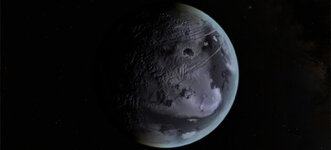
Europa Elev (levels 1-9) and .cfg attached.
I had to split and rename the zip to get it uploaded. Rename the zip files to: Europa_Elev.zip.001 and Europa_Elev.zip.002
This looks amazing! Fantastic job! I can't seem to get it working though, how did you compress the uploads? I can't get either of them to extract properly, I'm using 7zip. The file extracts but with an error message, I think it’s corrupted.

Another thing I'm wondering, how did you pad the base png image? Did you just do this manually in photoshop or similar? Not too difficult I know, but just wondering if you padded it or just stretched the image. I’ve almost finished a .bat file which automates this process. I’ve got it so it pads the base images, generates different levels and then splits into tiles with accompanying metadata files. Just cleaning it up now with some optional workflow for padding only and no cutting (thanks to helpful instructions by @dgatsoulis that’s all that’s needed if using the Tile Splitter tool). I also want to add some more user-input parameters for the metadata files generated too. This shouldn’t take long and I’ll post it in this thread soon.
 
This looks amazing! Fantastic job!
It's a very quick and dirty tweak of the blue alpha channel, the surface colour map has very mixed detail resolutions and is not really ideal but it kinda works. There are a lot of errors and the surface map could do with an overhaul (I had problems piecing the map together but with a good one I think I may have found a AI app that could fix it), but it's really nice not flying over something flat!

I instinctively made canyons, but I'm not actually sure that the dark lines on Europa are canyons or sediment ridges from ejecta? Could just reverse the map!
I can't seem to get it working though, how did you compress the uploads? I can't get either of them to extract properly, I'm using 7zip. The file extracts but with an error message, I think it’s corrupted.
I used Peazip, but had to split due to size. It's one .tree file. I checked it with 7zip, as long as I change the file names it unpacks fine? Otherwise I could just upload the tiles, no split, same compression, and self pack with texpack?
Did anyone else successfully unpack it?
Another thing I'm wondering, how did you pad the base png image? Did you just do this manually in photoshop or similar? Not too difficult I know, but just wondering if you padded it or just stretched the image.
I went first for the easy option. Just stretched it. It affects the poles and 0 Long, the poles look terrible but to be honest they all do, and there is a ridge at 0 Long, so padding might be needed. But I haven't noticed any misplacement of visual features with respect to the terrain height! It would be better though to experiment with a "cleaner" surf map.
I’ve almost finished a .bat file which automates this process. I’ve got it so it pads the base images, generates different levels and then splits into tiles with accompanying metadata files. Just cleaning it up now with some optional workflow for padding only and no cutting (thanks to helpful instructions by @dgatsoulis that’s all that’s needed if using the Tile Splitter tool). I also want to add some more user-input parameters for the metadata files generated too. This shouldn’t take long and I’ll post it in this thread soon.
Great news! :)
 
Last edited:
Last edited:
What version are you using?
I'm using a version of Photoshop Elements 6 that dates to around 2007, which only has limited support for 16-bit image files.

On a related note, I've successfully managed to create the elevation tiles for Ferenginar. The question is, how do I package them, since using texpack.exe doesn't seem to work for .elv tiles?
 
Last edited:
Okay so I've made a folder workspace with a batch file to convert 16-bit greystyle PNGs to elev .tree files. I used this process to make a very quick and dirty elevation map for Enceladus (attached).

The batch file's working folder has a subfolder called '_utils' which contains a copy of Orbiter's texpack.exe and @Face's ele2png.exe. These are only utilised by the batch file for part of its optional conversion (ele2png) and tree packaging (texpack). The main batch file is called processor.bat. A sample 16-bit greystile PNG is included too (this is the map I used to make the level 8 Enceladus heightmap also attached).

Note: The batch file requires Image Magick to be installed to work.

The batch file should be pretty self-explanatory to use:
  1. Keep the folder structure as-is after extracting
  2. Place a 16-bit 2:1 greystyle PNG image into the same directory
  3. Run the batch file processor.bat
  4. The first prompt is the image source, if the PNG from step one is called 'earth.png', type 'earth.png' (no folder directory, include extension)
  5. Follow the prompts
The processor has two main workflows, P or T (pad or tile):
  • padding just adds padding and resizes the images for use (in something like Elev Tile Splitter)
  • tile pads and then splits the image into tiles ready for batch conversion
    • After tile-cutting, an additional workflow allows for batch conversion to .elv tiles (using ele2png)
    • After .elv tile conversion, an additional workflow allows for archiving to .tree format (using texpack)
this means that the whole process, a single .png heightmap can be converted to an Elev.tree ready for use.

Further Notes:
  • Please note, I did not spend too much time optimizing this for speed, working with higher levels (7, 8, 9) might take a few minutes when cutting tiles and padding.
  • This includes texpack.exe and ele2png.exe in the zipped folder. I did not make these executables I only included them in this zip here because these were the versions I was using for this batch file, and I have not tried with other versions, I know for example newer versions of ele2png take .hdr extensions for meta files.
  • Thank you @Face for making ele2png (see this thread)
  • Thank you @misha.physics for sharing your surface tile splitter batch with me
  • If you are having trouble with the 16-bit greystile png format, open the sample.png included in heightmap_processor.zip, opening this in an image editor should give you somewhere to start.

Please let me know if you have any questions, suggestions or concerns. I hope this can be a decent starting place to help people (myself included) understand elevation mapping. This has been a big learning curve for me, and I'll likely update the Uranus and Neptune moons addons, as I can now quickly generate level 8 heightmaps from the original source imagery!
 

Attachments

Thank you all so much! I hope I will have some free time in a week to try this all.
 
View attachment 45517
ok, making a global heightmap with Elv Tile Splitter V2 is not that complicated.

1. Create a 16bit grayscale png file with dimensions (2*256n+3) x (256n+3) That's (515x259,1027x515,2051x1027,4099x2051,8195x4099,16387x8195) for levels (4,5,6,7,8,9). Since it's a global texture the sides ratio must be 2:1. -Save it in the textures folder of the body you want to create the elev tiles. (i.e: Textures\Europa)
2. Run Elv Tile Splitter V2. From the top bar press Options and Orbiter folder. Browse to your Orbiter installation folder.
3. Options (again) and press the Elev folder. Browse to the textures folder of the body you want to create the elev tiles. (i.e: Textures\Europa)
4. In the View tab, make sure that the Elev option is checked.
5. Check the Stretch - Unstretch box in the mid/lower part of the main window. Above it, there will be two boxes emin and emax. In those boxes enter the values that correspond to the minimum and maximum height of your map.
View attachment 45518
6. Now you are ready to import your png from step1. Press File->Import PNG.
7. Navigate to the folder where you saved it. As soon as you select it a new window will open asking you to save the .elv file for your image. The folder to save it should be the one you selected in step 3. Press Save.
8. The elv file will be loaded and you should see its name in the Centre Tile and also in the tool's display.
9. Check the boxes Write and Split.
10. You can press Start now but you will get an error. The error text will tell you what level to enter in the Level box, according to your image size.
View attachment 45519
11. Enter the correct level and press start again. The tiles will be created directly in your planetary body Elev folder. (ie Textures\Europe\Elev)

(you can skip the error by entering the correct level before pressing Start at step 10.)

That's it. You will get global coverage for your planet, for the level that you created the tiles for.

Keep in mind that this is how I used this tool, and I am not very experienced with it. Perhaps other members of the forum can give a more comprehensive guide and/or correct mistakes that they see here.

Also, this quick quide only covers the process of how to convert a single global png file that represents the planet's heightmap to an Elev quadtree.
It does not cover how to make a good heightmap using either real data (for real planetary bodies) or a fictional interpretation of a custom planet.

Just wondering, but what are the image sizes for level 1, 2, and 3 heightmaps?
 
Just wondering, but what are the image sizes for level 1, 2, and 3 heightmaps?
Doc\PlanetTextures.pdf page 8:
"Levels 3, 2, and 1 must be created from source bitmaps 512x512, 256x256 and 128x128, respectively."
(This is for textures (surf, mask)).

The elev tiles are half size + 3 so I believe they must be like so:
Level 1 = 67 x 67
Level 2 = 131 x 131
Level 3 = 259 x 259
 
level 8 Enceladus heightmap
Looks great! I'm using the hi-res surf.tree but still seems to work well.:)
Have to set maxpatchresolution to 19 for the ground contact to work.

Will test the batch exe soon.

Tilesplitter throws an error if the tiles are the wrong size. My experience so far.
Level 1-3 can all be made with the same 259x259 map
 
Okay so I've made a folder workspace with a batch file to convert 16-bit greystyle PNGs to elev .tree files. I used this process to make a very quick and dirty elevation map for Enceladus (attached).

Hi again all,

I've updated this batch file to optimize for speed, and also made another one that converts and packs surface maps (It uses plsplit64.exe and DxTex.exe). The included Enceladus heightmap has been slightly adjusted to smooth over the rough seams.

I have also updated the Enceladus map, and included a smoothed and recolored surface texture update to go with it:
Note, the above also contains markers for surface features as listed by the USGS Gazetteer of Planetary Nomenclature. It also includes an atmosphere definition for visual effect.
I included the atmosphere because I am hoping someone might be able to offer some insight into how to get the atmosphere to sit nicely with heightmaps. If you look inside the Textures\Enceladus\Archive folder, there are two Elev.tree files. Elev.tree is with an elevation range of 0m to 5000m, and this allows the atmosphere to look nice. Elev1.tree uses a more accurate -3100m to 1900m, but this leaves a black empty visible shell under the atmosphere at elevation 0, which looks bad. Does anyone know how to adjust the atmospheric parameters to negate this? It would be best practice to use proper relief values and not rely on the dirty 0-n hack I used.


Also if I could get some consensus on this; I would like to go around system-by-system and make heightmaps for all bodies (I'll include my Enceladus in such an addon) if people are interested, but many of the included bodies use only known textures, which can often appear quite jarring, like say the included Europa or Enceladus, with harsh seams clearly visible. Would people be interested in more softened textures, maybe with unknown areas filled with approximations, or would people preffer only 100% known surfaces, at the expense of aesthetics? My Uranian Moons addon for example uses textures by Astra that fill unknown areas with artistic approximations.
 

Attachments

first, Enceladus looks nicer with relief, thank you!
DG@Enceladus.png

It would be best practice to use proper relief values and not rely on the dirty 0-n hack I used.


Also if I could get some consensus on this
indeed, we've got the same issue like above whenever it is about modeling a subsurface volume (like a chasm or a lava tube on Mars, and why not a station...)

Personally, I would favor an approach that strictly expects actual scientific data, i.e. negative elevations whenever it is so. Then, I guess, it would require Orbiter to render a moon with a radius offset by the minimum elevation, say -H, and the elevation to be translated (inside Orbiter) by +H. Maybe a change in Orbiter's core, but worth doing, IMO.
 
Hi @Mr Martian, got round to testing your previous batch file, the padding operation worked (even without Image Magick), but the tiles don't. Will it work with the portable version? Is it still a dependency?
Also if I could get some consensus on this; I would like to go around system-by-system and make heightmaps for all bodies (I'll include my Enceladus in such an addon) if people are interested, but many of the included bodies use only known textures, which can often appear quite jarring, like say the included Europa or Enceladus, with harsh seams clearly visible. Would people be interested in more softened textures, maybe with unknown areas filled with approximations, or would people preffer only 100% known surfaces, at the expense of aesthetics? My Uranian Moons addon for example uses textures by Astra that fill unknown areas with artistic approximations.
This is something I was thinking about too, best to be as accurate as possible, but on some maps the detail is very low or absent and "intropolated" is better than nothing.
Also found that the breaks in detail don't look too bad, so if some areas aren't as good it's not a big problem, Europa is a good example. Still think an AI could fill the fuzzy bits and still be pretty accurate.
New worlds on the horizon:)
 
Back
Top