Question Custom Planet Elevation Maps for Orbiter 2016?

Astra

New member
Joined
Aug 31, 2016
Messages
7
Reaction score
1
Points
1
Hello. i searched the forms but couldn't find anything on this topic specifically.

Is there a guide to converting cylindrical projection planet maps into orbiter2016s new 3D texture system? I have looked into orbiter's readme.txt and the Utils tileedit_README.txt but found nothing of this process. i know Space Engine has a utility program that can do this, maybe orbiter would have one too? maybe texpack.exe?

I have a lot of good elevation maps that would be amazing to have in Orbiter but i just don't know how to get them into it yet. any help would be nice thank you! :)
 
Utils\plsplit64.exe is probably what you are looking for. It takes a map in cylindrical projection and splits it into individual texture tiles at a given resolution level. You have to run plsplit64 repeatedly on resampled versions of the map to produce the complete set of resolution levels for the quadtree.

Then you use texpack to bundle the individual tiles into a compressed archive file.

There is some more detail in doc\PlanetTextures.pdf.
 
doh! i wish i just looked at the doc folder... :blush:
that is what i was looking for though. thank you! = )
 
i have found ways to convert colour cylindrical maps for orbiter to use as .dds tiles for planet textures. but i can not find anything in the /doc folder about converting cylindrical maps to elevation tiles .elv

i am probably completely missing it and its right in front of me as usual but i just cant find the answer.
 
There no out of the box solution.
I wrote a javascript image splitter that will convert a grayscale elevation map into 259x259 .pngs. But I still need to move them into the appropriate folders and convert to 16bits. After that I need to run elv2png for each tile!

So no automated process, and because my solution is browser based, I can only go up to 4096x2048. On the same machine plsplit64.exe can go (at least) to 8192x4096.

Ideally plsplit64.exe should support splitting elevation maps, since elv2png is designed to handle smaller areas one tile at a time.
 
ok that explains it. thank you for the response and clarification. i will just have to wait i guess.
 
Have any improvements occurred in this area of texture creation for Orbiter? i still await the day when i can create addons with my hand painted Elevation maps for the moons of Uranus along with some other worlds. (stuff like http://fav.me/d9l070y ) im sorry to be asking again, i have just really been waiting a long time for this sort of thing. cheers.
 
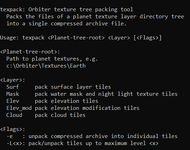
I need some help with understangind of the texpack.exe tool:

Без імені.png

Namely, I don't understand the last flag -L<x>. How to choose what to use: pack or unpack? What the maximum level <x> means? Do theese angle brackets necessary, namely do we need to type something like -L<12>?

For example, I have directories from 01 up to 09 in the Surf directory. What the flag should I use to pack all these tiles into a single *.tree archive?

I just don't think that the experimental method will be the best, maybe someone is familiar with this instrument.
 
The angle brackets denote that those are mandatory parameters and should not be entered literally.
The square brackets on the other hand denote optional settings, but are also not to be entered literally.

The usage line gives the best overview:
texpack <Planet-tree-root> <Layer> [<Flags>>]
  • texpack has to be entered literally (obvious, right?)
  • <Planet-tree-root> and <Layer> are mandatory and should be given as described. For <Layer> it is either Surf, Mask, Elev, Elev_mod or Cloud.
  • The <Flags> are optional overall, but when given, they must be given as described.

For example:
texpack C:\foo Surf
texpack C:\bar Cloud
texpack C:\foo Surf_Elev -e
texpack C:\foo Surf_Elev -e -L12

Hope this clears thing up a bit.
 
Thanks, I didn't know we can use both flags together. But how to choose: pack or unpack?
 
From the help I would say:
with -e it unpacks .tree file into individual files
without (-e) it packs individual files into a .tree file.

I would just test it with something like this:
texpack C:\folder\with\individual\levels\and\files Surf_Elev -L2
if it fails, my assumption was wrong ... If it creates a .tree file my assumptions were right :)

I would chose a "low level" to check (3 in my example) , then do it with the actual level you would like to use
 
Thanks. I made some tests, and I'm satisfied with results:

texpack C:\Orbiter2024\Textures\Mimas Surf packs tiles of all available levels into one archive.
texpack C:\Orbiter2024\Textures\Mimas Surf -L8 packs tiles from level 01 to level 08 into one archive.

texpack C:\Orbiter2024\Textures\Mimas Surf -e unpacks an archive into tiles of all available levels.
texpack C:\Orbiter2024\Textures\Mimas Surf -e -L8 unpacks an archive into tiles from level 01 to level 08.

So, it seems the flag -e means unpacking.
 
I have seen mentions of the "elv2png" tool. Where can I find it? I found one link, but it's broken for me. I thought it's a part of the "treeman" tool, but I don't see an option to get ELV tiles. Are there any other ways to create elevation tiles (from a picture (PNG))? I know there are the "tileedit" tool, but I'm not sure I can use it for creating ELV tiles for a whole planet.

It looks there is one more solution: Elv Tile Splitter, although I didn't try it yet.
 
Is anyone going to fix the poles? It is messed up for Moon bases?
 
Might have gotten the scale a bit wrong there... 😂
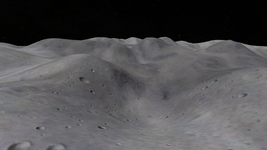
I reduced the "ElevationResolution" parameter by 100 times, ang got the much better result:

Без імені.png

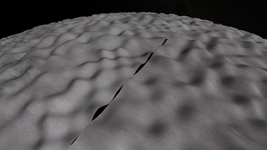
For now I don't know how to hide the seam:

Без імені2.png

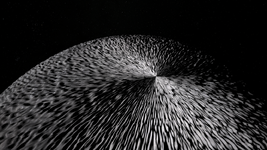
Also, there're "problems" at poles:

Без імені3.png
 
Even on many of Martins’ ball planets and moons, the poles look sorta like that, I guess it’s just how the geometry works.
 
There's a number of computational issues with poles, but this screenshot looks more like a random noise map got applied without running it through a mercator transformation first (that is assuming the terrain engine transforms the positions in the terrain map to lat-long coordinates, which I assume it does).

This would have the same effect as wrapping a rectangular image around a ball. It's just not going to work. You need to distort the image to compensate. It's never going to be perfect, but it's going to be a lot better than that.
 
Very interesting to see your terraforming experiments:)
For now I don't know how to hide the seam
Do an Orbiter forum search for "tile edges", several threads might be helpful.

Looking forward to new worlds!

Quick question to a long standing problem (I know your just getting to grips with this but maybe you have some insight):
How small can one make a tile (earth), and can one make it transparent?
It would be great if one could fix the fire-pit issue (and Clavius base, and...and...) that plauges Orb16 onwards. If one could make an invisible tile small enough to fill the gap with a base mesh?
Here's a good example.
0661.jpg
It nearly works here!
0663.jpg
 
Back
Top