Cape Canaveral Tiles - Level 21 (1024x1024)

OHM Cape Canaveral Tiles - Level 21 (1024x1024)

misha.physics

Well-known member
Joined
Dec 22, 2021
Messages
1,527
Reaction score
2,313
Points
128
Location
Lviv
Preferred Pronouns
he/him
misha.physics submitted a new addon:

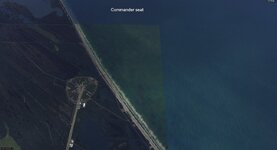
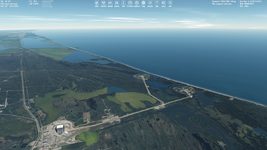
Cape Canaveral Tiles - Level 21 (1024x1024) - This add-on contains custom high-resolution tiles for the default Cape Canaveral spaceport

This add-on contains custom high-resolution tiles for the default Cape Canaveral spaceport.

There are two independent maps to choose from: Map 1 and Map 2. Links for two archives (for Map 1 and Map 2) are provided on my Google Drive.

Map 1 (7.4 GB archived, 17.1 GB unpacked) contains surface and mask tiles of levels 7-21. Levels 7-19 can be used with Orbiter 2016:
[URL...

Read more about this addon...
 
thanks for this
I intend to use it with O2016
so I have to delete lvl 20 and 21 ? :unsure:
that would be great cause my hard drive is precious :)
but how would it will look without those highest levels ?
 
It should look pretty good, since surface tiles have resolution of 1024x1024. And it will reduce size of tiles a lot.
 
Seems like a tile or two didn't get masked off properly for transparency. It's just off the coast, east of Launch Complex 39B.
 

Attachments

  • HiRes_Cape_Canaveral_tiles_forgotten_tile_mask.jpg
    HiRes_Cape_Canaveral_tiles_forgotten_tile_mask.jpg
    53.8 KB · Views: 9
Thanks. Are you using the default high-resolution Earth textures (~32 Gb)?
 
Then some mask tiiles can be taken from the default ones. I could look for them, but I'll be home in several days.
 
I tried the Cape Canaveral (Map 1) with the New Global Textures and Night Lights you mentioned above. A lot of mask tiles of various levels are required that are missed in my add-on, for example:

1783195153664.png

I made it to be the most compatible with the default high resolution Earth textures. But I could explain you how to download the needed mask tiles (using the Terrain Tool Kit that is built-in into Orbiter 2024) if you would like to use such the combination. It just requires some work with visual identification of missing mask tiles, downloading them, renaming and placing in correct directories.
 
I tried the Cape Canaveral (Map 1) with the New Global Textures and Night Lights you mentioned above. A lot of mask tiles of various levels are required that are missed in my add-on, for example:

I made it to be the most compatible with the default high resolution Earth textures. But I could explain you how to download the needed mask tiles (using the Terrain Tool Kit that is built-in into Orbiter 2024) if you would like to use such the combination. It just requires some work with visual identification of missing mask tiles, downloading them, renaming and placing in correct directories.
If you could explain this, please do.
 
I tried the Cape Canaveral (Map 1) with the New Global Textures and Night Lights you mentioned above. A lot of mask tiles of various levels are required that are missed in my add-on, for example:

View attachment 49519

I made it to be the most compatible with the default high resolution Earth textures. But I could explain you how to download the needed mask tiles (using the Terrain Tool Kit that is built-in into Orbiter 2024) if you would like to use such the combination. It just requires some work with visual identification of missing mask tiles, downloading them, renaming and placing in correct directories.

Wouldn't it be better to update the addon with the missing mask tiles, so it would work "out of the box", without the end user having to take extra steps?
 
Wouldn't it be better to update the addon with the missing mask tiles, so it would work "out of the box", without the end user having to take extra steps?
It may be, but I'm just not going to use such the combination, since the global custom textures are level 11. I switch to them in orbit, but I'm using the default high ones (~32 Gb) for flying near surface. Although I'd like to explain how to get the missed mask tiles, since it could be useful to know (for Orbiter developers), it's pretty easy technically, but needs some time.
If you could explain this, please do.
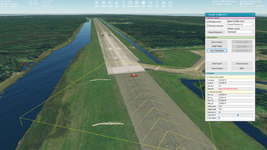
I'm using Orbiter 2024 (December 31, 2024). Enable TerrainToolKit on Modules tab. Press Ctrl+F4 and choose the TerrainToolKit function. Switch to external view. The missed tiles are highlighted in red, for example this mask tile of level 20 is abcent and can be downloaded:

1783233181073.png

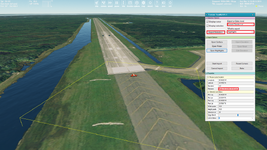
Just select it (yellow square), press ExportSelection and save it as DDS texture. You don't need high Earth textures. It will be extrapolated from the custom global textures of level 11. Here's the needed optons (correct names for the selected tile and directory where it should be placed:

1783233388969.png

Mask tiles are located in /Textures/Earth/Mask directory. If the Mask directory is abcent then it should be created. Notice, that mask tiles are missed for different levels, so it can be determined experimentally what the mask tiles you need. I just created surface and tiles mask together for the default high textures, so they are compatible.
 
Back
Top