Question Attempting to change material emissive color, set_materialex returns nil?

Thunder Chicken

Resident Lua Script Rabble-Rouser
Donator
Joined
Mar 22, 2008
Messages
5,845
Reaction score
5,509
Points
188
Location
Massachusetts
As indicated in the title, I am attempting to change the emissive color of several materials in a mesh to mimic illumination. I am attempting to use oapi.set_materialex(hMesh, matidx, matprp, col). From the Lua documentation, the parameters for this function are defined as:
  • hMesh handle mesh handle
  • matidx number material index
  • matprp number material property to be set
  • col colour material property value
hMesh apparently must be a DEVMESH handle as it throws an error indicating such when a loaded mesh handle is used (BTW the documentation should probably distinguish these mesh handles more clearly). I have the DEVMESH handle from the following:

Code:
function clbk_visualcreated(vis, refcount)

    hdevmesh = vi:get_devmesh(vis,0)

end

The material index matidx is known to exist in the mesh file (8 in this example) There are 23 materials so there doesn't seem to be a problem with this.

The material property matprp is apparently a number, but no further information is available in the Lua documentation. Looking at the API Reference there is a MatProp enumeration type and the numbers are defined in a materials property list, but there is no similar enumeration type listed in the Lua documentation. Searching through the code on Github in Atlantis.lua shows a usage of MATPROP.LIGHT in this function, so that was used. Again, this is information that should be added to the Lua documentation.

The color is defined as a color table as described in the Lua documentation:

Code:
cockpit_lights_on_emissive_color = {r= 0.906, g=0.906, b=0.906, a= 1.0}

But when I attempt to put it all together:

Code:
test = oapi.set_materialex(hdevmesh, 8, MATPROP.LIGHT, cockpit_lights_on_emissive_color)

oapi.dbg_out(test) immediately after this line returns 'nil' and there is no visual change in the panel emissivity.

Some checks on the parameters entered:

oapi.dbg_out(hdevmesh) returns a hexadecimal code with 'object'. (hdevmesh is needed elsewhere and it seems to be referenced properly).
oapi.dbg_out(MATPROP.LIGHT) returns '3', which matches the index of Light in the enum table.
oapi.dbg_out(cockpit_lights_on_emissive_color) returns the rgba color table as entered.

There are no errors on screen or in Orbiter.log, but this function simply returns 'nil'. I'm at a loss. It's not even throwing an error so apparently the method exists.

I am using Orbiter 2024.
 
Last edited:
In case of error, oapi.set_materialex returns 2 values : nil and an error string. Can you print the second value returned?
The error codes from the D3D9Client are :
//0 = success, 1=no graphics engine attached,
//2 = graphics engine does not support operation, 3 = invalid mesh handle,
//4 = material index out of range, 5 = material property not supported by shader used by the mesh.
I presume you're gonna get a 5
 
Doing this:

Code:
test, error = oapi.set_materialex(hdevmesh, 8, MATPROP.LIGHT, cockpit_lights_on_emissive_color)
oapi.dbg_out(error)

returns "oapiSetMaterialEx failed with error 2".
 
You need to run Orbiter_NG.exe in order to use D3D9Client. Orbiter.exe only supports the built in DX7 engine.
How does this affect set_materialex? Why is it necessary? Why have Orbiter.exe at all?

I am using set_material (no ex) elsewhere in the script and that works fine. The only problem is that I need to modify a large number of materials and I don't have a way to load the material tables into the script unless I manually copy them into the code, which basically makes the color definitions independent of the mesh, which is problematic.

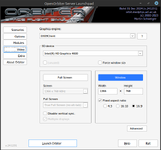
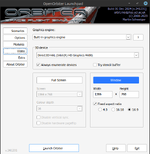
It turns out that Orbiter_NG.exe doesn't run for me. D3D9 is by default selected:

Screenshot at 2025-01-26 08-56-44.png

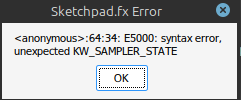
It launches, but only shows white screen, and I get this pop-up window:

Screenshot at 2025-01-26 08-45-37.png

Orbiter.log:

Code:
**** Orbiter.log
000000.000: Build Dec 31 2024 [v.602931718]
000000.000: Timer precision: 1e-07 sec
000000.010: Found 0 joystick(s)
000000.486: ---------------------------------------------------------------
000000.487: BaseDir    : Z:\home\matt\Desktop\Orbiter-2024\
000000.487: ConfigDir  : Z:\home\matt\Desktop\Orbiter-2024\Config\
000000.487: MeshDir    : Z:\home\matt\Desktop\Orbiter-2024\Meshes\
000000.487: TextureDir : Z:\home\matt\Desktop\Orbiter-2024\Textures\
000000.488: HightexDir : Z:\home\matt\Desktop\Orbiter-2024\Textures2\
000000.488: ScenarioDir: Z:\home\matt\Desktop\Orbiter-2024\Scenarios\
000000.488: ---------------------------------------------------------------
000000.542: D3D9 DLLs  : C:\windows\system32\d3d9.dll [v 5.3.1.904]
000000.553:            : C:\windows\system32\d3dx9_43.dll [v 9.29.952.3111]
000000.570: ---------------------------------------------------------------
000000.571: Module D3D9Client.dll ........ [Build 241231, API 241231]
000000.766: [D3D9] Native Interface
000000.766: [D3D9] DirectX9 Created...
000000.770: [D3D9] Initialize VideoTab...
000000.790: Loading module D3D9Client
000000.792: Module AtlantisConfig.dll .... [Build 241231, API 241231]
000000.792: Loading module AtlantisConfig (legacy interface)
000000.793: Module AtmConfig.dll ......... [Build 241231, API 241231]
000000.794: Loading module AtmConfig (legacy interface)
000000.795: Module DGConfigurator.dll .... [Build 241231, API 241231]
000000.795: Loading module DGConfigurator (legacy interface)
000028.541:
000028.541: **** Creating simulation session
000028.597: D3D9: [DirectX 9 Initialized]
000028.598: D3D9: 3D-Adapter.............. : Intel(R) HD Graphics 4600
000028.599: D3D9: MaxTextureWidth......... : 16384
000028.599: D3D9: MaxTextureHeight........ : 16384
000028.599: D3D9: MaxTextureRepeat........ : 32768
000028.600: D3D9: VolTexAddressCaps....... : 0x3F
000028.600: D3D9: NumSimultaneousRTs...... : 4
000028.600: D3D9: VertexDeclCaps.......... : 0x30F
000028.601: D3D9: MiscCaps................ : 0x2ECFF2
000028.601: D3D9: Separate AlphaBlend..... : Yes
000028.601: D3D9: Shadow Mapping.......... : Yes
000028.601: D3D9: D3DFMT_A16B16G16R16F.... : Yes
000028.602: D3D9: Vertex_A16B16G16R16F.... : Yes
000028.602: D3D9: Vertex_A32B32G32R32F.... : Yes
000028.602: D3D9: Vertex_R16F............. : Yes
000028.602: D3D9: Vertex_R32F............. : Yes
000028.603: D3D9: D3DFMT_A32B32G32R32F.... : Yes
000028.603: D3D9: D3DFMT_D32F_LOCKABLE.... : Yes
000028.603: D3D9: D3DFMT_A2R10G10B10...... : Yes
000028.603: D3D9: D3DFMT_L8............... : Yes
000028.604: D3D9: D3DDTCAPS_DEC3N......... : No
000028.604: D3D9: D3DDTCAPS_FLOAT16_2..... : Yes
000028.604: D3D9: D3DDTCAPS_FLOAT16_4..... : Yes
000028.604: D3D9: Runs under WINE......... : Yes
000028.604: D3D9: D3D9Build Date.......... : 0
000028.611: D3D9: Available Texture Memory : 1536 MB
000028.613: D3D9: [3DDevice Initialized]
000028.641: D3D9ERROR: D:\a\orbiter\orbiter\OVP\D3D9Client\D3D9Pad.cpp Line:98 Error:-2147467259 D3DXCreateEffectFromFileA(pDev, name, 0, 0, 0, 0, &FX, &errors)
000028.642: D3D9ERROR: Effect Error: <anonymous>:64:34: E5000: syntax error, unexpected KW_SAMPLER_STATE
 
oapiSetMaterialEx is only supported by the D3D9Client. AFAIK it's meant to modify D3D9 shaders specific parameters so it's useless in your case anyway..
Are you using wine?
 
oapiSetMaterialEx is only supported by the D3D9Client. AFAIK it's meant to modify D3D9 shaders specific parameters so it's useless in your case anyway..
Are you using wine?
Yes, I am running under Wine.

Is this D3D9-specific behavior of oapiSetMaterialEx documented anywhere? How can I know whether this will be a problem or not?
 
If you look here it looks like a similar issue.
The solution listed there seem to be using winetricks with the WINE_WINETRICKS_VERBS='d3dcompiler_47' option.
Don't ask my where and how to specify this, I don't use wine or winetricks.
No it's not documented in OrbiterAPI.h so it's not documented in the Lua manual either. It was a D3D9 extension that was moved at some point in the OAPI.
 
So to summarize - my issues with running Orbiter_NG.exe are with Wine not having the correct D3D9 modules and, independent of that, I would need to use Orbiter_NG.exe to utilize the set_materialex method on whatever system Orbiter is running on. Is this correct?

Would opening an issue in GitHub about documenting the D3D9 requirements for the oapi:set_materialex/oapiSetMaterialEx (and presumably other methods) be a help or a nuisance?

Another perhaps dumb question - what is the need to maintain both Orbiter.exe and Orbiter_NG.exe, especially if there are API methods that only work on one and not the other?

Investigating a workaround, I know I could use set_material, but that needs me to specify the entire material property table, and as far as I can see there is no method to get the material property tables from the mesh file. Are you aware of any way to do this?

Thanks for your help, as always.
 
Another perhaps dumb question - what is the need to maintain both Orbiter.exe and Orbiter_NG.exe, especially if there are API methods that only work on one and not the other?

Investigating a workaround, I know I could use set_material, but that needs me to specify the entire material property table, and as far as I can see there is no method to get the material property tables from the mesh file. Are you aware of any way to do this?

Thanks for your help, as always.
The idea now that Orbiter 2024 has been pushed out is to retire the DX7 version completely, so no more Orbiter.exe with a built in graphics engine. Right now it looks like D3D9Client is here to stay, so on Windows machines, it will become the de facto standard engine. To run D3D9Client, you need to have installed the DirectX 9 June 2010 Runtime package. Download that and unpack it and then run the setup.exe file to get them installed. If that fails, try this: https://www.dedoimedo.com/games/wine-directx.html
 
The idea now that Orbiter 2024 has been pushed out is to retire the DX7 version completely, so no more Orbiter.exe with a built in graphics engine. Right now it looks like D3D9Client is here to stay, so on Windows machines, it will become the de facto standard engine. To run D3D9Client, you need to have installed the DirectX 9 June 2010 Runtime package. Download that and unpack it and then run the setup.exe file to get them installed. If that fails, try this: https://www.dedoimedo.com/games/wine-directx.html
Thanks for this info. I'll fiddle with winetricks and get Orbiter_NG.exe running and work on my projects under that.

I suppose that documenting D3D9 requirements is a moot point if this is the path forward. It's a temporary issue that isn't worth fixing.
 
I have Orbiter_NG.exe running. FYI folks on Linux under Wine, downloading directx_Jun2010_redist.exe and just running it under Wine (wine directx_Jun2010_redist.exe or double click) gets it done. Extract it into any folder, run DXSETUP.exe, boom, done. Winetricks is the path to madness.

set_materialex is working with the MATPROP.LIGHT property. It does not seem to work with MATPROP.EMISSIVE property, but that seems to be some lingering experimental thing?

Progress! Thanks all.
 
Back
Top