
You are using an out of date browser. It may not display this or other websites correctly.
You should upgrade or use an alternative browser.
You should upgrade or use an alternative browser.
OHM Antares Manned Spacecraft 2.51
- Thread starter OrbitHangar
- Start date


Mantis
Member
LOL...I was just about to post the same thing as paleto. I flew that whole lunar orbit mission without a hitch except for those two astronauts who stowed away between the third stage and the Service Module! I'm guessing that it didn't end very well for them.:rofl:
What a fantastic spacecraft. The Jarvis launch vehicle to the Antares itself - is utterly amazing and I had a great time flying it. I can see that becomming my "go to" spacecraft when I want to fly a quick mission somewhere. Thank-you for all your hard work in creating it.
What a fantastic spacecraft. The Jarvis launch vehicle to the Antares itself - is utterly amazing and I had a great time flying it. I can see that becomming my "go to" spacecraft when I want to fly a quick mission somewhere. Thank-you for all your hard work in creating it.
astronut220
A dude in space
This version supports ummu. Read the development topic. 

Ark
New member
- Joined
- Jan 31, 2009
- Messages
- 2,199
- Reaction score
- 0
- Points
- 0
I am totally in love with this thing. It looks, feels, and flies like a real, rugged piece of near-future tech. The added functionality of the VC is great, especially the reentry displays that show airspeed, heat load, and dynamic pressure. All very useful. I'm going to log many, many hours flying this thing on every mission profile I can think of, because it looks to be capable of performing them all.
I do have one question though: When sitting on top of a Velcro stack, why does it teleport to the ground at high time acceleration, like when waiting for a launch window? It often CTDs, too. Does it have something to do with being defined as landed in the scenario file?
I do have one question though: When sitting on top of a Velcro stack, why does it teleport to the ground at high time acceleration, like when waiting for a launch window? It often CTDs, too. Does it have something to do with being defined as landed in the scenario file?
Last edited:

fausto
FOI SuperMod
Very nice addon, Thank you. But I have problem with scenario ALR-3

MMhh.. i had that problem some weeks ago.. it's something related to DLL mesh configuration.. does it happen after launching a scenario? Or is it during a longer mission?
I start scenario 01-ALR-3-Launch Cape Canaveral and after TLI I press key J for separation.MMhh.. i had that problem some weeks ago.. it's something related to DLL mesh configuration.. does it happen after launching a scenario? Or is it during a longer mission?
Edit:
I have orbiter 2010P1 and this addons:
IMFD 5.5
LMFD 1.4
Jarvis Heavy Launch Vehicle, version 2.0
Universal MMU 2.0 by dansteph
Vinka’s Multistage2
Vinka’s Spacecraft3
Texture earth 14+11
---------- Post added at 12:15 PM ---------- Previous post was at 11:41 AM ----------
I have other problem with frame. When I run scenario 01 - ALR-1 - Launch or 01 - ALR-2 - Launch and I get to the parking orbit, after separation my frame drops to 16 fps.
Before separation 84 fps:

After separation 16 fps:

OR
This is scenario 02 - ALR-2 - In Orbit 45 fps:

This is scenario 03 - ALR-1 - Elipctic orbit 14 fps:

Some scenarios working good FPS and some scenarios working LOW FPS.
ALL OTHER ADDONS FROM ORBITERHANGAR WORKING GOOD 40-180 FPS IN 1920X1080 32Bit.
My system: Intel pentium 4 3200Mhz, 1GB ram, ATI radeon X1650Pro 512MB, Windows XP Pro
Last edited:

Scruce
Ad astra per aspera
- Joined
- Sep 17, 2010
- Messages
- 1,409
- Reaction score
- 0
- Points
- 0
Can somebody confirm this:when you deploy and then retract the solar panels the craft becomes unresponsive.
I confirm.

Ark
New member
- Joined
- Jan 31, 2009
- Messages
- 2,199
- Reaction score
- 0
- Points
- 0
Okay, I think I figured out my problem. It's not the fact that the ship is landed, or the level of time acceleration. It's the damage simulation kicking in due to a main bus undervolt because the solar panels aren't deployed. With Velcro the ship exists in the scenario at all times, so the clock starts as soon as the scenario loads, instead of when the ship is created at final stage jettison.
I can sort of work around it by deploying the solar panels on the launch pad while waiting for a window. Is there any chance of seeing an option in the config file to disable the main bus undervolt feature? It would really help enable people to come up with other interesting things to do with the Antares.
---------- Post added at 11:26 AM ---------- Previous post was at 11:19 AM ----------
And now I also run afoul of this error. Except in my scenarios I get a CTD as well.
I can sort of work around it by deploying the solar panels on the launch pad while waiting for a window. Is there any chance of seeing an option in the config file to disable the main bus undervolt feature? It would really help enable people to come up with other interesting things to do with the Antares.
---------- Post added at 11:26 AM ---------- Previous post was at 11:19 AM ----------
Can somebody confirm this:when you deploy and then retract the solar panels the craft becomes unresponsive.
And now I also run afoul of this error. Except in my scenarios I get a CTD as well.
fausto
FOI SuperMod
Can somebody confirm this:when you deploy and then retract the solar panels the craft becomes unresponsive.
This is normal! Antares is supposed to work with solar panels and radiators completley deployed. This spacecraft has limited self battery that works for 30 minutes after lift off. If you retract solar panels after that time, the craft has no more energy and it dies!
FPS problem: very strange: open the "meshes/antares/antaresLRcap" msh file by using notepad and chek the final lines. Do you have this?
TEXTURES 16
Antares\MC01.dds
Antares\MC04.dds
Antares\MC02.dds
Antares\MC11.dds
Antares\Navmode1.dds
Antares\Navmode2.dds
Antares\MC05.dds
Antares\MC10.dds
Antares\MC07.dds
Antares\MC09.dds
Antares\MC03.dds
Antares\MC08.dds
Antares\MC06.dds
Antares\MFD1.dds D
Antares\TimeLR.dds D
Antares\Vetro.dds
fausto
FOI SuperMod
I start scenario 01-ALR-3-Launch Cape Canaveral and after TLI I press key J for separation.
Edit:
I have orbiter 2010P1 and this addons:
IMFD 5.5
LMFD 1.4
Jarvis Heavy Launch Vehicle, version 2.0
Universal MMU 2.0 by dansteph
Vinka’s Multistage2
Vinka’s Spacecraft3
Texture earth 14+11
---------- Post added at 12:15 PM ---------- Previous post was at 11:41 AM ----------
I have other problem with frame. When I run scenario 01 - ALR-1 - Launch or 01 - ALR-2 - Launch and I get to the parking orbit, after separation my frame drops to 16 fps.
Before separation 84 fps:
After separation 16 fps:
OR
This is scenario 02 - ALR-2 - In Orbit 45 fps:
This is scenario 03 - ALR-1 - Elipctic orbit 14 fps:
Some scenarios working good FPS and some scenarios working LOW FPS.
ALL OTHER ADDONS FROM ORBITERHANGAR WORKING GOOD 40-180 FPS IN 1920X1080 32Bit.
My system: Intel pentium 4 3200Mhz, 1GB ram, ATI radeon X1650Pro 512MB, Windows XP Pro
Ok i noticed that your system cannot support very high graphic stress, and i suggest you to do this:
In the launch pad, set video by this way:
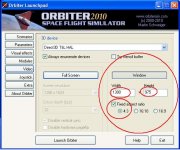
this will help your FPS growing up and it may fixx the external crew members problem! :thumbup:
Ark
New member
- Joined
- Jan 31, 2009
- Messages
- 2,199
- Reaction score
- 0
- Points
- 0
This is normal! Antares is supposed to work with solar panels and radiators completley deployed. This spacecraft has limited self battery that works for 30 minutes after lift off. If you retract solar panels after that time, the craft has no more energy and it dies!
That makes it pretty useless for bringing along on interplanetary voyages, if it's docked to a mothership it doesn't need it's own solar panels sticking out. Plus, you wouldn't immediately and permanently lose all power and control upon folding them, including the ability to unfold them again.
I have a problem: On all the scenarios I've tried, when the spacecraft is released from the upper stage it has no fuel in it at all. Also, two files were extracted straight to the Orbiter folder, antaresLRjett.cfg and antaresSRjett.cfg. If that's the problem, where should those files be?
fausto
FOI SuperMod
I have a problem: On all the scenarios I've tried, when the spacecraft is released from the upper stage it has no fuel in it at all. Also, two files were extracted straight to the Orbiter folder, antaresLRjett.cfg and antaresSRjett.cfg. If that's the problem, where should those files be?
The two files are in the right position!
This is a FPS problem! Try the video solution i suggested some posts ago!


Nice add-on!
Some bug reporting: the buttons of the MFDs on the VC don't show the letters. Also, the astronauts don't wear off the suit when you repressurise the CM.
Edit: After an EVA, the astronaut that got out doesn't appear inside the module when the EVA finishes
Some bug reporting: the buttons of the MFDs on the VC don't show the letters. Also, the astronauts don't wear off the suit when you repressurise the CM.
Edit: After an EVA, the astronaut that got out doesn't appear inside the module when the EVA finishes
Last edited:
fausto
FOI SuperMod
Nice add-on!
Some bug reporting: the buttons of the MFDs on the VC don't show the letters. Also, the astronauts don't wear off the suit when you repressurise the CM.
Edit: After an EVA, the astronaut that got out doesn't appear inside the module when the EVA finishes
Most of the things you refet to are not bugs, but normal spacecraft organization issues:
1)MFDs buttons are not supposed to be shown. Press MNU and you get the entire options list
2) Astronauts wear off when you hit the button protection!
3) Again, the astronaut appears when you hit the button protection!

- Joined
- Feb 11, 2008
- Messages
- 2,604
- Reaction score
- 31
- Points
- 63
I suspect the astronaut meshes are added and not part of the main mesh (haven't checked yet) because they are not visible through the windows. I assume that the authors are aware of the importance of the order of see-through groups (glass).
fausto
FOI SuperMod
I suspect the astronaut meshes are added and not part of the main mesh (haven't checked yet) because they are not visible through the windows. I assume that the authors are aware of the importance of the order of see-through groups (glass).
Yes this is a known bug.. we were not able to fix it.. and i confirm that astronauts are separate meshes.. do you have any suggestion about that?
 lease:
Similar threads

- Replies
- 0
- Views
- 1K

- Replies
- 21
- Views
- 18K


- Replies
- 0
- Views
- 5K
- Replies
- 3
- Views
- 3K