Installation Orbiter isn't showing anything on the screen

Lizzard

New member
Joined
Mar 14, 2026
Messages
4
Reaction score
1
Points
3
Location
Mountains
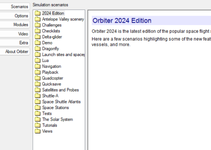
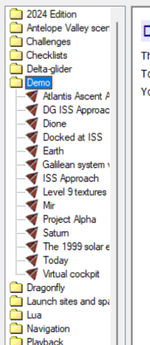
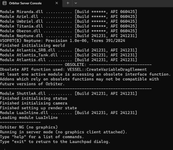
Downloaded, unzipped, get this.
 

Attachments

  • Screenshot 2026-03-14 101531.png
    Screenshot 2026-03-14 101531.png
    183.9 KB · Views: 5
  • Screenshot 2026-03-14 101556.png
    Screenshot 2026-03-14 101556.png
    127.4 KB · Views: 5
  • Screenshot 2026-03-14 101608.png
    Screenshot 2026-03-14 101608.png
    154.4 KB · Views: 5
I've approved your post and edited the title so it makes more sense to the question you're asking. The subject should be a summary of the question.

Now, as for your issue - are you running orbiter_ng (no graphics) or orbiter.exe?
 
All I know is the pic on left comes up then selecting something the second then third pic. Looks like files only on all selection. As for your question I am not sure. I downloaded the 24 from this site then unzipped the file.
 
try orbiter.exe instead or obiter_ng.exe

ng = no graphics.
 
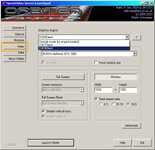
The Orbiter_ng.exe should work (more so on recent systems), you just need to select "Video" on the left side, and then in the "Graphics Engine:" select "D3D9Client".
 
The Orbiter_ng.exe should work (more so on recent systems), you just need to select "Video" on the left side, and then in the "Graphics Engine:" select "D3D9Client".
I just installed a new "clean" Orbiter today (for testing my new rocket) and had the same problem : I was in console mode instead of D3D9.

help.jpg

I think that's the issue for you, Lizzard....
 
Back
Top