Question Implementing XRSound in Lua?

Thunder Chicken

Resident Lua Script Rabble-Rouser
Donator
Joined
Mar 22, 2008
Messages
5,846
Reaction score
5,509
Points
188
Location
Massachusetts
I am trying to restore some custom sounds to the Bell 222. I have the following so far

In clbk_postcreation:

Code:
sound = xrsound.create_instance(vi)

sound:load_wav(1, "Sound/_CustomVesselsSounds/BELL222/BELL222ENGINES.wav", PlaybackType.BothViewClose)
sound:load_wav(2, "Sound/_CustomVesselsSounds/BELL222/BELL222GEAR.wav", PlaybackType.InternalOnly)
sound:load_wav(3, "Sound/_CustomVesselsSounds/BELL222/BELLSTART.wav", PlaybackType.BothViewClose)

When I attempt to play a sound in clbk_poststep:
Code:
sound.play_wav(1, false, 1.0)

I get this error related to the play_wav line:

Code:
lua_toxrsound: Argument is not an xrsound object

I also get this error for the other files 2 and 3, and if I omit the optional arguments (sound.play_wav(1)).

XRSound module is enabled for Orbiter 2024 and I get the default Orbiter sounds (I need to disable them, but that's another matter). I just can't get these custom files to work.
 
I am trying to restore some custom sounds to the Bell 222. I have the following so far

In clbk_postcreation:

Code:
sound = xrsound.create_instance(vi)

sound:load_wav(1, "Sound/_CustomVesselsSounds/BELL222/BELL222ENGINES.wav", PlaybackType.BothViewClose)
sound:load_wav(2, "Sound/_CustomVesselsSounds/BELL222/BELL222GEAR.wav", PlaybackType.InternalOnly)
sound:load_wav(3, "Sound/_CustomVesselsSounds/BELL222/BELLSTART.wav", PlaybackType.BothViewClose)

When I attempt to play a sound in clbk_poststep:
Code:
sound.play_wav(1, false, 1.0)

I get this error related to the play_wav line:

Code:
lua_toxrsound: Argument is not an xrsound object

I also get this error for the other files 2 and 3, and if I omit the optional arguments (sound.play_wav(1)).

XRSound module is enabled for Orbiter 2024 and I get the default Orbiter sounds (I need to disable them, but that's another matter). I just can't get these custom files to work.
Can you spot the difference ?
Code:
sound:load_wav(1, "Sound/_CustomVesselsSounds/BELL222/BELL222ENGINES.wav", PlaybackType.BothViewClose)
sound.play_wav(1, false, 1.0)
Hint:
Code:
sound:play_wav(...)
is syntactic sugar for
Code:
sound.play_wav(sound, ...)
 
XRSound module is enabled for Orbiter 2024 and I get the default Orbiter sounds (I need to disable them, but that's another matter).
Have you known how to disable all the default Orbiter sounds in Lua? Maybe something like "xrsound.mute_default_sounds(vi)...", but it doesn't initialized.
 
Last edited:
Have you known how to disable all the default Orbiter sounds in Lua? Maybe something like "xrsound.mute_default_sounds(vi)...", but it doesn't initialized.
XRSound methods are available in the Orbiter Lua Script Interface doc under XRSound Class.

You can use xrsound:set_defaultsoundenabled (which, enabled) looped over all default sound IDs (which), and set the enabled booleans to false.
 
Thanks, I found it in Lua documentation. I'm not sure how to disable all default sounds in Lua script and use the only my custom sounds. Or should I use "xrsound:set_defaultsoundenabled (which, enabled)" for every default sound IDs separately?

It also says "This can also be done globally via the configuration file" (meaning disabling default sounds). Does anyone know how to disable all default XRSound in the vessel configuration file? Maybe @dbeachy1 could help me with it? Is it described in the XRSound manual?
 
From XRSound.h:

Note: when you are writing vessel code, do not use any custom sound IDs that are >= 10000 and < 12000; they are reserved for use (and future use) by XRSound's default sounds.

So looping over Sound IDs 10000 to 11999 might work, although it's a bit much I think.

In the same file:
C++:
    enum DefaultSoundID
    {
        AirConditioning = 10000,    // 10000
        LandedWind,                 // 10001
        AudioGreeting,              // 10002
        MainEngines = 10004,        // 10004
        RetroEngines,               // 10005
        HoverEngines,               // 10006
        RCSSustain = 10008,         // 10008
        SwitchOn,                   // 10009
        SwitchOff,                  // 10010
        Rotation,                   // 10011
        Translation,                // 10012
        Off,                        // 10013
        CustomEngines,              // 10014
        AFPitch,                    // 10015
        AFOn,                       // 10016
        AFOff,                      // 10017
        Crash,                      // 10018
        MetalCrunch,                // 10019
        WheelChirp,                 // 10020
        Touchdown,                  // 10021
        WheelStop,                  // 10022
        TiresRolling,               // 10023
        OneHundredKnots,            // 10024
        Liftoff,                    // 10025
        WarningGearIsUp,            // 10026
        YouAreClearedToLand,        // 10027
        Docking,                    // 10028
        DockingCallout,             // 10029
        Undocking,                  // 10030
        UndockingCallout,           // 10031
        Wheekbrakes,                // 10032
        DockingRadarBeep,           // 10033
        FlightWind,                 // 10034
        ReentryPlasma,              // 10035
        SonicBoom,                  // 10036
        AutopilotOn,                // 10037
        AutopilotOff,               // 10038
        SubsonicCallout,            // 10039
        RCSAttackPlusX,             // 10040
        RCSAttackPlusY,             // 10041
        RCSAttackPlusZ,             // 10042
        RCSAttackMinusX,            // 10043
        RCSAttackMinusY,            // 10044
        RCSAttackMinusZ,            // 10045
        LastDefaultSound,

        // these are sound IDs that play from a group of files, each in a configured folder
        RadioATCGroup = 11000,          // 11000
        CabinAmbienceGroup,             // 11001
        MachCalloutsGroup,              // 11002
        AltitudeCalloutsGroup,          // 11003
        DockingDistanceCalloutsGroup,   // 11004
        MusicFolder,                    // 11005; this is a special, global (i.e., vessel-independent) sound ID.
        LastDefaultGroup
    };

...so you can limit the loop to only those.

Two loops, one from 10000 to 10045 and one from 11000 to 11005 :)
 
Hi. I'm implementing engine sound for Airbus using XRSoud in a Lua script, but the aircraft has the big size, so sound is very quiet from a distance in external view (46 meters from the center of mass). Is it possible to fix it anyway on Lua? Or creating a custom XRSound configuration file for the aircraft?
 
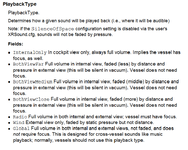
I'm thinking of using separate sounds for external and internal views. Lua documentation regarding XRSound provides the following playback types:

Без імені.png

InternalOnly works as described. Isn't there the only exrernal playback type? I tried Wind, but it plays a sond both in external and internal views.
 
Does Orbiter API contain a command something like "get_cameramode" or "get_cameratarget()", etc? Is it available in Lua? Maybe I could use it for assigning different sounds for external and internal view? Are there any ways to do it?
 
Code:
oapi.get_cameratarget ()
Return a handle to the current camera target.
The camera target is not necessarily a vessel, and if it is a vessel, it is not necessarily the focus object (the vessel receiving user input).

Returns:
handle or nil handle to the current camera target (i.e. the object the camera is pointing at in external mode, or the handle of the vessel in cockpit mode)
 
Thanks, do you know if this command is implemented on Lua?
 
Also, I'm not sure if it returns the camera mode (external/inner). It seems it just returns the camera target (obviously), so I doubt it can help me.
 
Well. So, any ideas how to play different songs for internal and external views for a Lua based vessel are welcome.
 
Back
Top