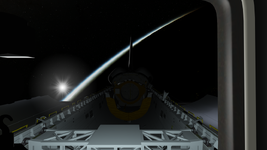
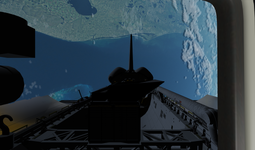
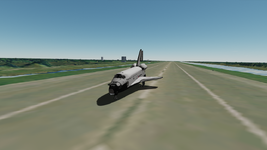
Project Space Shuttle Vessel

any tips for actually getting a KU lock at a reasonable distance? im pretty close with -Z tracking using the orbiter target camera.
For now it is a manual process: you need to point in the general direction of the target (which of course needs to be in range), and then do a search... and then it finds the target or not 🤷‍♂️
For v2.0 the GPCs will have the ICC bus, so eventually the GNC GPC will be able to "ask" the SM GPC to point the antenna to the target, and tracking should be easier then.


also the mission editor doesn't want to save my custom elevation for MC-2. keeps going back to the 29.06
How/when are you editing that? If you "raw edit" the I-Load, then load a new target set in the Orbit tab, it overwrites whatever is in those I-Loads...
 
How/when are you editing that? If you "raw edit" the I-Load, then load a new target set in the Orbit tab, it overwrites whatever is in those I-Loads...
I'm manually changing it and then saving the mission, not messing with the target sets, it says custom set loaded. when i reload the mission file after saving its back to the default. i am running the new editor with the IY for testing with Indy, so maybe thats a part of it.
 
I'm manually changing it and then saving the mission, not messing with the target sets, it says custom set loaded. when i reload the mission file after saving its back to the default.
I just changed the value, saved, confirmed that the mission file has the new value, reloaded the file and the I-Load shows the new value as expected...
Then fired up SPEC 34, loaded set 12, and the value shown (now in degrees) is what I have in the mission file. 🤷‍♂️

i am running the new editor with the IY for testing with Indy, so maybe thats a part of it.
Not related.
 
I think that the lateral offset for the keel cameras are incorrect. According to my information, they should be offset 4 inches (0.1016 m) to the left. While the axis is correct, the offset is not. The attached screenshot shows this, the keel camera target is located exactly 4 inches to the left while the camera is more than that.
 

Attachments

  • SSV_keel_camera_offset.jpg
    SSV_keel_camera_offset.jpg
    68.4 KB · Views: 14
I seem to be able to control the RMS while I'm controlling another vessel. Is this intended or not?
That is weird... did you actually switch to the other vessel, or just changed the camera view to focus on it?
I need to check what GetManualControlLevel() is returning... I think it should be 0 if the vessel isn't in focus, but I actually have a check for the vessel when getting the inputs of the RHC/THC, so...

I think that the lateral offset for the keel cameras are incorrect. According to my information, they should be offset 4 inches (0.1016 m) to the left. While the axis is correct, the offset is not. The attached screenshot shows this, the keel camera target is located exactly 4 inches to the left while the camera is more than that.
I'll check.
 
That is weird... did you actually switch to the other vessel, or just changed the camera view to focus on it?
I need to check what GetManualControlLevel() is returning... I think it should be 0 if the vessel isn't in focus, but I actually have a check for the vessel when getting the inputs of the RHC/THC, so...
Yeah i switched to the other vessel. I was in End Effector mode in translation, if that means anything. i don't recall seeing this before with other modes, or i switched back to RCS control after i was done with the arm
 
I think that the lateral offset for the keel cameras are incorrect. According to my information, they should be offset 4 inches (0.1016 m) to the left. While the axis is correct, the offset is not. The attached screenshot shows this, the keel camera target is located exactly 4 inches to the left while the camera is more than that.
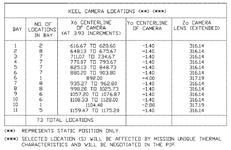
Where is the camera located? Most locations are not at Yo-4...
keelcamera.PNG
From "Shuttle Orbiter /Cargo Standard Interfaces (CORE) ICD-2-19001, Revision L".


Yeah i switched to the other vessel. I was in End Effector mode in translation, if that means anything. i don't recall seeing this before with other modes, or i switched back to RCS control after i was done with the arm
Yep, the GetManualControlLevel() returns non-zero on inputs, even when the vessel isn't in focus... I can close that "logic hole" in SSV, but maybe that should be changed in Orbiter, as that is a VESSEL function, so IMO it should only return inputs to the itself.
 
Where is the camera located? Most locations are not at Yo-4...
View attachment 46794
From "Shuttle Orbiter /Cargo Standard Interfaces (CORE) ICD-2-19001, Revision L".
It was at 895.93 (PL ID 227). The position was based on photographic analysis only.
 
It was at 895.93 (PL ID 227). The position was based on photographic analysis only.
I think it is the SCOM that says there are only 4 camera positions... and maybe originally there were only 4, but that document seemed recent enough, so I went with it. 🤷‍♂️
 
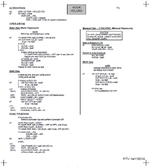
looking at some documents for the later flights, should the CBs on R14 for the CCTV system be closed before launch? This Cue Card from STS-118, under the Activation section just has you turn on the monitors and the control unit, nothing with the CBs.
 

Attachments

  • 1769037661449.png
    1769037661449.png
    153.1 KB · Views: 9
looking at some documents for the later flights, should the CBs on R14 for the CCTV system be closed before launch? This Cue Card from STS-118, under the Activation section just has you turn on the monitors and the control unit, nothing with the CBs.
In the Ascent checklist they are listed open (except the cabin camera, which I guess powered a camera in the flight deck for launch).
In the Post Insertion checklist, they are all closed at 59 minutes into the mission.
That checklist probably only refers to the on-orbit on/off operations, without the full "plug/unplug of the power socket".
 
In the Ascent checklist they are listed open (except the cabin camera, which I guess powered a camera in the flight deck for launch).
In the Post Insertion checklist, they are all closed at 59 minutes into the mission.
That checklist probably only refers to the on-orbit on/off operations, without the full "plug/unplug of the power socket".
I conveniently happened to miss that line in the PI checklist lol.
 
It doesn't CTD inside a SSV vessel, but inside Orbiter... possibly because of something done in a SSV vessel.... :cautious:
Could a bunch of Xenon_Lights be somehow overloading the lights logic in D3D9? Although they are off at the start of the scenario, they are still declared... I haven't really done much work in the vessels in the last few versions, so nothing else is standing out for me at the moment.
This is now something that is beginning to irritate me a lot. Is there anything I could on my end to help trace this down? And so far it only happens if I start with a pre-launch scenario. If I start with an on-orbit scenario, everything is very stable and good.
 
This is now something that is beginning to irritate me a lot. Is there anything I could on my end to help trace this down? And so far it only happens if I start with a pre-launch scenario. If I start with an on-orbit scenario, everything is very stable and good.

Do the v1.14 or v1.13 modules also produce the CTD?
Does the Xenon_Light presence make a difference?
 
Do the v1.14 or v1.13 modules also produce the CTD?
Does the Xenon_Light presence make a difference?
Removing the xenon lights make no difference.
 
And downgrading to even v1.13 yields no change in the CTD behavior.
 
Back
Top