Discussion Vessel cfg file : 'CollisionHull' parameter

N_Molson

Addon Developer
Addon Developer
Donator
Joined
Mar 5, 2010
Messages
10,002
Reaction score
4,418
Points
203
Location
Toulouse
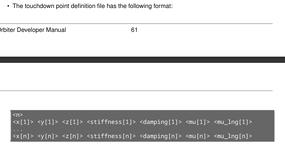
In the Orbiter Developer Manual (ed. 2024), section 7 - The vessel class configuration file, the following parameter is mentionned (page 60) :

1764637792382.png

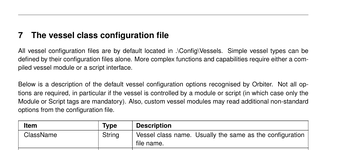
with the note being :

1764637852237.png

Has someone managed to get this working ? If yes, could you provide a simple example ?

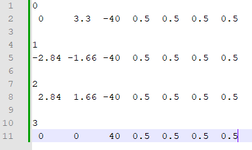
I made something like that, named as 'file.dat' :
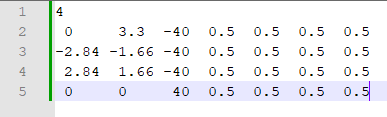
1764638334485.png

and in the cfg file :

CollisionHull = file
 

Attachments

  • 1764637761174.png
    1764637761174.png
    55.3 KB · Views: 4
  • 1764638173123.png
    1764638173123.png
    7.4 KB · Views: 6
Last edited:
This should be the same method of specifying touchdown points as Orbiter 2016 had.
 
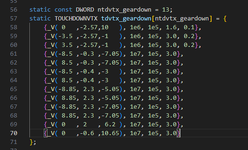
So, the idea is to 'translate' something like this (example from DeltaGlider.cpp) :

1764639006050.png

Into :

0 -2.57 10 1e6 1e5 1.6 0.1
3.5 -2.57 -1 1e6 1e5 3.0 0.2
etc...

and save the thing into a file.dat file ?

(it doesn't work)
 
Last edited:
CollisionHull = file
I've never done this specifically, but I would expect that this value must have the extension included (i.e. "file.dat"), but I'd really recommend naming it something more descriptive. Also, pay attention that the path seems to be relative to the config root folder the cfg is found in, not relative to the folder the cfg is in. So, for example, if your cfg is in <orbiter-dir>/config/myvessel, and file.dat is in the same folder, then the path needs to be "myvessel/file.dat".

Also, I would expect there to be some error in the log about the file not being found or being in an unreadable format when you load the cfg, but I guess that's not guaranteed.
 
We really need a working example, even a simple one defining a tetraedron (4 points). Else nobody will ever use this functionality, I can guarantee that.
 
be more specific, please

OK, let's try again.

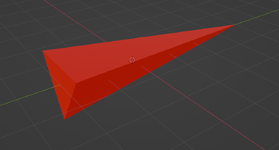
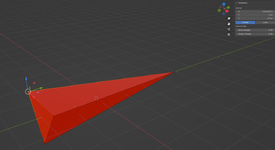
1. Here's TetraOne, my new rocket. It is a tetraedron, with the pointy end up. Nothing fancy.

1764876647838.png

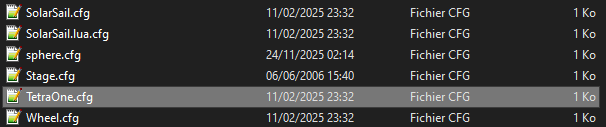
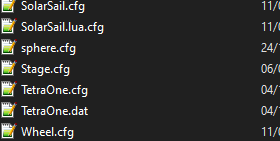
2. Once exported to TetraOne.msh, let's create a config (.cfg) file for that new vessel. It will be TetraOne.cfg. No special folder, again nothing fancy :

1764877066436.png

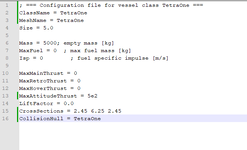
3. Now we fill the config file with the basics :

1764877193673.png

4. Let's fill TetraOne.dat :

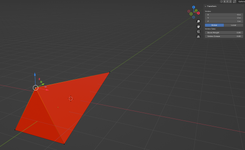
4.1. We retrieve the vertices coordinates from Blender (and we remember to swap y and z axis) :

1764877531053.png

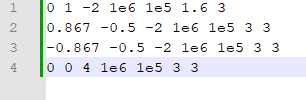
4.2. ... which gives us : (where we take suspension parameters from the DeltaGlider code and hope for the best)

1764879574558.png

1764880090986.png

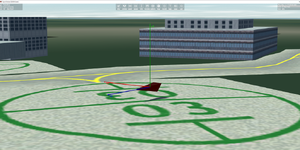
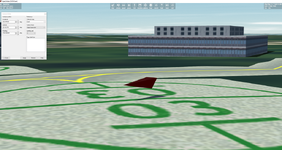
5. The pointy end (+Z) is not up :

1764881097486.png

So, it looks very much like CollisionHull doesn't work.

(see the TetraOne.zip attached archive).
 

Attachments

  • TetraOne.zip
    TetraOne.zip
    2.4 KB · Views: 2
  • 1764879872527.png
    1764879872527.png
    509.7 KB · Views: 3
  • 1764877436433.png
    1764877436433.png
    294.4 KB · Views: 0
Last edited:
  • Like
Reactions: GLS
OK, let's try again.

1. Here's TetraOne, my new rocket. It is a tetraedron, with the pointy end up. Nothing fancy.

View attachment 46017

2. Once exported to TetraOne.msh, let's create a config (.cfg) file for that new vessel. It will be TetraOne.cfg. No special folder, again nothing fancy :

View attachment 46018

3. Now we fill the config file with the basics :

View attachment 46019

4. Let's fill TetraOne.dat :

4.1. We retrieve the vertices coordinates from Blender (and we remember to swap y and z axis) :

View attachment 46021

4.2. ... which gives us : (where we take suspension parameters from the DeltaGlider code and hope for the best)

View attachment 46022

View attachment 46024

5. The pointy end (+Z) is not up :

View attachment 46027

So, it looks very much like CollisionHull doesn't work.

(see the TetraOne.zip attached archive).
Went to the code to see the logic, and I actually had some breakpoints in there already... don't remember why, but the function needs to have some log outputs when there is an error... it would probably help figuring this out faster.
Anyway, put in the first line of the file the number of points (I actually have that in the manual), to let's see if Orbiter likes the file.
 
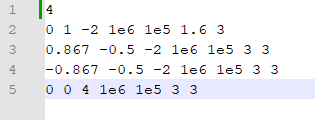
I tried this as TetraOne.dat, but no joy : (where '4' is the number of vertices/points).

1764889124860.png
 
Last edited:
I tried this as TetraOne.dat, but no joy : (where '4' is the number of vertices/points).

View attachment 46037
Added that to Carina, and the code loaded it without apparent issues. Then I let Carina fall from the sky, and it seemed like it had touchdown points when it reached the ground.... 🤷‍♂️
Can you try and put your vessel off the ground using Scenario Editor, and let it fall down to see what happens when it lands?
 
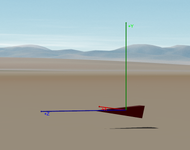
It snaps to this orientation as soon as it hits the ground. Seems very much like 'by default old touchdownpoints' kind of behavior.

1764892925479.png
 
It looks a bit confusing here, because the Blender view shows right-handed axis with +y as the main longitudinal axis (a.k.a. main thrust). Whereas Orbiter considers left-handed axes, with +Z as main thrust direction. On the last view, it seems that some touchdownpoints are at Y=-2 (or -4?).

Maybe you should try:
  • inverting 2nd and 3rd colum
  • multiplying 2nd colum value by -1
  • removing 7th column (?)
(EDIT: mmmmh, but you said you swap y and z....)
 
From memory:
blender <=> orbiter
+x <=> -x
+y <=> +z
+z <=> -y
 
It looks a bit confusing here, because the Blender view shows right-handed axis with +y as the main longitudinal axis (a.k.a. main thrust). Whereas Orbiter considers left-handed axes, with +Z as main thrust direction. On the last view, it seems that some touchdownpoints are at Y=-2 (or -4?).

Maybe you should try:
  • inverting 2nd and 3rd colum
  • multiplying 2nd colum value by -1
  • removing 7th column (?)
(EDIT: mmmmh, but you said you swap y and z....)

Yes, and I don't only said that, I did it. I think I've mastered this part of the process, given the complexity of the Ares V project I'm working on. @Blake Blender Tools automated the process, to be fair.

What would help a lot is to show me what works for you, and attach here a copy of the file. The test 'TetraOne' vessel and a test scenario are attached above, post #8.

From there I can generalize what works and what doesn't.
 
Last edited:
A quick test, and it all seems to work: https://c-cdn.streamin.top/uploads/ef8835fa.mp4

Added it using Scenario Editor (shows up upside down, which might be due to the order of the points), paused, added a few meters altitude, unpaused (and went back to 1x).

Vessel:
Code:
; === Configuration file for vessel class pyramid ===
ClassName = pyramid
MeshName = pyramid
Size = 2.0

Mass = 200; empty mass [kg]
MaxFuel = 0  ; max fuel mass [kg]
Isp = 0        ; fuel specific impulse [m/s]

MaxMainThrust = 0
MaxRetroThrust = 0
MaxHoverThrust = 0
MaxAttitudeThrust = 5e2
CameraOffset = -.715 .865 -2.5
CW = 10 10 5
LiftFactor = 0.0
CrossSections = 2.45 6.25 2.45
CollisionHull = pyramid

Mesh:
Code:
MSHX1
GROUPS 1
LABEL pyramid
MATERIAL 1
GEOM 16 6
1.0 0.0 1.0 -0.0 -1.0 -0.0
1.0 0.0 -1.0 -0.0 -1.0 -0.0
-1.0 0.0 1.0 -0.0 -1.0 -0.0
-1.0 0.0 -1.0 -0.0 -1.0 -0.0
1.0 0.0 1.0 -0.0 0.44718772172927856 0.8944059610366821
-0.0 2.0 -0.0 -0.0 0.44718772172927856 0.8944059610366821
-1.0 0.0 1.0 -0.0 0.44718772172927856 0.8944059610366821
-0.0 2.0 -0.0 -0.0 0.44718772172927856 -0.8944059610366821
1.0 0.0 -1.0 -0.0 0.44718772172927856 -0.8944059610366821
-1.0 0.0 -1.0 -0.0 0.44718772172927856 -0.8944059610366821
-0.0 2.0 -0.0 -0.8944059610366821 0.44718772172927856 -0.0
-1.0 0.0 1.0 -0.8944059610366821 0.44718772172927856 -0.0
-1.0 0.0 -1.0 -0.8944059610366821 0.44718772172927856 -0.0
1.0 0.0 1.0 0.8944059610366821 0.44718772172927856 -0.0
-0.0 2.0 -0.0 0.8944059610366821 0.44718772172927856 -0.0
1.0 0.0 -1.0 0.8944059610366821 0.44718772172927856 -0.0
12 11 10
13 15 14
8 9 7
3 1 0
6 4 5
3 0 2
MATERIALS 1
MATERIAL pyramid
1 1 1 1
1 1 1 1
0.9 0.9 0.9 1 20
0 0 0 1
TEXTURES 0

Hull:
Code:
5
1 0 -1 1e6 1e5 1.6 3
-1 0 -1 1e6 1e5 1.6 3
1 0 1 1e6 1e5 1.6 3
-1 0 1 1e6 1e5 1.6
0 2 0 1e6 1e5 1.6
 
4.1. We retrieve the vertices coordinates from Blender (and we remember to swap y and z axis) :

View attachment 46021

4.2. ... which gives us : (where we take suspension parameters from the DeltaGlider code and hope for the best)

View attachment 46022

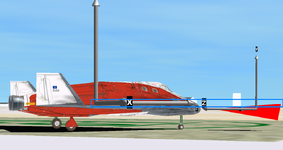
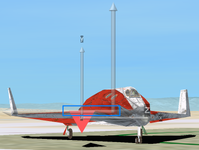
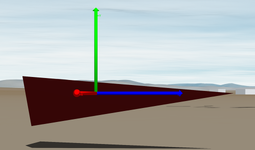
I don't think it comes from your .dat file as the mesh behaves quiet expected when falling from some height (hard to be sure, though). But I noted an unexpected coincidence with the default Delta-Glider, when both meshes are considered side-by-side:

horizontal plane (1).pnghorizontal plane (2).png

My interpretation is that
  1. your mesh's COG is the one of the Delta-Glider! (surprisingly similar heights as shown from blue rectangles) -> which may be a problem of configration of your vessel, as herited from DG's class, or worse a default value considered by Orbiter
  2. your COG (on Y-axis) is not in the middle of the mesh but, apparently, at the edge of the including box (right view, top of triangle aligned with DG's COG), which looks more like a Blender-to-Orbiter conversion problem
 
Last edited:
which may be a problem of configration of your vessel, as herited from DG's class, or worse a default value considered by Orbiter

1. It isn't. It has a config file, but no module. All I took from the DG code are the suspension parameters (stiffness etc...), that I pasted in the dat file.

2. Maybe @Blake (sorry to bother you) can clear this one ? But on my end, the vessel Center Of Gravity looks like it is at the geometric center of the mesh :

1765121841355.png
 
yes, you're right for the "COG" as the frame is centered on it. Still, the alignment of the edge with the Y coordinate of the DG's COG is really unexpected.
 
Last edited:
I could be wrong, but I have always treated (0,0,0) as the center of gravity for a vessel, not the mesh geometric center. Specifically, when I setup a thruster it pushes through (points at) this coordinate (0,0,0).

I also don't believe the collision hull definition controls the center of gravity.

--I have not read through this entire thread, so I hope this is helpful, I may be out in left field.
 
Back
Top