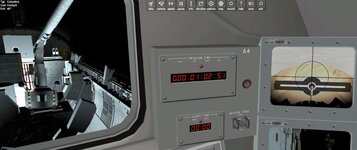
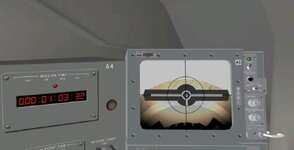
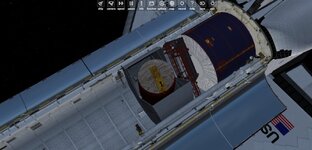
Ok. I was hoping just to attach it to the pdp to rms to check camera alignment.
What does it mean "Attached vessel does not match vessel in scenario data"
What does it mean "Attached vessel does not match vessel in scenario data"

ORBITER-FORUM will be temporarily closed at 2026-07-23 18:00 UTC while we complete some OF maintenance tasks. The amount of downtime is expected to take up to one hour, but probably less.

The grapple fixtures of the PFTA should be to spec, you can check your dimensions against them.Ok. I was hoping just to attach it to the pdp to rms to check camera alignment.
I means that the scenario parameters don't all match.What does it mean "Attached vessel does not match vessel in scenario data"


============================ ERROR: ===========================
Could not load vessel module: SSV_OV
[Vessel::LoadModule | .\Vessel.cpp | 5747]
===============================================================
000000.000: Finished initialising status
000000.000: Finished initialising camera
000000.000: Finished setting up render state
D3D9: ERROR: Base Object 0x2683F5C8 = 'Clavius Base' not cataloged
D3D9: ERROR: Base Object 0x268403E8 = 'Preary Base' not cataloged
D3D9: ERROR: Base Object 0x2775F178 = 'UCGO Base Europa' not cataloged
000000.000: D3D9: [Scene Initialized]
000000.000: oapi::Module::clbkSimulationStart
000000.000: [CRT]IMENSIONS: 1039 1039
000000.000: Finished initialising panels
D3D9: NewShader [MeshIdx-0]=4
D3D9: NewShader [SSV\OV\OV]=FFFF
000028.092: [CRT]
000029.093: [CRT]
000036.944: [CRT]
000065.135: [CRT]
000085.176: D3D9: [Session Closed. Scene deleted.]
000085.176: D3D9: [Destroy Render Window Called]
D3D9: ERROR: UnDeleted Surface(s) Detected
D3D9: ERROR: [Failed to Reset DirectX Device] (Likely blocked by undeleted resources)
============================ ERROR: ===========================
Parse error from base definition file for Cape Canaveral: Block: TEXn: expected 3 values (*char, scalar, scalar)
[BaseObject:arseError | .\Baseobj.cpp | 184]
===============================================================
============================ ERROR: ===========================
Parse error from base definition file for Cape Canaveral: Block: TEXn: expected 3 values (*char, scalar, scalar)
[BaseObject:
===============================================================
000000.000: BaseObject: Parse error 2
Which versions of Orbiter and SSV are you using?any idea why am I either getting CTD or mission starts but can't see Shuttle anymore at all ?
it's just a blank space. and I've never seen this before. everything loads fine but shuttle
and I believe I have everything installed.
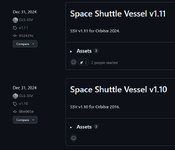
that's from read me, so I guess it's the latest* Changes from SSV v1.11 *
replaced dead Flight Data File page link with archived version
small code cleanup and corrections....
latest SSV I believe
and O2016
I've been thinking about this and I think the best way would be to externalize all systems stuff, VC elements included. Currently, everything is internal to the main SSV DLL module, which I think unnecessarily complicates things as things much exist both internally and externally at the same time. Once upon a time there was an add-on developer, Radu094, that came up with what I have always thought to have been a brilliant solution to this problem. It was called the "System&Panel SDK" which allowed for complex systems and at time, 2D panels, to be developed outside DLLs, in regular cfg files.Yes.
Initially I was thinking the alignment might not be good enough, but actually that might not work at all. The IECM vessel is already attached via a "parent" attachment (only one parent is allowed). When the vessel is attached directly to the PLB via the active latches, there is a "handover" between them and the RMS, thus working around this limitation.
I'll have to figure something out for this situation... thanks for catching it! Meanwhile you'll have to release the IECM from the pallet and then grapple it with the RMS.
The SPSDK is very interesting, and it is a shame it wasn't continued... maybe it could be integrated into GenericVessel or VesselBuilder or some other similar framework, to expand their capabilities.I've been thinking about this and I think the best way would be to externalize all systems stuff, VC elements included. Currently, everything is internal to the main SSV DLL module, which I think unnecessarily complicates things as things much exist both internally and externally at the same time. Once upon a time there was an add-on developer, Radu094, that came up with what I have always thought to have been a brilliant solution to this problem. It was called the "System&Panel SDK" which allowed for complex systems and at time, 2D panels, to be developed outside DLLs, in regular cfg files.
Unfortunately, it fell by the way side and was all but forgotten about. But the problems presented in this thread finally lead me to dig up Radu094's old site from 2005 (20 years ago) and thanks to the Wayback Machine, it can found archived here, with all the links working: https://web.archive.org/web/20060215040008/http://217.10.196.198/Orbiter/main.html
Would something like this work for SSV?
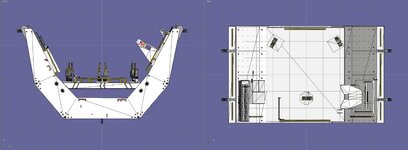
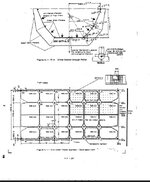
Search "Spacelab Payload Accommodation Handbook", and you'll find specs for the pallet and other parts of the SpaceLab system. The pallets were used as bases for other payloads, so those handbooks will only give info on the "basic pallet" without the extras that were mounted in them.Do we have specs for the Pallet? this is for STS51A
It should be on the 2 horizontal lines (the central ones) with the black dots.Thanks. Now just to figure where the trunnions fit
BASE_attach = CreateAttachment(true, _V(0, -.010, -0.02), _V(0, -1, 0), _V(0, 0, 1), "MMUFSS1", true);
Are you editing the scenario?I attach it in the scenario.