General Question Forcing Old Rockets to sit upright in orbiter 2024 (is there any hope?)

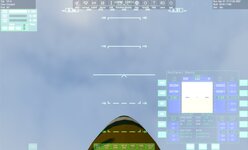
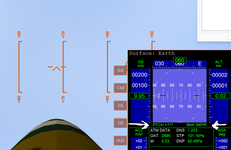
Not sure. I have adjusted the attachment and even though the rocket moves the hud/pitch are the same?

Maybe it needs to be redone in 2016 sdk?

Like I said I tried and got errors.
like this:
oapiWriteScenario_float (scn, "RANGE", Range);
'void oapiWriteScenario_float(FILEHANDLE,char *,double)': cannot convert argument 2 from 'const char [6]' to 'char *'
Hmm .. have you tried launching the rocket after you moved it even though the hud indicates no change?
 
Weird.
I get the rocket to pitch 90
but when I fire it up it ctd.
nothing really in the log.
not sure about this:
000000.000: Module v2pad.dll ............. [Build 250622, API 160828]
D3D9: ERROR: Large surface created Handle=0x1712D9E0 (9889560,9889588)

try this scn. the v2 cfg has been modified to add an attachment. K when focused on the base releases the rocket.

For 2016
 

Attachments

Weird.
I get the rocket to pitch 90
but when I fire it up it ctd.
nothing really in the log.
not sure about this:
000000.000: Module v2pad.dll ............. [Build 250622, API 160828]
D3D9: ERROR: Large surface created Handle=0x1712D9E0 (9889560,9889588)

try this scn. the v2 cfg has been modified to add an attachment. K when focused on the base releases the rocket.

For 2016
I don't get any CTD on my part. but the following happens:

If i select the rocket and just fire it either with O or NUM + - the engine starts and of course because it is attached after 2 or 3 seconds it explodes and transforms itself into the V2_wreck that is supposed to be when it hits it's target. This of course makes sense because it is attached to the base so i tried a different method:

Select the rocket press O - you have 7 seconds delay
Select the base and when the rocket engine starts i press K to "release" it from the base.

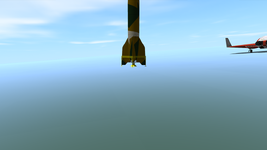
This worked well BUT for some reason the moment the rocket detaches itself from the base it almost instantly moves from 90 to about 70+ degrees and continues from there.
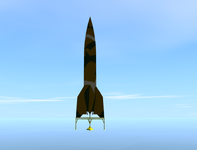
Also the rocket sits at an angle on the pad in 3rd person but i think it you know that already so it's not from my orbiter.

Can you make it sit straight on the pad even though the hud shows it not at 90 ? maybe that will work .. i have no idea
This is a crazy thing .. i thought it would be easier to fix 1750600985354.png
 
yes. in the scn the attachment values are there.
so make it this:
V2base:v2base
PL1_OFS 0.0000 1.5200 0.0000
PL1_DIR 0.0000 0.0000 1.0000
PL1_ROT 0.0000 1.0000 0.0000
 
yes. in the scn the attachment values are there.
so make it this:
V2base:v2base
PL1_OFS 0.0000 1.5200 0.0000
PL1_DIR 0.0000 0.0000 1.0000
PL1_ROT 0.0000 1.0000 0.0000

I think you did it !

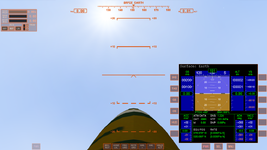
The rocket sits upright and the hud shows the right 90 degrees at least in my orbiter 2016 :)
I will test this further.

1750601928739.png
1750602384618.png
 
Last edited:
So i tested it and i ran into a small problem. The scenario that you have works well, the rocket launches into the right attitude and the autopilot does it's job BUT when i try to change location or even the heading of the launch the rocket just won't move and of course because of that the autopilot will fail.

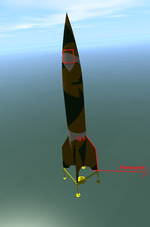
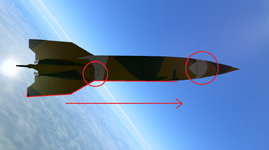
A bit of explanation: The V2 rocket does not have a Roll program so it needs to be fired more or less like an artillery round in the right direction.

In Orbiter it does the same and you can see which side or the rocket the autopilot considers to be "forward" if you look at these clues on the texture
1750612385567.png1750612397466.png


In the old Addon you could move the heading by changing the heading variable in the SCN editor or by simply rotating the rocket from the sim.

Now for your base here the scn editor is out of the question because the moment you move it it glitches out.
It doesn't matter too much because most of the time you will insert the heading in the scenario file but when i go into the scenario file i see conflicting stuff here

1. Now i have to set the base and the rocket's heading because both are linked together however in your scenario headings do not have the same value:
V2-6:V2i
HEADING 323.47

V2base:v2base
HEADING 329.99

2. No matter what heading i insert in those two even if i account for the differences between them, the base and rocket won't turn in real life.
Here is a quick test i did: i put a DG in front of me, looked at the heading,
Exit the scenario and change the heading to 90 degrees or so the dg should now be to my left or right but as you can see from the screenshots the DG is still in front of me, which means that the base and the rocket didn't rotate.
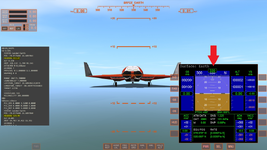
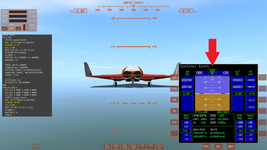
1750612453402.png1750612472872.png

So my question is how do i rotate the rocket in order to aim it in this case?
What variables do i need to change in the SCN?

 
Try this new base. Fixed the moving the base.
V2base:v2base
PL1_OFS 0.0000 3.0000 0.0000
PL1_DIR 0.0000 0.0000 1.0000
PL1_ROT 0.0000 1.0000 0.0000
STATUS Landed Earth
POS -78.9776380 26.6896960
HEADING 18.99
ALT -1.213
AROT 56.007 -12.969 11.145
AFCMODE 7
NAVFREQ 0 0
XPDR 0
END
changed the attachment offset

so really you just need to change the attachment and the ALT
 

Attachments

Try this new base. Fixed the moving the base.
V2base:v2base
PL1_OFS 0.0000 3.0000 0.0000
PL1_DIR 0.0000 0.0000 1.0000
PL1_ROT 0.0000 1.0000 0.0000
STATUS Landed Earth
POS -78.9776380 26.6896960
HEADING 18.99
ALT -1.213
AROT 56.007 -12.969 11.145
AFCMODE 7
NAVFREQ 0 0
XPDR 0
END
changed the attachment offset

so really you just need to change the attachment and the ALT
I tried the new version and now the base moves with the heading you insert in the scenario editor but:
1750629444514.png

we are back to square one sadly.
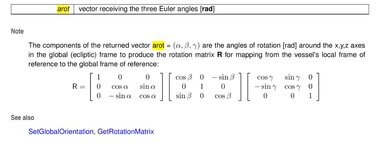
However i kind of managed to make the first version to work by changing the AROT variable for the v2base.. turns out that's that turns the rocket and base. The hard part is finding the correct values for it.
Not sure probably there is a way of calculating it, if so i would love to know so i can make myself a nice excel sheet.

Man, thx for trying to fix this old addon, :hailprobe:
 
Can you send a scenario. So my turning the V2base and rocket via Scenario editor doesn't work?
 

Attachments

  • arot1.jpg
    arot1.jpg
    47.8 KB · Views: 4
Can you send a scenario. So my turning the V2base and rocket via Scenario editor doesn't work?
In the second update that you gave me the "version2" you can move the base from the ingame scenario editor however the rocket is still banked like i showed in the picture above.
Maybe i will record a video of it so you can actually see what is going on on my screen.
 

Attachments

Not sure. In the scenario editor you can adjust the AROT. but it didn't seem to do anything about the pitch,....... And it might not because it is landed.


If the pitch needs to be 90. Either adjust via attachment or flat area. Or redo the code for 2016/2024 maybe it would fix it?
 
Not sure. In the scenario editor you can adjust the AROT. but it didn't seem to do anything about the pitch,....... And it might not because it is landed.


If the pitch needs to be 90. Either adjust via attachment or flat area. Or redo the code for 2016/2024 maybe it would fix it?
Yeah.. it's not a fast fix for this one it seems.
I can make it work (kind of) by editing the SCN file directly. I copy the AROT values from another parked vessel that sits nice and flat on the ground and in the right heading that i need. Thx for trying and for the base, another hail probe for ya.:salute::hailprobe:
 
Back
Top