Problem Sikorsky R4 in C++ (port from Lua)

Ok. I got everything working except the Autopilot.

In my version it moves up and down and the scripted in remains steady?

The code looks similar to the lua? in the image the y goes to about 5 and then -5. collective goes up and down

void R4::SetAutopilot_Altitude() {

VECTOR3 airspdvec;

if (altitude_hold == 1) {

//Proportional error


double altitude = GetAltitude(ALTMODE_MEANRAD);

double propoportional_error = altitude_target - altitude;
// sprintf(oapiDebugString(), "target %f alt %f", altitude_target,altitude);
//Derivative error

GetAirspeedVector(FRAME_LOCAL, airspdvec);
double derivative_error = airspdvec.y;

sprintf(oapiDebugString(), "target %f alt %f y %f", altitude_target, altitude, derivative_error);


//calculate control response using PD gains determined by Ziegler-Nichols tuning method.

double Ku = 0.84; //Ultimate gain
double Tu = 2.73; //Ultimate period (s)

double Kp = 0.8 * Ku;
double Kd = 0.125 * Tu;

collective_input = Kp * propoportional_error + Kd * derivative_error;

SetThrusterGroupLevel(THGROUP_HOVER, collective_input);

}

}

lua
local set_autopilot = {}

function set_autopilot.altitude()

if altitude_hold == true then

--Proportional error

local altitude = vi:get_altitude(ALTMODE.MEANRAD)
local proportional_error = altitude_target - altitude

--Derivative error

local derivative_error = -vi:get_airspeedvector(REFFRAME.LOCAL).y

--calculate control response using PD gains determined by Ziegler-Nichols tuning method.

local Ku = 0.84 --Ultimate gain
local Tu = 2.73 --Ultimate period (s)

local Kp = 0.8*Ku
local Kd = 0.125*Tu

collective_input = Kp * proportional_error + Kd * derivative_error

vi:set_thrustergrouplevel(THGROUP.HOVER, collective_input)

end

end

return set_autopilot
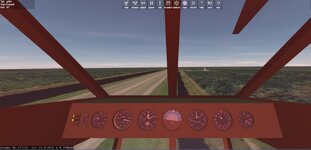
 

Attachments

  • copterap.jpg
    copterap.jpg
    54.4 KB · Views: 4
Not sure how to fix the AP.
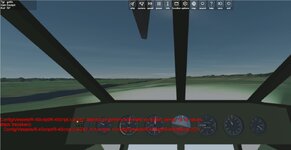
Also this error showed up in the lua scripted copter

In the scripted copter the collective moves very slow up/down to keep the ALT..

I don't know enough about LUA to edit the LUA script to display the values to see where I am going wrong
 

Attachments

  • alterror1.jpg
    alterror1.jpg
    52.8 KB · Views: 4
  • luascript.jpg
    luascript.jpg
    48 KB · Views: 4
Also this error showed up in the lua scripted copter
Can you post the Orbiter.log file when this occurs? The screen errors are not necessarily the originating errors, but something that failed because of another error. If you reload a scenario, sometimes if fails with spurious errors like this. Not sure exactly why this occurs, or if this is the problem you are having.
In the scripted copter the collective moves very slow up/down to keep the ALT..
I don't see anything obvious. Note that the controller function behavior is also influenced by the vessel mass and the thruster definitions. If any of that is incorrect the controller won't behave appropriately. Also, it is a very rudimentary autopilot meant to assist in hover. If you attempt to use it while maneuvering you may get some strange results.
I don't know enough about LUA to edit the LUA script to display the values to see where I am going wrong
You can use oapi.dbg_out(output_string) to output debugging info to the lower left corner of the screen.
 
Can you post the Orbiter.log file when this occurs? The screen errors are not necessarily the originating errors, but something that failed because of another error. If you reload a scenario, sometimes if fails with spurious errors like this. Not sure exactly why this occurs, or if this is the problem you are having.

I don't see anything obvious. Note that the controller function behavior is also influenced by the vessel mass and the thruster definitions. If any of that is incorrect the controller won't behave appropriately. Also, it is a very rudimentary autopilot meant to assist in hover. If you attempt to use it while maneuvering you may get some strange results.

You can use oapi.dbg_out(output_string) to output debugging info to the lower left corner of the screen.
Thanks
I know nothing of Lua. so no idea how to add that line in.
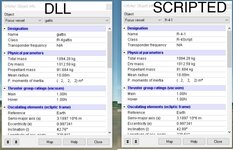
Mass and thrust seem to be the same.
 

Attachments

  • SCRIPTEDMASS.jpg
    SCRIPTEDMASS.jpg
    101.6 KB · Views: 1
Thanks
I know nothing of Lua. so no idea how to add that line in.
You just type that in the main script in clbk_prestep or clbk_poststep and set the string equal to whatever you want to print out. No compiling needed. You then just fire up the scenario in Orbiter.
 
Thanks.
I added this:

function clbk_prestep(simt,simdt,mjd)

--Get flight control inputs
oapi.dbg_out(target alt %f alt %f propoportional_error %f derivative_error %f", altitude_target, altitude, propoportional_error,derivative_error)

in the log:
000067.214: ============================ ERROR: ===========================
000067.214: Config/Vessels/R-4Script/R-4Script.lua:230: ')' expected near 'alt'
stack traceback:
[C]: in function 'dofile'
./Script/oapi_init.lua:33: in function 'run_global'
[string "line"]:1: in main chunk
000067.215: [Interpreter::LuaCall | D:\a\orbiter\orbiter\Src\Module\LuaScript\LuaInterpreter\Interpreter.cpp | 98]
000067.215: ===============================================================
 
Thanks.
I added this:

function clbk_prestep(simt,simdt,mjd)

--Get flight control inputs
oapi.dbg_out(target alt %f alt %f propoportional_error %f derivative_error %f", altitude_target, altitude, propoportional_error,derivative_error)

in the log:
000067.214: ============================ ERROR: ===========================
000067.214: Config/Vessels/R-4Script/R-4Script.lua:230: ')' expected near 'alt'
stack traceback:
[C]: in function 'dofile'
./Script/oapi_init.lua:33: in function 'run_global'
[string "line"]:1: in main chunk
000067.215: [Interpreter::LuaCall | D:\a\orbiter\orbiter\Src\Module\LuaScript\LuaInterpreter\Interpreter.cpp | 98]
000067.215: ===============================================================
You need to either use proper Lua string formatting or simply put in the single variable that you want to see the output for.

Lua syntax can be found on the internet if you look for it. That's how I figured it out.
 
So on the LUA:
000034.653: Config/Vessels/R-4Script/R-4Script.lua:242: attempt to perform arithmetic on global 'power' (a nil value)
stack traceback:
Config/Vessels/R-4Script/R-4Script.lua:242: in function <Config/Vessels/R-4Script/R-4Script.lua:227>
000034.653: [ScriptVessel::LuaCall | D:\a\orbiter\orbiter\Src\Vessel\ScriptVessel\ScriptVessel.cpp | 262]

I was able to do this:
oapi.dbg_out(derivative_error)

How to show more than 1 value? l

and they look like what I get to in the dll

It seems to go wild drastic changes with the target and target hold are the same?

Tried to figured out what this variable does?
oapiWriteScenario_float(scn, ch_collective, main_rotor_spec.prop_eff);

In the dll version when save the value is 0.0000 but when you load the value is the hover thrust level.
 
So here is the dll copter when the AP is applied.
When the target gets near the target hold the collective/hover goes minus,....

propoportional_error = altitude_target - altitude;
derivative_error = airspdvec.y;
collective_input = Kp * propoportional_error + Kd * derivative_error;
slowed the time down


trying to get the scrip to display the same:
but I get this on screen:
000455.681: Config/Vessels/R-4Script/Modules\set_autopilot.lua:30: bad argument #4 to 'format' (number expected, got nil)
stack traceback:
[C]: in function 'format'
Config/Vessels/R-4Script/Modules\set_autopilot.lua:30: in function 'altitude'
Config/Vessels/R-4Script/R-4Script.lua:271: in function <Config/Vessels/R-4Script/R-4Script.lua:227>
000455.681: [ScriptVessel::LuaCall | D:\a\orbiter\orbiter\Src\Vessel\ScriptVessel\ScriptVessel.cpp | 262]
in the script I have:
local formatted = string.format("altitude_target %f, altitude %f, propoportional_error %f,derivative_error %f,collective_input%f",altitude_target, altitude, propoportional_error,derivative_error,collective_input)
print(formatted)
 
Last edited:
propoportional_error = altitude_target - altitude;
derivative_error = airspdvec.y;
collective_input = Kp * propoportional_error + Kd * derivative_error;
You're flying backwards at a very high speed. The derivative_error is based on local y velocity assuming that you are nearly stationary laterally relative to the horizon and just want to control vertical airspeed.

You can try getting the y velocity coordinate in the horizontal reference frame (REFFRAME.HORIZON)
instead of local vessel coordinates.
 
Thanks
I did this:
GetAirspeedVector(FRAME_HORIZON, airspdvec);
double derivative_error = airspdvec.y;

really no change. Not sure why when the target gets near the target hold it drops the collective,....
 
This is what I have so far. You need the r4 scripted. Same commands.

I might try to see if it works in 2016.

So try to redo some other copters of mine
 

Attachments

Code conversion. from 2024 to 2016
in 2024 material setting to 2016. The indicator lights are no emmissive when off and change the emmissive to bright when on.

But when I change the value the lights are white and not yellow. And when off they go transparent
void R4::SetPretty_StatusLights() {
//

lights_mat.emissive.r = 0;
lights_mat.emissive.g = 0;
lights_mat.emissive.b = 0;

lights_mat1.emissive.r = 1;
lights_mat1.emissive.g = 1;
lights_mat1.emissive.b = 0;

VECTOR4 emissive_off = { 0.0, 0.0, 0.0, 1.0 };
VECTOR4 emissive_on = { 1.0, 1.0, 0.0, 1.0 }; //yellow

if (engine_on == 1) {


if (hdevmesh0) oapiSetMaterial(hdevmesh0, 1, &lights_mat1);//yellow light on

}
else if (engine_on == 0) {

if (hdevmesh0) oapiSetMaterial(hdevmesh0, 1, &lights_mat);//yellow light off

}
 
Back
Top