
Hud problem with Shuttle fleet

Ender

New member
Joined
Oct 1, 2013
Messages
14
Reaction score
0
Points
0
Hello, fellow space travelers.

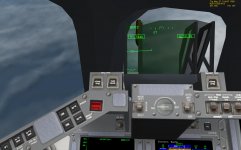
I've discoverd a problem in the cockpit of the shuttle fleet shuttle.

There are two HUD's overlapping each other.
Also, objects behind the transparancy are invisible, witch makes the hud unusable.

Is this a known problem ? ,and so.....is there a solution ?

I've attached a screenshot, hope that worked out... (first time).

Thanks already !
 

Attachments

  • Shuttle fleet hud problem.jpg
    Shuttle fleet hud problem.jpg
    122 KB · Views: 71
This is a new one for me.
What are your graphics setting? What is you graphics card?
 
Thanks for the interest and the reply PhantomCruiser

Gforce GTX 680, using D3D9 client.
Nvidea setting is "quality" (tried other settings but.. no joy)

D3D9 settings AA is None, anisotropic to 8x.
I did also try without D3D9 But the trouble remains.

If I start the standard shuttle "Atlantis" the cockpit is Oke, so it must be related to the cockpit grafics of shuttle fleet it seems.

I' think i will reinstall, and see where it go's wrong.

Tanks again
 
Thanks for the interest and the reply PhantomCruiser

Gforce GTX 680, using D3D9 client.
Nvidea setting is "quality" (tried other settings but.. no joy)

D3D9 settings AA is None, anisotropic to 8x.
I did also try without D3D9 But the trouble remains.

If I start the standard shuttle "Atlantis" the cockpit is Oke, so it must be related to the cockpit grafics of shuttle fleet it seems.

I' think i will reinstall, and see where it go's wrong.

Tanks again

I would indeed re-install the latets version of the shuttle fleet. Maybe an other add-on has messed up the mesh.
 
Did new install 1- Orbiter, 2-Orbiter sound, 3- D3D9 client, 4- shuttle fleet.

So no addons that i don't need for shuttle....still same problem.....giving up, just not using VC that much anymore.

Just a question out of curiossity : if you guys go in VC shuttle fleet and take the position of the flight engineer, do you see double hud structures with commander and pilot ??
 
Go to video tab in the launchpad...
press the advanced button in the lower right...
uncheck 'Disable near clip plane compatibility mode'
 
Well i be .......Thanks very much, how did you find out that one ???

That did the trick,
It would have taken a long time to figure that one out by my self (allready gave up), specially because i could have sworn that i disabled the D3D9 client and still had the problem.:idk:

Anyway

Thanks a lot :cheers:
 
Well i be .......Thanks very much, how did you find out that one ???

Came across that back when I was testing out one of the D3D9 builds, dont remember which one exactly but yeah, the SF mesh doesnt play well with that box checked.

:cheers:
 
I actually seem to have this problem too. But for some reason, my launchpad doesn't show the advanced button. :shrug:

raoq6a.png
 
You need the D3D9 client for Orbiter.
 
Thanks! That just made Orbiter look a whole lot better.

However, this actually seems to be an unrelated issue.

For me, the HUD only appears "double" when seen "mid-deck." From either the Commander or Pilot's seat it looks fine. I tried on a clean install, and it did the same thing. So maybe it was always like this and I'm just noticing it now? It's not a big deal anyways, since it looks fine from the pilot seats.

The default shuttle doesn't have this issue though.

zxqszb.jpg
 
Back
Top