OHM Universal Autopilots 0.3.1

That could be a step forward towards AI-controlled vessels... :hmm:
Not a bit. These are execution autopilots. AI require determination of actions - an intelligence core. I.e. where to fly, not how.

Just one thing about the docking AP, I think that the docking numbers are out of sync: :huh:
For instance, dock port 1 become 0. If you want to dock with/use dock port 2, you have to enter 1.
Correct, there are 2 ports - 0 and 1. What's wrong with that?
 
Correct, there are 2 ports - 0 and 1. What's wrong with that?

the problem is that the Orbiter's GUI selection of docking ports starts at 1, yours starts at 0, so you could do with subtracting 1 from the input value, so Orbinauts can use the same docking ports that Orbiter gives them, now What Orbiter uses itself
 
-2 DGs race from KSC to the Moon station.scn, long fun

100x acel causes them to go wildly out of control and crash (was done in atmo just a few seconds after becoming airborne.

DGs start out off to the left of the runway, not on the runway.

I've seen this before, and I saw somewhere that in 2010 P1 the Lat/Long of KSC was shifted slightly...
 
I was waiting for a "tool" like this since long time...
Just... OUTSTANDING!!!:thumbup:

I'm testing the Runway take-off with my favourite vessels, the XRs.

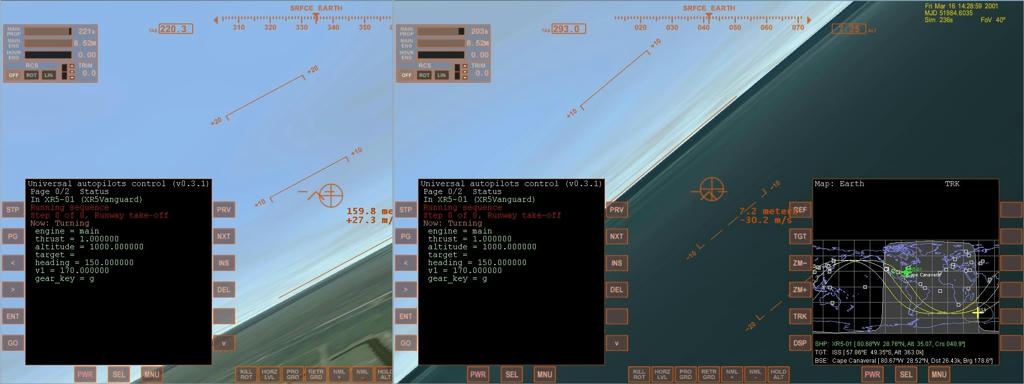
While with XR1 and XR2 UAP Runway seems OK, XR5 crashes on ground during heading turn, due to a negative pitch.

I used the standard XR5 to ISS scenario, no time acceleration.
 
...DGs start out off to the left of the runway, not on the runway.
I've seen this before, and I saw somewhere that in 2010 P1 the Lat/Long of KSC was shifted slightly...
That's because you probably installed [ame="http://orbithangar.com/searchid.php?ID=2811"]Hi-res Kennedy Space Center[/ame], which has corrected coordinates, and the scenario you load was saved on a system without it.
Just go into the Scenario editor and modify you location.
 
@ArtLav: Loving it man, but I notice one this that I think (like I know what I'm talking about, NOT!) should be easy to do. AP docking vectors sideways toward the docking port, often making it pass though parts of the ISS or other space station, and overall not being "prototypical".

How hard would it be to make it approach a point that is 100m directly out from the docking port and then have it fly straight ahead and dock?

Maybe it's crazy hard, I don't know....

@Ripley: I have

Vanilla Orbiter 2010 P1
Thortons ISS (w/ TMA and Progress)
Thortons Soyuz Launch Vehicle (Proton? can't remember)

That's all...

EDIT-UPDATE- I just checked and did the following. Started built in Shuttle Atlantis and the 2 DG race scenarios in my regular install, then with Hi-Res KSC, then with Oribiter "repaired" by the installer. Each time LC39 and the Runway were in the same location. Each time the shuttle (default one, not the 4.7 one) was on the pad, each time the DG was off to the side from the runway.

 
Last edited:
Hey,

First off, outstanding work on this autopilot! :)

I've noticed a behavioral feature here, though:

1. UAP does not check vessel state for active legacy autopilots (re: prograde, retrograde, normal+/-, etc).

2. UAP and the legacy autopilot will fight each other to RCS tank exhaustion for control of the vessel.

I discovered this behavior while pretending to be a moron after orbital insertion and forgetting to turn prograde mode off on the stock AP. :thumbup:
 
Does this expose an API to be used as the autopilot for other MFDs? It'd be very handy if it did so that others (meaning me for the time being) could just call PointMyShipInThisDirection() and not worry about how it actually did it, thus freeing up their (read: my) time to work on the guidance
 
Does this expose an API to be used as the autopilot for other MFDs?
It is an API for making autopilots, technically you can register a common class in your MFD as an autopilot, and use it that way. Not exactly what it was designed for.

A way for another MFD to define and trigger a sequence can easily be provided (UAP MFD does just that), but i don't think it would be a nice thing to have - several MFDs can fight for that, for example.

the problem is that the Orbiter's GUI selection of docking ports starts at 1, yours starts at 0
Ok, that is fixable.

100x acel causes them to go wildly out of control and crash (was done in atmo just a few seconds after becoming airborne.
Well, Duh.

DGs start out off to the left of the runway, not on the runway.
Old scenarios, to be updated for O2010P1 coordinates. Didn't notice that in the dark.

How hard would it be to make it approach a point that is 100m directly out from the docking port and then have it fly straight ahead and dock?
Quite exactly what it does, only 10m away. The problem with 100m is that even if it's much closer it would still go there, and there still would be situations that make it pass through the station, or stations larger than 100m.
I see no improvements from such change.

UAP does not check vessel state for active legacy autopilots (re: prograde, retrograde, normal+/-, etc).
A car does not check if the brakes are pressed when throttle is floored. Resulting damage is a responsibility of the user who decided to try what would happen. :)

I don't think forcing all autopilots off would be a good idea, makes for less generality.
 
Ok, I thought the AP locked out unsafe Time Accel amounts, my bad :facepalm:

Could you (would you) make that 10m distance for docking a variable we can change in the AP, if we wanted to?
 
Quite exactly what it does, only 10m away. The problem with 100m is that even if it's much closer it would still go there, and there still would be situations that make it pass through the station, or stations larger than 100m.
I see no improvements from such change.

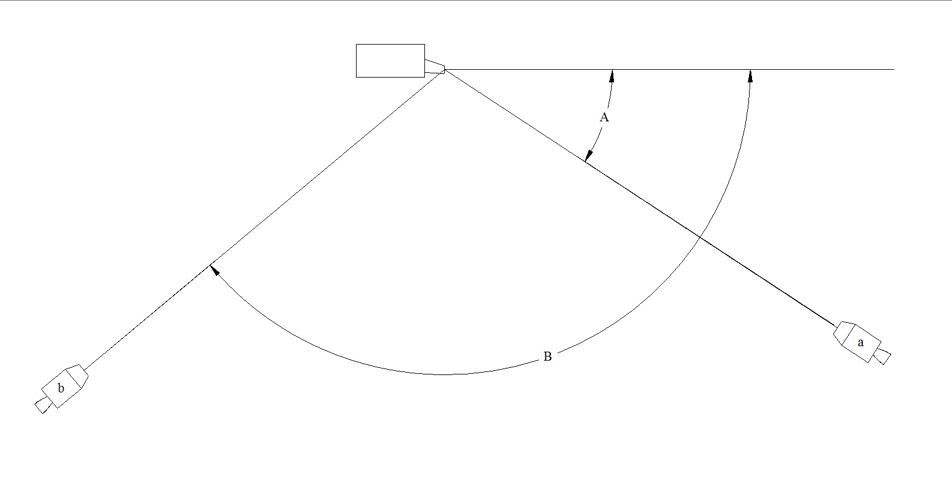
How about using the angle between the approaching craft and the docking centerline to determine the point that the AP is aiming for.
DAng.jpg


Craft b will aim for a point further out then craft a. There are a few ways you could calculate the distance required.
If the angle is < 60° 10m distance is fine.
If it's 60°<Angle>120° use 50m. (Maybe scaled 10-50 proportional to the angle)
If it's >120°, fly parallel to centerline until A<120°.

The exact values are subject for testing. The AP would work exactly the same way, only with varying distance for the initial aiming point.

IDK how easy it is to calculate this angle, but it should avoid the "collisions" that make most Orbiteer's skin crawl. :lol:

---------- Post added at 05:32 PM ---------- Previous post was at 05:21 PM ----------

PS: Just my suggestion for a possible future v1.0 :)

Excellent addon!!! :10sign:
 
Ok, I thought the AP locked out unsafe Time Accel amounts, my bad :facepalm:
It locks out guaranteed unsafe accelerations, but does not always lock out borderline unsafe ones. If you have low FPS, these may be a problem.

Also, there is a mode that prevents time acceleration control at all, you could have accidentally activated it (Shift+A twice or so).

How about using the angle between the approaching craft and the docking centerline to determine the point that the AP is aiming for.
Nice idea, i'll try how that looks.
 
Am I the only one to experience this land crash with XR-5?

897b7976591e21bb995243319f688992d61c27b92ed21fb0eca3fc2560c96e596g.jpg
 
How does UAP calculate gains for atmospheric flight? Can they be made tunable?
 
Hello Artlav,

Is it possible, that AP does stop itself if orbiter shut down? Sometimes I forgot to stop it
befor closing, or orbiter shut down by itself, then at the next start the program is running
and I have to stop and start again.
The next thing I miss is in the Hohmann-program. Will be nice, if you can make more
input-options for the target-object-orbit. Inc. Lan. Alt. etc. And maybee a possibility to choose if I want go a cw- or ccw-orbit.
That will be nice. Great MFD :thumbup:
 
How does UAP calculate gains for atmospheric flight? Can they be made tunable?
Guesstimations. Probably yes.

Is it possible, that AP does stop itself if orbiter shut down? Sometimes I forgot to stop it
befor closing, or orbiter shut down by itself, then at the next start the program is running
and I have to stop and start again.
Why? It should restarts from the same place it stopped at. What problems arise? Why stop and restart?


The next thing I miss is in the Hohmann-program.
Only planet-to-satellite is available now, and no target orbit parameters. On the list.
 
Congratulations on your PA.
Hello, Error if anyone has detected when there Docking ports outside and away from the longitudinal line and backward.
Shown: Sequence error relative velocity is to fast .
 
Last edited:
Congratulations on your PA.
Hello, Error if anyone has detected when there Docking ports outside and away from the longitudinal line and backward.
Shown: relative error is to fast error relative is to fast.
Huh?
 
Hi, I got a littkle problem with this addon.

I'm trying desperately to use the sync orbit function on shuttle fleet to bring the bird to the ISS.

But it's always "can't find any solutioon"

My settings are all default, and the TGT Distance is from 100 to 500 in all my tests.

The AP never starts. Whay shoult I do before getting mad ???

Is there a particular point when we got to star it, or can we just set it, press go and wait, like with IMFD....

Thanks in advance. If I continue to miss the ISS, i'm gonna kill someone...
 
Problem solved, reinstating

dockerror.jpg
Sequencerror.jpg
 
Last edited:
Back
Top