FlatAreaWizard is a tool designed to remove the guesswork from the terrain flattening feature that comes with the D3D9 client for Orbiter2016.
The tool doesn't flatten the terrain by itself, but provides a visual representation of the terrain to be flattened and then writes the relative
information to an .flt file that is used by the D3D9 client.
Here is a video demonstration of how it works.
The first version was created after DaveS' request posted here.
Installation
1. Download the FlatAreaWizard zip file.
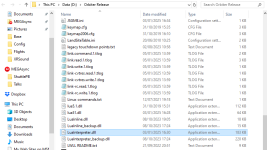
2. Extract the contents to your Orbiter root directory
(Note that the following files will be overwritten by newer versions).
.\LuaInterpreter.dll
.\LuaInline.dll
.\Modules\Plugin\LuaConsole.dll
.\Modules\Plugin\LuaMFD.dll
(The files above extend the Lua API with access to many additional Orbiter API functions)
Usage
1. Run Orbiter_ng.exe
2. Go to the Modules Tab and make sure that the D3D9Client and the LuaConsole boxes are checked.
3. Go to Visual effects Tab and make sure that Surface elevation, using linear interpolation is checked.
4. Run any scenario you want and set the focus to a landed vessel near the area you want to flatten.
5. Press Ctrl-F4 and double click on LuaConsole in the popup window.
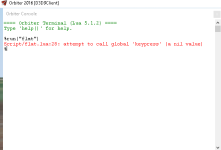
6. In the LuaConsole window type: run("flat") and close the window.
All set!
The tool is now running. Follow the instructions on screen to flatten the area you want.
There are several changes/additions since the first version, the main ones are below.
-The script creates the tool for you, no need to use the scenario editor.
-You can have multiple flattening tools in a single scenario.
-You can move the tool with the numpad keys (for a complete list of keys used see below and also in the Doc\FlatAreaWizard\FlatAreaWizard.txt file).
-You can directly set the flat area dimensions by pressing the BackSpace key.
-You can toggle between a Rectangle or Ellipse with the F11 key.
-Help text with keys on screen (toggle-able with H key)
Keys:
NUMPAD8 = Move Forward 10 meters,
CTRL-NUMPAD8 = Move Forward 1 meter,
NUMPAD2 = Move Back 10 meters,
CTRL-NUMPAD2 = Move Back 1 meter,
NUMPAD4 = Move Left 10 meters,
CTRL-NUMPAD4 = Move Left 1 meter,
NUMPAD6 = Move Right 10 meters,
CTRL-NUMPAD6 = Move Right 1 meter,
NUMPAD7 = Rotate Left 1°,
CTRL-NUMPAD7 = Rotate Left 0.1°,
NUMPAD9 = Rotate Right 1°,
CTRL-NUMPAD9 = Rotate Right 0.1°,
W = increase Length/Major by 1 meter,
SHIFT-W = Decrease Length/Major by 1 meter,
CTRL-W = Increase Length/Major by 10 meters,
ALT-W = Decrease Length/Major by 10 meters,
A = Increase Width/Minor by 1 meter,
SHIFT-A = Decrease Width/Minor by 1 meter,
CTRL-A = Increase Width/Minor by 10 meters,
ALT-A = Decrease Width/Minor by 10 meters,
BACKSPACE = Enter Length - Width manually,
E = Increase Height,
Q = Decrease Height,
F11 = Toggle RECT/ELLIPSE,
F12 = Commit changes to flt file,
H = Toggle Help Screen
Many thanks to Orbiter Forum user "kuddel" for his kind permission to redistribute the LuaScriptPlus dll files for Orbiter 2016.
Also many thanks to DaveS who made the request for the creation of a flattening tool. This was a fun project for me and something that I thought was needed.
This thread was created for testing purposes. If users find the tool useful and there are no major bugs, I will post it as an addon.
If you have the first version of the tool, simply overwrite the files when you unzip the FlatAreaWizard.zip
The tool doesn't flatten the terrain by itself, but provides a visual representation of the terrain to be flattened and then writes the relative
information to an .flt file that is used by the D3D9 client.
Here is a video demonstration of how it works.
The first version was created after DaveS' request posted here.
Installation
1. Download the FlatAreaWizard zip file.
2. Extract the contents to your Orbiter root directory
(Note that the following files will be overwritten by newer versions).
.\LuaInterpreter.dll
.\LuaInline.dll
.\Modules\Plugin\LuaConsole.dll
.\Modules\Plugin\LuaMFD.dll
(The files above extend the Lua API with access to many additional Orbiter API functions)
Usage
1. Run Orbiter_ng.exe
2. Go to the Modules Tab and make sure that the D3D9Client and the LuaConsole boxes are checked.
3. Go to Visual effects Tab and make sure that Surface elevation, using linear interpolation is checked.
4. Run any scenario you want and set the focus to a landed vessel near the area you want to flatten.
5. Press Ctrl-F4 and double click on LuaConsole in the popup window.
6. In the LuaConsole window type: run("flat") and close the window.
All set!
The tool is now running. Follow the instructions on screen to flatten the area you want.
There are several changes/additions since the first version, the main ones are below.
-The script creates the tool for you, no need to use the scenario editor.
-You can have multiple flattening tools in a single scenario.
-You can move the tool with the numpad keys (for a complete list of keys used see below and also in the Doc\FlatAreaWizard\FlatAreaWizard.txt file).
-You can directly set the flat area dimensions by pressing the BackSpace key.
-You can toggle between a Rectangle or Ellipse with the F11 key.
-Help text with keys on screen (toggle-able with H key)
Keys:
NUMPAD8 = Move Forward 10 meters,
CTRL-NUMPAD8 = Move Forward 1 meter,
NUMPAD2 = Move Back 10 meters,
CTRL-NUMPAD2 = Move Back 1 meter,
NUMPAD4 = Move Left 10 meters,
CTRL-NUMPAD4 = Move Left 1 meter,
NUMPAD6 = Move Right 10 meters,
CTRL-NUMPAD6 = Move Right 1 meter,
NUMPAD7 = Rotate Left 1°,
CTRL-NUMPAD7 = Rotate Left 0.1°,
NUMPAD9 = Rotate Right 1°,
CTRL-NUMPAD9 = Rotate Right 0.1°,
W = increase Length/Major by 1 meter,
SHIFT-W = Decrease Length/Major by 1 meter,
CTRL-W = Increase Length/Major by 10 meters,
ALT-W = Decrease Length/Major by 10 meters,
A = Increase Width/Minor by 1 meter,
SHIFT-A = Decrease Width/Minor by 1 meter,
CTRL-A = Increase Width/Minor by 10 meters,
ALT-A = Decrease Width/Minor by 10 meters,
BACKSPACE = Enter Length - Width manually,
E = Increase Height,
Q = Decrease Height,
F11 = Toggle RECT/ELLIPSE,
F12 = Commit changes to flt file,
H = Toggle Help Screen
Many thanks to Orbiter Forum user "kuddel" for his kind permission to redistribute the LuaScriptPlus dll files for Orbiter 2016.
Also many thanks to DaveS who made the request for the creation of a flattening tool. This was a fun project for me and something that I thought was needed.
This thread was created for testing purposes. If users find the tool useful and there are no major bugs, I will post it as an addon.
If you have the first version of the tool, simply overwrite the files when you unzip the FlatAreaWizard.zip