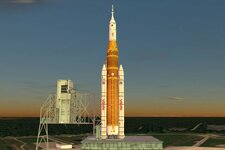
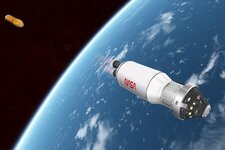
Project Artemis Orange-SLS with Centaur Upper Stage

francisdrake

Addon Developer
Addon Developer
Joined
Mar 23, 2008
Messages
1,328
Reaction score
1,647
Points
128
Website
francisdrakex.deviantart.com
0644a.jpg
0640a.jpg

When NASA announced the Centaur V will be the future common upper stage for the SLS, it got my attention.
How much punch does this combination have? Can it loft the Orion to the Moon and posssibly assist in Lunar orbit insertion?

I looked into my old Orange-SLS from 2016 and brushed it up a bit. The Centaur was 'lying around' from the Vulcan Centaur,
and - yes - only minimal adaption were necessary to fit it to the SLS.

As some of you guys show interest in this combination, I publish it here, knowing it is still a bit buggy
The bugs mainly affect the old Orion-MPCV, which I did not touch (yet). You may experience occasionally stuck thrusters, or so.

You have to fly the Orange-SLS manually into orbit:

Num [+] ... starts the engines.
Num [2] ... 'pulls' the rocket during ascent (we fly a heads-down attitude!)
[E] ... Camera look back or forward
[J] ... Jettison the upper stage
Num [+] ... start the upper stage

Also included in the package are the Blue Moon lander and the Moonship lander as docking targets.
Have fun flying and let me know your experiences!
 

Attachments

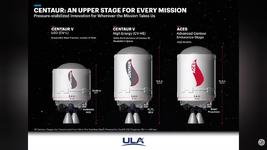
I did download it and found that only the ICPS stage was there but no Aces upper stage the SLS has a lot of detail which looks really good but it was turned to the side on the pad. could use an AP.

the big difference between the Centaur 5 and the ACES will be insulation to allow the ACES to stay in space longer with less boil off
 

Attachments

  • Aces.png
    Aces.png
    334.1 KB · Views: 22
only the ICPS stage was there but no Aces upper stage
Thanks for posting the picture from ULA!
I was thinking that the ACES upper stage has died long time ago.
It may be revived, but probably only for missions further in the future, if any.

Found papers, where - by only adding insulation and accepting a boil-off of 2-3% per day - the duration of a Centaur could be extended to 3 days.
Centaur Upperstage Applicability for Several -Day Mission Durations with Minor Insulation Modifications
Centaur Extensibility For Long Duration (pdf)

3 days would make it a pretty good Moon-tug. Acutally, when you keep the Cenatur (of this addon) attached after the TLI burn, it can provide nearly all dV for the Lunar capture. Ok, this is a bit of a cheat, as it would not survive so long without improvments, but it shows the potential of this configuration.

Maybe will have look into that. But first have to hunt down the bugs of the current configuration. :)
 
Using orbiter 2024, SLS falls through the launch pad and breaks up on scenario load in. Missing dependency? Setting issue? The 3 included spacecraft otherwise work fine as far as I can tell
 
SLS falls through the launch pad
Yes, I have observed this also. But not on scenario loading, only when a thruster becames active.
Could be caused by wrong touchdown points. Will look into that.

To avoid it, just hit the Num [+] at startup. This ignites main engines and boosters, and the rocket 'jumps' off the launchpad.
 
Yes, I have observed this also. But not on scenario loading, only when a thruster becames active.
Could be caused by wrong touchdown points. Will look into that.

To avoid it, just hit the Num [+] at startup. This ignites main engines and boosters, and the rocket 'jumps' off the launchpad.

Ah, for some reason it was happening right at load-in because the instance was starting out with the main engines firing, for some reason. It's fine after closing the instance and running the scenario a second time (without closing the launchpad)

The vehicle now starts sitting on the pad just fine, but pressing num+ is actually what causes sls to teleport and icps staging to occur. When you say hit it at startup do you mean before loading in?
 
No. Usually it should start sitting at launchpad, with engines off.
Then, when you are ready, press Num +.

Do you have an autopilot active?
Can you try starting a different scenario?
 
No. Usually it should start sitting at launchpad, with engines off.
Then, when you are ready, press Num +.

Do you have an autopilot active?
Can you try starting a different scenario?

Pressing num + is what initiates the issue for me, happens on every scenario and I don't have any autopilot active.
 
Question: Do the engines start, when you press Num [+] (main engines and SRB boosters)?
And keep they running?

I can add a different key to start all engines - thinking of [V], which is used at Falcon9 and Vulcan Centaur.
________
Edit: Are you sure, you are using Num [+], and not the [+] of the main keyboard?
________
Try the attached Orange-SLS.dll.
Unzip it and put it into the Modules folder, replacing the file there.
With this, you can start the engines using the [V] key. Everything else is unchanged.
 

Attachments

Last edited:
Question: Do the engines start, when you press Num [+] (main engines and SRB boosters)?
And keep they running?

I can add a different key to start all engines - thinking of [V], which is used at Falcon9 and Vulcan Centaur.
________
Edit: Are you sure, you are using Num [+], and not the [+] of the main keyboard?
________
Try the attached Orange-SLS.dll.
Unzip it and put it into the Modules folder, replacing the file there.
With this, you can start the engines using the [V] key. Everything else is unchanged.

Good catch, the engines were indeed only running while I was holding num+ and would shut off the second I let go

I tried the new dll and unfortunately while the engines do stay running this time (on the icps at least) the issue is still present. I also just wanted to mention that I'm still having the issue where the engines are running for the first frame after load in on a fresh instance of orbiter, though I can resolve the issue by quitting to the launchpad (without terminating the instance) and relaunching the same or any scenario. Not sure if that might give a clue or not. Let me know if you need me to send anything over!
 
Back
Top