Request Visual terrain editor

The FRENCH GUIANA SURFACE TILES has ELV tiles of levels 4-17 in "Elev" folder and ELV tiles of levels 4-13 in "Elev_mod" folder. Maybe @jacquesmomo could help us how it was made? :)
Yes I. Made a elv_mod tile for the ELS Pad at kourou for the soyuz site.
I remember it was not easy for me...
Flat system is easier
I made this with tileedit prog.
 
In my opinion, unless you have some custom made level 19 elev tiles for the area that you are editing, don't go below 40 meters in either width and length (and that is assuming that you have level 17 elev tiles to support it).
Can "tileedit" create ELV tiles of such high levels like 17, 19...? Are there any other ways to make custom ELV tiles? (Except the "Elv Tile Splitter V2" which I mentioned above, but not tried yet.)
Yes I. Made a elv_mod tile for the ELS Pad at kourou for the soyuz site.
Did you make it only for flattening purpose or did you made some custom elevations like hills?

Did you already have ELV tiles in "Elev" folder up to 17 level before you start creating ELV tiles for "Elev_mod" folder?

Or did you extract ELV tiles for "Elev" folder from TREE format?
Flat system is easier
You mean *.flt files, yes?
I remember it was not easy for me...
I made this with tileedit prog.
Could you advise some materials which will be useful to do that procedure?

Is it possible to get ELV tiles from TREE format without "tileedit"? For example, we can download surface tiles from the Orbiter site. Can we get ELV tiles in a similar way? Initially Orbiter 2016 comes with only TREE files for planet textures.

Is it normal that console window closes immediately after running "treeman.exe"?
 
Can "tileedit" create ELV tiles of such high levels like 17, 19...? Are there any other ways to make custom ELV tiles? (Except the "Elv Tile Splitter V2" which I mentioned above, but not tried yet.)

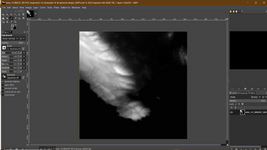
TileEdit can extract a png file that represents the elevation data, which can be edited with an image editor and then imported as .elv back to Orbiter (both extraction and importing are done with tileedit). It can create a tile for a resolution that doesn't exist by synthesizing it from a sub-region of the last resolution that exists.


1720254448316.png

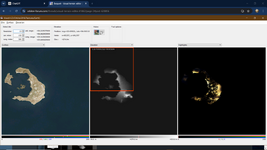
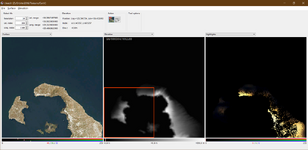
You can even extract a range of tiles that don't exist from a previous tile. In this example this island has level 13 tiles. I want to create level 14 tiles for it from the existing one. (level 14 for this area doesn't exist).
1720254605964.png


I only need the left side, since the right side is the sea. I check the range of tiles that I need in the next level:
14 000304 001168 to 14 000305 001168
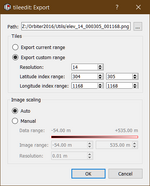
1720256451870.png

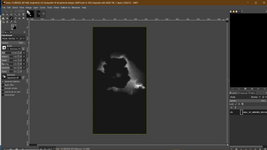
Notice that this image has double the height of a single tile.
1720256505814.png

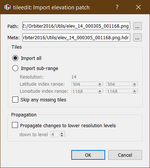
After editing what ever I want, I can import the whole thing back to Orbiter with a single import.
1720257056870.png

Now I have level 14 tiles for the island.
1720257147259.png

Is it normal that console window closes immediately after running "treeman.exe"?
Yes if you double click it in Windows. It runs from the command prompt.


Here is an example how to extract a single tile from the tree archive (so you don't clutter your hard drive with tiles that you may not want).
(I am using the -F (file list) option - in this example I will extract a single tile, but you can extract multiple different tiles if you want by adding more lines in the txt file -see below).
Create a file named "Surf.txt" and place it in the same folder as treeman (preferably the utils folder)
Open it and enter the index of the tile that you wish to export (don't forget the zeros): .elv for elevation tiles, .dds for the others. Don't mix different types of tiles (i.e: .elv with .dds)
\13\000361\001009.elv

Save the file and exit.
In the windows search bar, type cmd and click on the command prompt.
In the command prompt, navigate to the utils folder (mine is Z:Orbiter2016\Utils)
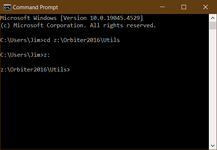

1720258322916.png

Once you are there, type treeman and hit enter to see all the different options you have.

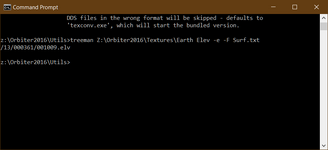
Now type: treeman Z:\Orbiter2016\Textures\Earth Elev -e -F Surf.txt
and hit enter.
1720259390938.png
(obviously your path to the textures will be different ; the line below the command prompt that I typed is the tile extracted.

Surf surface layer tiles
Mask water mask and night light texture tiles
Cloud cloud tiles
Elev elevation tiles
Elev_mod elevation modification tiles


This is how I do it and I haven't had any major hickups.

 

Attachments

  • 1720257126914.png
    1720257126914.png
    249.7 KB · Views: 3
Thank you! I got a tile of level 14 from the 13 one. I didn't even extracted the 13 level before that.
After editing what ever I want, I can import the whole thing back to Orbiter with a single import.
1720257056870.png
It seems you have to set "Import sub-range" to choose 304-305 lattitude index range, because otherwise you get the only 14 304 1168 tile, not 14 304 1168 with 14 305 1168. I did that and it works correctly.
Now type: treeman Z:\Orbiter2016\Textures\Earth Elev -e -F Surf.txt
and hit enter.
I did it. I got the ELV using "treeman". Thank you!

Maybe I found one of the reason for crashing of the "tileedit". It happens after setting the Elev_mod mode in the third window (right) and then clicking in any window (you could try it :)). Then I deleted "tileedit.ini" and didn't set Elev_mod mode anymore. And I don't get crashes!
 
I have removed this version of the tool from post #29.
You can find the latest version in its own thread here:
 
I noticed that a surface tile must have 512x512 resolution to be displayed in the "tileedit".

It looks like the "treeman" can only extract the tiles that are presented in the TREE file. That is, for example, the "treeman" can't extract the "\18\011468\004370.elv" tile if it's not contained in the TREE file, so the "treeman" can't create tiles of the high levels from the low ones. But the "tileedit" can do that. Is it correct?
 
Back
Top