Project Orbiter Galaxy

I'm using Win7 64-bit.

Pyromaniac what's your processor speed?
My RAM is 2 gigabytes if that's what you mean. Otherwise you might need to explain what you mean.

Darren

Edit: Oh, wait, 5.258 Gigahertz.

Edit2: Yet that still doesn't seem right...

Edit3: 2.4 GHz, I finally got it right. :facepalm:
 
Last edited:
I understand that it is in Alpha and bugs are to be expected, but it should probably work a little better than this.

Well, as it seems it does work a lot better for most people. There will always be instances where unexpected behaviour occurs on certain systems, and it's pretty hard to fix from a distance, so please be patient while we try to figure out what's going on.

I am running it with Orbiter 2010 P1, and I'm using Windows 7 if that matters.

Thanks, that is fine. It was designed for orbiter 2010p1, so if you'd have run it on anything else that might have been a cause of trouble. Windows 7 is what I'm running it on too, so we can exclude the OS as a source of trouble also.

Now, the first thing I would like you to do is to run the standalone .exe file (in your orbiter root directory) and see if that works. If it doesn't, re-install the whole add-on. One thing that would cause such a behaviour as you described even in the standalone could be if there are files missing or damaged, so it could be worth a try to re-download the whole thing. Make sure you have both the add-on installed as well as the patch over it.

If the standalone works, but the plug-in not, try on a CLEAN orbiter install. If it still doesn't work there, we're in serious trouble.

Pyromaniac what's your processor speed?

If it can run orbiter, it can run the map. The loading time is a lot more dependant on harddrive speed than on the CPU, really, because there's about 10 megabyte of data that are read into memory. Even a slow processor wouldn't explain why Orbiter freezes when the map is opened. There's clearly an error occuring somewhere in there, although it seems strange since Win 7 usually notices such stuff pretty well and notifies the user. Pyromaniac talked about a freeze, not a crash, though. Currently I put all my hopes in a damaged file, since that would be the explanation that fits the description best and would be easiest to resolve.

EDIT: Also, good news on that GUI crash. I've isolated the trouble to the tool tip text. Must be a really small glitch within Irrlicht that does no harm as long as you don't run it within another aplication like I do. There's no quick fix in sight, but the tool tip text isn't really an essential feature, so I'm just going to deactivate it...

 
Last edited:
I have 8 gigabytes RAM and 3.2 GHz. Still takes a while to generate textures on CPU.
 
I have 8 gigabytes RAM and 3.2 GHz. Still takes a while to generate textures on CPU.

He's not talking about texture export. He's talking about orbiter freezing when he tries to open the map ;)
 
Ah, anyway, the standalone program and map in Orbiter take the same time to load after opening.
 
They should. The standalone is potentially a bit faster when exporting on a multi-core cpu, since it usually gets assigned on an idling cpu, while in Orbiter it has to share it with orbiter, but other than that, there's really not much difference.
 
A suggestion about the texture exportation, it would be great to have a way to determine the progress of the exportation (like a loading bar or something that would say 4/6 planets exported or the like) so that it would be possible to tell if the textures were just taking a long time or if the program was frozen or something.
 
A suggestion about the texture exportation, it would be great to have a way to determine the progress of the exportation (like a loading bar or something that would say 4/6 planets exported or the like) so that it would be possible to tell if the textures were just taking a long time or if the program was frozen or something.

Is planned, but I need to restructure the code a bit to get a window handle to the callback function. Won't be tomorrow, but it will there sometime.
 
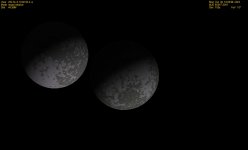
Look what i found.
attachment.php

Looks like something interesting is going to happen.:hide:
 

Attachments

  • Wow look at this.jpg
    Wow look at this.jpg
    133.7 KB · Views: 107
:lol:

Yeah, I know that there can be strange occurances with moons... The only limit currently checked is the roche limit, but that won't prevent them from being very close to each other if they are of similiar mass and density.

This will get reworked for 0.7, but let's get 0.6 as stable as I can get it first.

I wish I could have some more reports from Izack and Pyromaniac, since on their systems it doesn't seem to work at all...
 
Pyromaniac, what are the seed settings in your OGalaxy config file? I can't find that star.
 
err... Did I miss something? I can't find a post from Pyromaniac where he mentions a star. Last thing I know, Orbiter Galaxy still freezes his Orbiter... ?

And the seed settings would be in the MilkyWay.cfg, not OGalaxy.cfg...
 
Last edited:
:lol:

Yeah, I know that there can be strange occurances with moons... The only limit currently checked is the roche limit, but that won't prevent them from being very close to each other if they are of similiar mass and density.

This will get reworked for 0.7, but let's get 0.6 as stable as I can get it first.

I wish I could have some more reports from Izack and Pyromaniac, since on their systems it doesn't seem to work at all...
For me it's pretty stable, it will crash sometimes when working with the map. Also those moons get so close they actualy touch. (i say moons because they orbite each other) Very interesting to watch from ground level.
 
For me it's pretty stable, it will crash sometimes when working with the map.

Yeah, the next patch should improve stability quite a lot in that respect, now that I fixed the memory leak and that GUI crash. The status display for texture export is already in too, but it works only for CPU support, because when running with the GPU the window doesn't update. Artlav's looking into it, I would like to wait with the patch until he has found the cause.

Very interesting to watch from ground level.

I should imagine. HIT THE DECK, IT'S COMMING AGAIN! :lol:

@Barrel: Just now I realise that your question was probably about Donatellos picture, and wrongly addressed. As such, don't try to find the system. The search function works only for stars in the catalogue and stars that are currently visible to you. Otherwise, the WHOLE galaxy would have to be in memory, which would be a bit too much even for our days of gigabytes of RAM. Let alone that it would take a week to start the bloody map! ;)
 
I think I forgot an important piece of information. I am using Windows 7... 64 bit!
That could be the problem, 64 bit is known to cause incombatabilities.
Is anyone that can get it working using 64 bit?

Darren
 
I should imagine. HIT THE DECK, IT'S COMMING AGAIN! :lol:

a bit off topic, but in theory couldn't you jump from one moon to the other if they get REALLY close?

or could you float in space, equidistant from each other between them?
 
I tried running the standalone map, and it crashed.
So I reinstalled it along with the patch and... it still crashes.
The strange thing is I remember when I first downloaded it the standalone map worked fine. :shrug:

Darren

PS: I just realised this came out on my birthday! :)
 
Back
Top